

2Charlie
Inspiring
October 21, 2022
Question

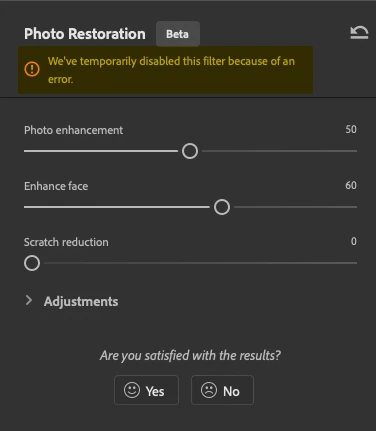
We've temporary disabled this filter because of an error.

  • October 21, 2022
  • 12 replies
  • 17701 views

Anyone getting this error on the lattest Photoshp release 24.0.0? I'm constantly getting this issue.

 

12 replies

Known Participant
October 22, 2022

Yes I have exactly the same problem on some of the neural filters since updating to V.24.0.0

The Photo Restoration filter works on mine, but I get the same message as you if I try the 'Colorize' filter

Ranjisha Sengupta
Legend
November 22, 2022

Hi @Grahamfromburnley 

Sorry for the delay in response. Did you try re-installing the application? What is your operating system version? Are the drivers up-to-date? 

 Look at the following troubleshooting article and check the known issues and workarounds related to neural filters: https://helpx.adobe.com/photoshop/using/neural-filters-feedback.html. 

Let us know if it helps.

Thanks,

Ranjisha

Known Participant
November 22, 2022

Hi Ranjisha,

I am using Windows 10 Pro, fully upto date, and the latest version of Photoshop. My drivers are also upto date.

Ranjisha Sengupta
Legend
October 21, 2022

Hi there,


Thanks for reaching out. 

Could you please share the system info of Photoshop from Help > System info > Copy & paste into a doc and share it with us?

Can you check if the graphics processor is enabled or not from the preferences? Also, check it's compatibility: https://helpx.adobe.com/photoshop/kb/photoshop-cc-gpu-card-faq.html

 Look at the following troubleshooting article and check the known issues and workarounds related to neural filters: https://helpx.adobe.com/photoshop/using/neural-filters-feedback.html. 


Let us know how it goes,


Thanks,

Ranjisha

Participating Frequently
November 3, 2022

I am having the same problem. My graphics card is enabled. Attached is my system info.

Ranjisha Sengupta
Legend
November 22, 2022

Hi @RayRainka 

Thanks for the info. Would you mind updating your Photoshop to the latest version? Also, I see the drivers are eight months old. You can try re-installing the latest drivers and then try using them. We're here to help, just need some info.

Thanks.

Ranjisha