UBOG
Participant
December 1, 2024
Answered

Weird default destination folder when performing save-as of PDF original

  • December 1, 2024
  • 12 replies
  • 498 views

Hi Adobe team,

There is a weird annomaly when saving-as an opened PDF file. If any other type of file is opened (e.g.: JPG, TIFF, PSD, etc.) save-as will always offer a destination folder that points to the folder where the original image is stored. Fore some noncomprehensible reason when saving an opened PDF file, the offered default destination folder wil point to the folder where the latest save-as of PDF has been performed instead of PDF's original location folder. This means any last PDF save-as destination performed in context of this Photoshop. It may be months old. There is no reasoning why PDF should be treated differently than other file types, nor why would anyone want to save particular PDF to the location of some previous project. This si very annoying when performing actions quickly and than realizing that the "as" file isn't there. Of course one typically doesnt remember the last saved-as PDF location so reopening of original PDF is required and checking the exact location where save-as points to. I'm using Photoshop 25.12.0 in Windows, however, this bug is not new and has been there in may previous releases. 

Steps how to repeat the problem:

Use two PDF files one located in folder A and the other in folder B.

1. Open PDF-A file located in folder A in Photoshop

2. Save-as PDF-A file as JPG in folder A

3. Open the other PDF-B file located in folder B

4. Save-as PDF-B file as JPG. The save-as dialog will open foler A for JPG saving destination instead of folder B.

If you use TIFF sources instead of PDFs, it will work as expected.


Kind regards,

Uros

This topic has been closed for replies.
Correct answer Stephen Marsh

@c.pfaffenbichler – That's great!


Here is a version of your code with a GUI:
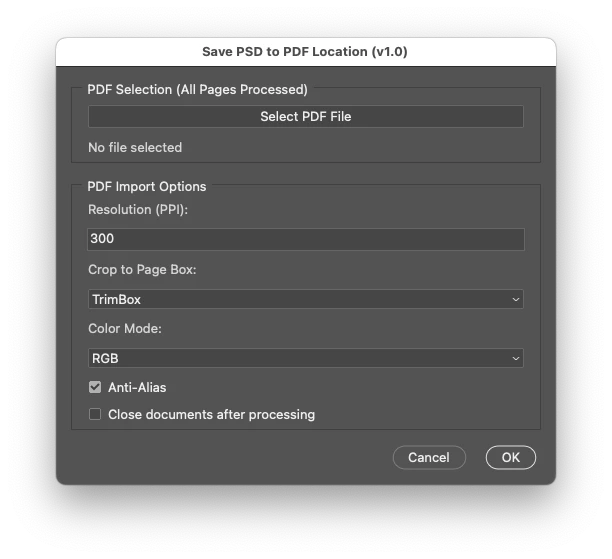
 

// Save PDF-sides as PSDs with ScriptUI interface for options
// 2024, use it at your own risk

// Main function
function main() {
    // Create the ScriptUI dialog
    var dialog = new Window("dialog", "Save PSD to PDF Location (v1.0)", undefined, { resizeable: false });
    dialog.orientation = "column";
    dialog.alignChildren = "fill";
    dialog.preferredSize.width = 500; // Set the window width

    // PDF Selection Panel
    var pdfSelectionPanel = dialog.add("panel", undefined, "PDF Selection (All Pages Processed)");
    pdfSelectionPanel.orientation = "column";
    pdfSelectionPanel.alignChildren = "fill";

    var selectPDFButton = pdfSelectionPanel.add("button", undefined, "Select PDF File");
    var selectedPDFText = pdfSelectionPanel.add("statictext", undefined, "No file selected", { truncate: "middle" });

    // PDF Open Options Panel
    var pdfOptsPanel = dialog.add("panel", undefined, "PDF Import Options");
    pdfOptsPanel.orientation = "column";
    pdfOptsPanel.alignChildren = "fill";

    pdfOptsPanel.add("statictext", undefined, "Resolution (PPI):");
    var resolutionInput = pdfOptsPanel.add("editnumber", undefined, "300");
    resolutionInput.characters = 5;

    var cropOptions = ["TrimBox", "MediaBox", "CropBox", "BleedBox", "ArtBox"];
    pdfOptsPanel.add("statictext", undefined, "Crop to Page Box:");
    var cropDropdown = pdfOptsPanel.add("dropdownlist", undefined, cropOptions);
    cropDropdown.selection = 0;

    pdfOptsPanel.add("statictext", undefined, "Color Mode:");
    var colorModes = ["RGB", "CMYK", "GRAYSCALE"];
    var colorModeDropdown = pdfOptsPanel.add("dropdownlist", undefined, colorModes);
    colorModeDropdown.selection = 0;

    var antiAliasCheckbox = pdfOptsPanel.add("checkbox", undefined, "Anti-Alias");
    antiAliasCheckbox.value = true;

    //var suppressWarningsCheckbox = pdfOptsPanel.add("checkbox", undefined, "Suppress Warnings");
    //suppressWarningsCheckbox.value = true;

    var closeWithoutSavingCheckbox = pdfOptsPanel.add("checkbox", undefined, "Close Documents After Saving");
    closeWithoutSavingCheckbox.value = false;

    // Buttons
    var buttonGroup = dialog.add("group");
    buttonGroup.alignment = "right";
    var cancelButton = buttonGroup.add("button", undefined, "Cancel");
    var okButton = buttonGroup.add("button", undefined, "OK");

    // PDF Selection Button Logic
    var selectedPDFFile = null;
    selectPDFButton.onClick = function () {
        selectedPDFFile = selectFile(false);
        if (selectedPDFFile) {
            selectedPDFText.text = selectedPDFFile.fsName; // Update the statictext with the selected file path
        } else {
            selectedPDFText.text = "No file selected";
        }
    };

    // Cancel button logic
    cancelButton.onClick = function () {
        dialog.close(0);
    };

    // OK button logic
    okButton.onClick = function () {
        if (!selectedPDFFile) {
            alert("Please select a PDF file before proceeding.");
            return;
        }

        var pdfOpenOpts = new PDFOpenOptions();
        pdfOpenOpts.resolution = parseInt(resolutionInput.text, 10) || 300;
        pdfOpenOpts.cropPage = CropToType[cropDropdown.selection.text.toUpperCase()];
        pdfOpenOpts.mode = OpenDocumentMode[colorModeDropdown.selection.text.toUpperCase()];
        pdfOpenOpts.antiAlias = antiAliasCheckbox.value;
        //pdfOpenOpts.suppressWarnings = suppressWarningsCheckbox.value;

        var closeWithoutSaving = closeWithoutSavingCheckbox.value;

        // Pass the options and file to the main processing function
        processPDF(selectedPDFFile, pdfOpenOpts, closeWithoutSaving);
        dialog.close(1);
    };

    // Show the dialog
    dialog.center();
    dialog.show();
}

// Function to process the PDF
function processPDF(myPDFFile, pdfOpenOpts, closeWithoutSaving) {
    var dialogSettings = app.displayDialogs;
    app.displayDialogs = DialogModes.NO;

    var basename = File(myPDFFile).name.match(/(.*)\.[^\.]+$/)[1];
    var docPath = File(myPDFFile).path;

    var myCounter = 1;
    var theCheck = true;

    while (theCheck) {
        try {
            pdfOpenOpts.page = myCounter;
            var thisOne = openPDFPage(myPDFFile, pdfOpenOpts, myCounter);

            var saveOpts = new PhotoshopSaveOptions();
            saveOpts.embedColorProfile = true;
            saveOpts.alphaChannels = false;
            saveOpts.layers = true;
            saveOpts.spotColors = true;

            thisOne.saveAs(new File(docPath + '/' + basename + "-" + String(myCounter) + ".psd"), saveOpts, false);

            // Conditionally close the document without saving changes
            if (closeWithoutSaving) {
                thisOne.close(SaveOptions.DONOTSAVECHANGES);
            }

            myCounter++;
        } catch (e) {
            theCheck = false;
        }
    }

    app.displayDialogs = dialogSettings;
}

// Functions
function selectFile(multi) {
    var theString = multi ? "Please select files" : "Please select one file";
    if ($.os.search(/windows/i) != -1) {
        return File.openDialog(theString, '*.pdf', multi);
    } else {
        return File.openDialog(theString, getFiles, multi);
    }

    function getFiles(theFile) {
        if (theFile.name.match(/\.(pdf)$/i) || theFile.constructor.name === "Folder") {
            return true;
        }
    }
}

function openPDFPage(myPDFFile, pdfOpenOpts, myCounter) {
    var thePdf = app.open(myPDFFile, pdfOpenOpts);
    thePdf.flatten();
    thePdf.layers[0].isBackgroundLayer = false;
    thePdf.layers[0].name = myPDFFile.name + "-" + myCounter;
    //thePdf.layers[0].name = "Layer 0";
    return thePdf;
}

// Run the script
main();


https://prepression.blogspot.com/2017/11/downloading-and-installing-adobe-scripts.html

12 replies

UBOG
UBOGAuthor
Participant
December 3, 2024

This would help. Thank you guys, you're awsame.


Kind regards.

Stephen Marsh
Community Expert
Stephen MarshCommunity ExpertCorrect answer
Community Expert
December 3, 2024

@c.pfaffenbichler – That's great!


Here is a version of your code with a GUI:


// Save PDF-sides as PSDs with ScriptUI interface for options
// 2024, use it at your own risk

// Main function
function main() {
    // Create the ScriptUI dialog
    var dialog = new Window("dialog", "Save PSD to PDF Location (v1.0)", undefined, { resizeable: false });
    dialog.orientation = "column";
    dialog.alignChildren = "fill";
    dialog.preferredSize.width = 500; // Set the window width

    // PDF Selection Panel
    var pdfSelectionPanel = dialog.add("panel", undefined, "PDF Selection (All Pages Processed)");
    pdfSelectionPanel.orientation = "column";
    pdfSelectionPanel.alignChildren = "fill";

    var selectPDFButton = pdfSelectionPanel.add("button", undefined, "Select PDF File");
    var selectedPDFText = pdfSelectionPanel.add("statictext", undefined, "No file selected", { truncate: "middle" });

    // PDF Open Options Panel
    var pdfOptsPanel = dialog.add("panel", undefined, "PDF Import Options");
    pdfOptsPanel.orientation = "column";
    pdfOptsPanel.alignChildren = "fill";

    pdfOptsPanel.add("statictext", undefined, "Resolution (PPI):");
    var resolutionInput = pdfOptsPanel.add("editnumber", undefined, "300");
    resolutionInput.characters = 5;

    var cropOptions = ["TrimBox", "MediaBox", "CropBox", "BleedBox", "ArtBox"];
    pdfOptsPanel.add("statictext", undefined, "Crop to Page Box:");
    var cropDropdown = pdfOptsPanel.add("dropdownlist", undefined, cropOptions);
    cropDropdown.selection = 0;

    pdfOptsPanel.add("statictext", undefined, "Color Mode:");
    var colorModes = ["RGB", "CMYK", "GRAYSCALE"];
    var colorModeDropdown = pdfOptsPanel.add("dropdownlist", undefined, colorModes);
    colorModeDropdown.selection = 0;

    var antiAliasCheckbox = pdfOptsPanel.add("checkbox", undefined, "Anti-Alias");
    antiAliasCheckbox.value = true;

    //var suppressWarningsCheckbox = pdfOptsPanel.add("checkbox", undefined, "Suppress Warnings");
    //suppressWarningsCheckbox.value = true;

    var closeWithoutSavingCheckbox = pdfOptsPanel.add("checkbox", undefined, "Close Documents After Saving");
    closeWithoutSavingCheckbox.value = false;

    // Buttons
    var buttonGroup = dialog.add("group");
    buttonGroup.alignment = "right";
    var cancelButton = buttonGroup.add("button", undefined, "Cancel");
    var okButton = buttonGroup.add("button", undefined, "OK");

    // PDF Selection Button Logic
    var selectedPDFFile = null;
    selectPDFButton.onClick = function () {
        selectedPDFFile = selectFile(false);
        if (selectedPDFFile) {
            selectedPDFText.text = selectedPDFFile.fsName; // Update the statictext with the selected file path
        } else {
            selectedPDFText.text = "No file selected";
        }
    };

    // Cancel button logic
    cancelButton.onClick = function () {
        dialog.close(0);
    };

    // OK button logic
    okButton.onClick = function () {
        if (!selectedPDFFile) {
            alert("Please select a PDF file before proceeding.");
            return;
        }

        var pdfOpenOpts = new PDFOpenOptions();
        pdfOpenOpts.resolution = parseInt(resolutionInput.text, 10) || 300;
        pdfOpenOpts.cropPage = CropToType[cropDropdown.selection.text.toUpperCase()];
        pdfOpenOpts.mode = OpenDocumentMode[colorModeDropdown.selection.text.toUpperCase()];
        pdfOpenOpts.antiAlias = antiAliasCheckbox.value;
        //pdfOpenOpts.suppressWarnings = suppressWarningsCheckbox.value;

        var closeWithoutSaving = closeWithoutSavingCheckbox.value;

        // Pass the options and file to the main processing function
        processPDF(selectedPDFFile, pdfOpenOpts, closeWithoutSaving);
        dialog.close(1);
    };

    // Show the dialog
    dialog.center();
    dialog.show();
}

// Function to process the PDF
function processPDF(myPDFFile, pdfOpenOpts, closeWithoutSaving) {
    var dialogSettings = app.displayDialogs;
    app.displayDialogs = DialogModes.NO;

    var basename = File(myPDFFile).name.match(/(.*)\.[^\.]+$/)[1];
    var docPath = File(myPDFFile).path;

    var myCounter = 1;
    var theCheck = true;

    while (theCheck) {
        try {
            pdfOpenOpts.page = myCounter;
            var thisOne = openPDFPage(myPDFFile, pdfOpenOpts, myCounter);

            var saveOpts = new PhotoshopSaveOptions();
            saveOpts.embedColorProfile = true;
            saveOpts.alphaChannels = false;
            saveOpts.layers = true;
            saveOpts.spotColors = true;

            thisOne.saveAs(new File(docPath + '/' + basename + "-" + String(myCounter) + ".psd"), saveOpts, false);

            // Conditionally close the document without saving changes
            if (closeWithoutSaving) {
                thisOne.close(SaveOptions.DONOTSAVECHANGES);
            }

            myCounter++;
        } catch (e) {
            theCheck = false;
        }
    }

    app.displayDialogs = dialogSettings;
}

// Functions
function selectFile(multi) {
    var theString = multi ? "Please select files" : "Please select one file";
    if ($.os.search(/windows/i) != -1) {
        return File.openDialog(theString, '*.pdf', multi);
    } else {
        return File.openDialog(theString, getFiles, multi);
    }

    function getFiles(theFile) {
        if (theFile.name.match(/\.(pdf)$/i) || theFile.constructor.name === "Folder") {
            return true;
        }
    }
}

function openPDFPage(myPDFFile, pdfOpenOpts, myCounter) {
    var thePdf = app.open(myPDFFile, pdfOpenOpts);
    thePdf.flatten();
    thePdf.layers[0].isBackgroundLayer = false;
    thePdf.layers[0].name = myPDFFile.name + "-" + myCounter;
    //thePdf.layers[0].name = "Layer 0";
    return thePdf;
}

// Run the script
main();


https://prepression.blogspot.com/2017/11/downloading-and-installing-adobe-scripts.html

Stephen Marsh
Community Expert
Community Expert
December 2, 2024
quote

...each time searching for where the hell did PS save my file this time...


By @UBOG


Photoshop saves the file in the nominated location when you press OK, where you tell it to save. So it's not really fair to blame Photoshop for where you choose to save, however, I understand what you mean that if the default save location was the parent folder of the original PDF then you wouldn't need to navigate to that location. The script from @c.pfaffenbichler should help.

c.pfaffenbichler
Community Expert
Community Expert
December 2, 2024
// save pdf-sides as psds;
// 2024, use it at your own risk;
var myPDFFile = selectFile(false);
if (myPDFFile) {
// suppress dialogs;
var theDialogSettings = app.displayDialogs;
app.displayDialogs = DialogModes.NO;
//var docName = thedoc.name
var basename = File(myPDFFile).name.match(/(.*)\.[^\.]+$/)[1];
var docPath = File(myPDFFile).path;
// open;
var pdfOpenOpts = new PDFOpenOptions;
pdfOpenOpts.antiAlias = true;
pdfOpenOpts.bitsPerChannel = BitsPerChannelType.EIGHT;
pdfOpenOpts.cropPage = CropToType.TRIMBOX;
pdfOpenOpts.mode = OpenDocumentMode.RGB;
pdfOpenOpts.resolution = 300;
pdfOpenOpts.suppressWarnings = true;
pdfOpenOpts.usePageNumber  = true;
var myCounter = 1;
var theCheck = true;
while (theCheck == true) {
try {
pdfOpenOpts.page = myCounter;
var thisOne = openPDFPage (myPDFFile, pdfOpenOpts, myCounter);
// save;
saveOpts = new PhotoshopSaveOptions();
saveOpts.embedColorProfile = true;
saveOpts.alphaChannels = false;
saveOpts.layers = true;
saveOpts.spotColors = true;
thisOne.saveAs((new File(docPath+'/'+basename+"_"+String(myCounter)+".psd")),saveOpts,false);
myCounter++;
} catch (e) {theCheck = false}
};
app.displayDialogs = theDialogSettings;
};
////////////////////////////////////
////////////////////////////////////
////////////////////////////////////
////// select file //////
function selectFile (multi) {
if (multi == true) {var theString = "please select files"}
else {var theString = "please select one file"};
if ($.os.search(/windows/i) != -1) {var theFiles = File.openDialog (theString, '*.pdf', multi)}
else {var theFiles = File.openDialog (theString, getFiles, multi)};
////// filter files  for mac //////
function getFiles (theFile) {
    if (theFile.name.match(/\.(pdf)$/i) || theFile.constructor.name == "Folder") {
        return true
        };
	};
return theFiles
};
////// open pdf page //////
function openPDFPage (myPDFFile, pdfOpenOpts, myCounter) {
var thePdf = app.open(myPDFFile, pdfOpenOpts);
thePdf.flatten();
thePdf.layers[0].isBackgroundLayer = false;
thePdf.layers[0].name = myPDFFile.name+"_"+myCounter;
return thePdf
};
UBOG
UBOGAuthor
Participant
December 2, 2024

It may be a couple times a day or a couple of times a week. Just enough to piss me off each time searching for where the hell did PS save my file this time. I guess I'm not the only one struggling with this. It's been bugging me for a long time, but never pissed me off enough to report it (until now), hoping someone else will request a fix.

c.pfaffenbichler
Community Expert
Community Expert
December 2, 2024

Valid points. 


How frequent is the task in your work? 

As mentioned earlier a Script might work out well for you. 

UBOG
UBOGAuthor
Participant
December 2, 2024

Thanks, I get your point and I guess you're right, it isn't a bug  Now I can see the logic behind this behaviour. Nevertheless, the user experience is annoying, at least for me. From this point of view caching the source path when rastering the input file and using it instead of using the saved last time used path, woluld be a nice enhancement of user frendlieness, unless there are other use cases which also employ rasterization, where proposed behaviour would violate associated logic.

c.pfaffenbichler
Community Expert
Community Expert
December 2, 2024

Depending on the frequency of the task a Script with file- (or folder-) selection of the pdf might provide an alternative approach, I guess. 

Stephen Marsh
Community Expert
Community Expert
December 2, 2024
quote

Then you did not actually open an image, but converted the pdf’s page/s (»Import PDF«) and the open image/s is/are simply not the pdf and therefore has/have no connection to its location on disc. 


By @c.pfaffenbichler 


Agreed, this is the equivalent of creating a new untitled doc with no backing path, which is why I asked the question regarding rasterizing a generic PDF vs opening a Photoshop PDF.

c.pfaffenbichler
Community Expert
Community Expert
December 2, 2024

Then you did not actually open an image, but converted the pdf’s page/s (»Import PDF«) and the open image/s is/are simply not the pdf and therefore has/have no connection to its location on disc.