@c.pfaffenbichler – That's great!
Here is a version of your code with a GUI:
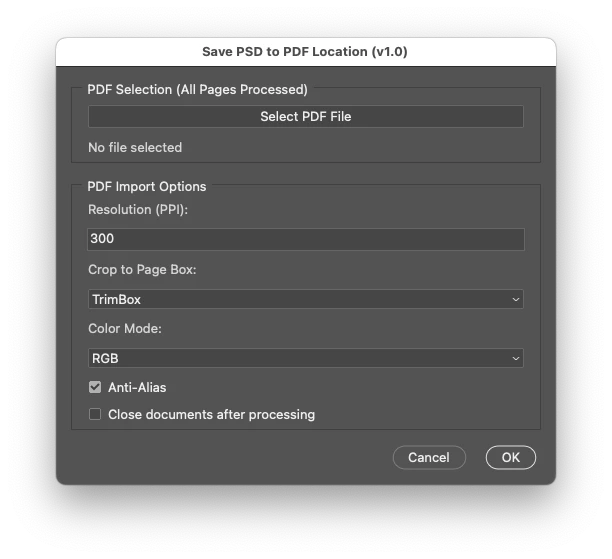
// Save PDF-sides as PSDs with ScriptUI interface for options
// 2024, use it at your own risk

// Main function
function main() {
    // Create the ScriptUI dialog
    var dialog = new Window("dialog", "Save PSD to PDF Location (v1.0)", undefined, { resizeable: false });
    dialog.orientation = "column";
    dialog.alignChildren = "fill";
    dialog.preferredSize.width = 500; // Set the window width

    // PDF Selection Panel
    var pdfSelectionPanel = dialog.add("panel", undefined, "PDF Selection (All Pages Processed)");
    pdfSelectionPanel.orientation = "column";
    pdfSelectionPanel.alignChildren = "fill";

    var selectPDFButton = pdfSelectionPanel.add("button", undefined, "Select PDF File");
    var selectedPDFText = pdfSelectionPanel.add("statictext", undefined, "No file selected", { truncate: "middle" });

    // PDF Open Options Panel
    var pdfOptsPanel = dialog.add("panel", undefined, "PDF Import Options");
    pdfOptsPanel.orientation = "column";
    pdfOptsPanel.alignChildren = "fill";

    pdfOptsPanel.add("statictext", undefined, "Resolution (PPI):");
    var resolutionInput = pdfOptsPanel.add("editnumber", undefined, "300");
    resolutionInput.characters = 5;

    var cropOptions = ["TrimBox", "MediaBox", "CropBox", "BleedBox", "ArtBox"];
    pdfOptsPanel.add("statictext", undefined, "Crop to Page Box:");
    var cropDropdown = pdfOptsPanel.add("dropdownlist", undefined, cropOptions);
    cropDropdown.selection = 0;

    pdfOptsPanel.add("statictext", undefined, "Color Mode:");
    var colorModes = ["RGB", "CMYK", "GRAYSCALE"];
    var colorModeDropdown = pdfOptsPanel.add("dropdownlist", undefined, colorModes);
    colorModeDropdown.selection = 0;

    var antiAliasCheckbox = pdfOptsPanel.add("checkbox", undefined, "Anti-Alias");
    antiAliasCheckbox.value = true;

    //var suppressWarningsCheckbox = pdfOptsPanel.add("checkbox", undefined, "Suppress Warnings");
    //suppressWarningsCheckbox.value = true;

    var closeWithoutSavingCheckbox = pdfOptsPanel.add("checkbox", undefined, "Close Documents After Saving");
    closeWithoutSavingCheckbox.value = false;

    // Buttons
    var buttonGroup = dialog.add("group");
    buttonGroup.alignment = "right";
    var cancelButton = buttonGroup.add("button", undefined, "Cancel");
    var okButton = buttonGroup.add("button", undefined, "OK");

    // PDF Selection Button Logic
    var selectedPDFFile = null;
    selectPDFButton.onClick = function () {
        selectedPDFFile = selectFile(false);
        if (selectedPDFFile) {
            selectedPDFText.text = selectedPDFFile.fsName; // Update the statictext with the selected file path
        } else {
            selectedPDFText.text = "No file selected";
        }
    };

    // Cancel button logic
    cancelButton.onClick = function () {
        dialog.close(0);
    };

    // OK button logic
    okButton.onClick = function () {
        if (!selectedPDFFile) {
            alert("Please select a PDF file before proceeding.");
            return;
        }

        var pdfOpenOpts = new PDFOpenOptions();
        pdfOpenOpts.resolution = parseInt(resolutionInput.text, 10) || 300;
        pdfOpenOpts.cropPage = CropToType[cropDropdown.selection.text.toUpperCase()];
        pdfOpenOpts.mode = OpenDocumentMode[colorModeDropdown.selection.text.toUpperCase()];
        pdfOpenOpts.antiAlias = antiAliasCheckbox.value;
        //pdfOpenOpts.suppressWarnings = suppressWarningsCheckbox.value;

        var closeWithoutSaving = closeWithoutSavingCheckbox.value;

        // Pass the options and file to the main processing function
        processPDF(selectedPDFFile, pdfOpenOpts, closeWithoutSaving);
        dialog.close(1);
    };

    // Show the dialog
    dialog.center();
    dialog.show();
}

// Function to process the PDF
function processPDF(myPDFFile, pdfOpenOpts, closeWithoutSaving) {
    var dialogSettings = app.displayDialogs;
    app.displayDialogs = DialogModes.NO;

    var basename = File(myPDFFile).name.match(/(.*)\.[^\.]+$/)[1];
    var docPath = File(myPDFFile).path;

    var myCounter = 1;
    var theCheck = true;

    while (theCheck) {
        try {
            pdfOpenOpts.page = myCounter;
            var thisOne = openPDFPage(myPDFFile, pdfOpenOpts, myCounter);

            var saveOpts = new PhotoshopSaveOptions();
            saveOpts.embedColorProfile = true;
            saveOpts.alphaChannels = false;
            saveOpts.layers = true;
            saveOpts.spotColors = true;

            thisOne.saveAs(new File(docPath + '/' + basename + "-" + String(myCounter) + ".psd"), saveOpts, false);

            // Conditionally close the document without saving changes
            if (closeWithoutSaving) {
                thisOne.close(SaveOptions.DONOTSAVECHANGES);
            }

            myCounter++;
        } catch (e) {
            theCheck = false;
        }
    }

    app.displayDialogs = dialogSettings;
}

// Functions
function selectFile(multi) {
    var theString = multi ? "Please select files" : "Please select one file";
    if ($.os.search(/windows/i) != -1) {
        return File.openDialog(theString, '*.pdf', multi);
    } else {
        return File.openDialog(theString, getFiles, multi);
    }

    function getFiles(theFile) {
        if (theFile.name.match(/\.(pdf)$/i) || theFile.constructor.name === "Folder") {
            return true;
        }
    }
}

function openPDFPage(myPDFFile, pdfOpenOpts, myCounter) {
    var thePdf = app.open(myPDFFile, pdfOpenOpts);
    thePdf.flatten();
    thePdf.layers[0].isBackgroundLayer = false;
    thePdf.layers[0].name = myPDFFile.name + "-" + myCounter;
    //thePdf.layers[0].name = "Layer 0";
    return thePdf;
}

// Run the script
main();
https://prepression.blogspot.com/2017/11/downloading-and-installing-adobe-scripts.html



 AdChoices