


Participant
November 7, 2025
Question

Weird grey backgrounds behind *some* layers, since upgrading to 27.0

  • November 7, 2025
  • 1 reply
  • 76 views

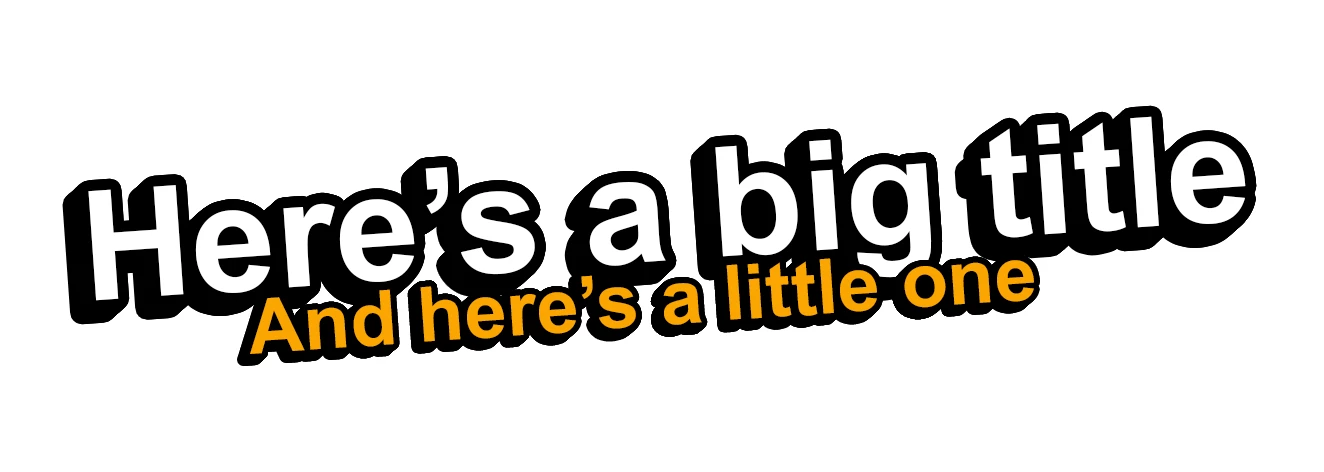
A picture's worth a thousand words, so here's how the exact same PSD file looks in 26.11.1:
And 27.0.0:
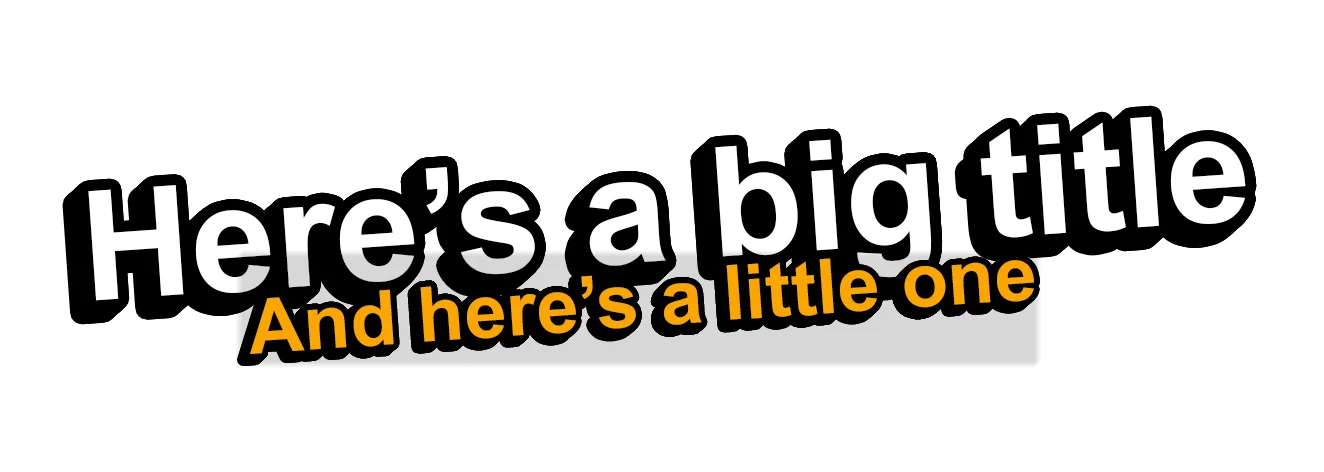
I don't think it's a graphics driver thing. I've tested this on two computers -- one with onboard Intel graphics, and one with an Nvidia RTX 3060. And these aren't screenshots -- I used "Quick Export as PNG".


What's even more puzzling is that the "big title" and "little title" both work the same way; they're just stacks of layers piled on top of each other to create the drop shadow. And it's only happened on some of my image templates, not all of them!


I've attached my PSD file in case anyone wants to have a look -- any ideas what might be going on?

1 reply

Anshul_Saini
Community Manager
Community Manager
November 18, 2025

Hi @Critical Chicken,


Thank you for the detailed report and for sharing the before-and-after examples. I was able to reproduce the exact same gray-box artifact on my end when opening your file in Photoshop 27.0, and it does not appear in 26.11.1.

Before I escalate this to the product team, I need a bit more clarification from your side so we can pinpoint what is triggering the issue. From what I can tell, turning off the effects from every text layer makes the grey box disappear.

• Please confirm whether this is the only PSD that shows the gray rectangles or if you are seeing the same behavior in any other templates as well.
• Let me know how these text effect stacks were originally created. For example, did you duplicate the text layer multiple times with layer effects, or were Smart Objects involved at any point? Any specific step that was unique when you created these graphics will help narrow down the cause.
• Confirm where the file is stored. For example, a local drive, an external drive, or a cloud-synced folder.


Once I have these details, I will compile them and share the information with the product team.


Regards
Anshul Saini

Participant
November 18, 2025

Thanks, Anshul.


  • Is this the only PSD with the issue: I'd made 13 different PSD templates containing these titles (totalling 1.13 GB, and I don't want to share them publically, but I'm happy to share them with your team if there's a way to do it privately). They were all originally created in Photoshop 26 (unsure whether it was always 26.11.1). This issue exists in 8 of the files, but the strange thing is they were all based off the same original template – so I don't know why the issue isn't in all of them!
  • I created an initial file with just the text effects (which is the PSD attached to this post); then I resized that document, and copied and pasted the resized layers into my other PSD files. As you'll see from the PSD, the issue exists in the original file as well, though.
  • How the text effect stacks were created: There were no Smart Objects involved. This was the tutorial I followed to create the effect: https://www.youtube.com/watch?v=-wXiVIhkyHc It simply involves pressing Alt + Down lots of times, to duplicate the layer while moving it 1px down each time.
  • Where the file is stored: It's stored on a cloud-synced Google Drive folder (using the "Google Drive for Desktop" app for Windows).


I hope that helps, but please let me know if you'd like any other information.

Anshul_Saini
Community Manager
Community Manager
November 19, 2025

Thank you for confirming those details, @Critical Chicken. I have shared your PSD and the full findings with the product team internally so they can investigate what is causing the gray-box artifacts in 27.0.

At this point, I am waiting for their analysis. If the engineering team needs additional files for comparison, I will reach out to you directly, and we can move to DM to exchange the remaining templates privately.


We will keep you updated as soon as we hear back from the team.


Regards
Anshul Saini