
pasijarvenpaa
Participant
November 5, 2024
Question

Weird photoshop tooltips

  • November 5, 2024
  • 3 replies
  • 272 views

Hello.


I just updated to Photoshop 2025. 


I get weird ghosting tooltips over the working area. First I thought its a burn in in my macbook pro screen. But i was wrong. You can see the ghosting on top of the dark gray area in the image attached. How could I get rid of it? It annoys me a lot while cleaning images.
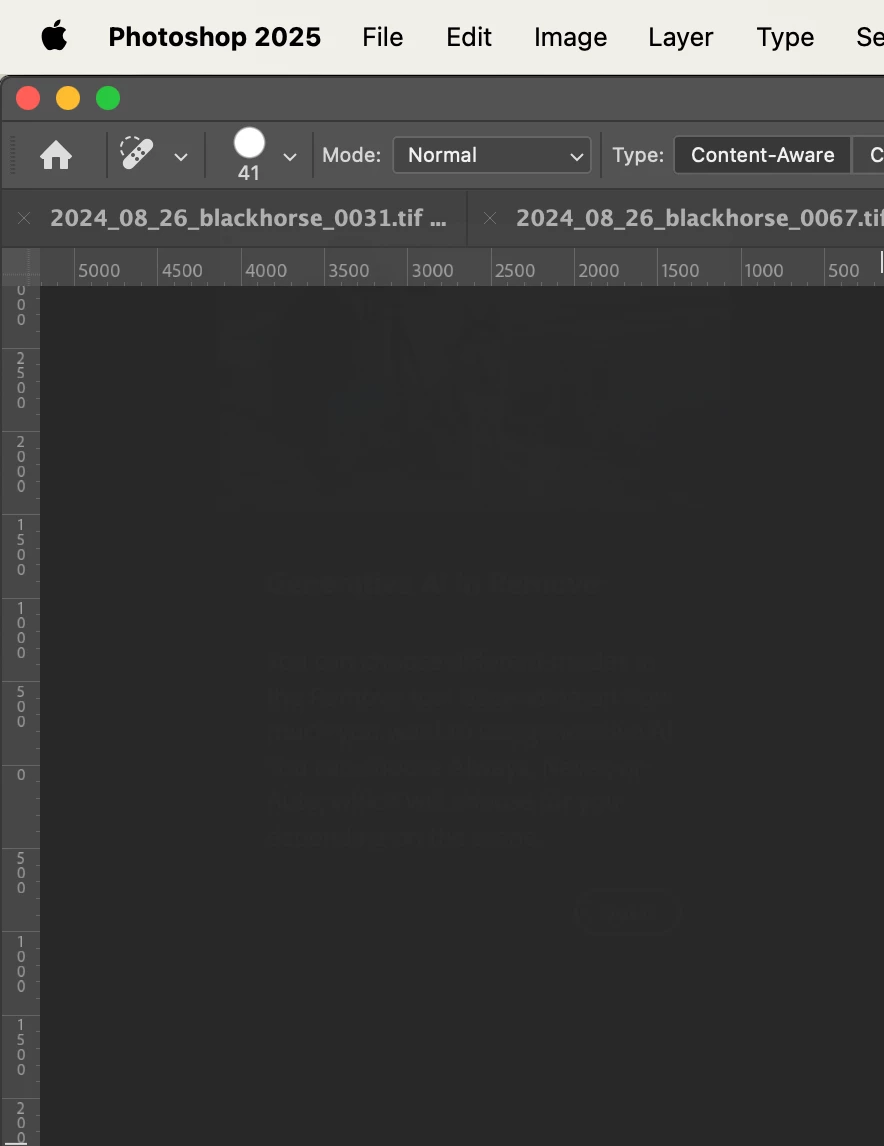


This topic has been closed for replies.

3 replies

jane-e
Community Expert
Community Expert
November 6, 2024

Brilliant idea Ged!


Jane

Sameer K
Community Manager
Community Manager
November 6, 2024

Hey, @pasijarvenpaa. Welcome to the Photoshop Community.


Do you see this even after you restart Photoshop? Has this started to happen since a recent update?


@jane-e & @Ged_Traynor - Do you see this in your Photoshop too?

I couldn't recreate this on my Windows test devices. 


Awaitng to hear from you. Thank!
Sameer K

(Use '@mention' to tag me when you reply)

Ged_Traynor
Community Expert
Community Expert
November 6, 2024

@Sameer K not seeing it on my system, I'm on Windows 10, Photoshop version 26.0

Ged_Traynor
Community Expert
Community Expert
November 6, 2024

@jane-e I opened the screenshot in PS and made a level adjustment, you can see what the OP is referring too


jane-e
Community Expert
Community Expert
November 5, 2024

@pasijarvenpaa 


Sorry, but I don't see anything untoward.


Jane