
Participant
July 14, 2014
Answered

What am I doing wrong? Cannot save as brush?

  • July 14, 2014
  • 3 replies
  • 18605 views

Hi all

I am trying to make a watermark for photos on my website.

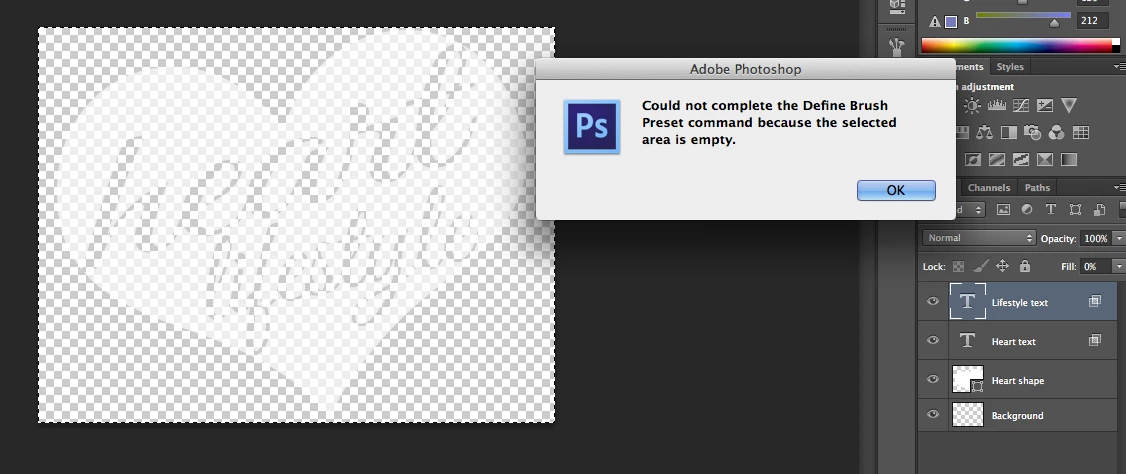
However, when I try save my image as a brush preset, I get the error "Could not complete the define brush preset command because the selected area is empty"

I have made the background transparent, the heart white coloured with opacity, and the text is 'knocked out' of the heart.

Here's a picture of what I have done so far. Any help would be greatly appreciated.
This topic has been closed for replies.
Correct answer Chris Cox

You're targeting a type layer, that has no actual pixels on it.

Merge the layers, make sure you have a black shape on a white background - then define as a brush.

3 replies

Participant
April 16, 2023

Or you can use a color that is different from white when using an image or shape? It worked for me ironically and here's another way if you want the image/shape to remain white:

Once your brush is made with another color (as shown in the video below), you can also use the color overlay to make it white when you are done drawing

Participating Frequently
December 8, 2016

hi. [abuse removed] the 2nd answer works though.

Chris Cox
Chris CoxCorrect answer
Legend
July 15, 2014

You're targeting a type layer, that has no actual pixels on it.

Merge the layers, make sure you have a black shape on a white background - then define as a brush.

Participant
February 26, 2018

Thanks MAn