


MahaB82A
June 6, 2025
Answered

What happened behind the scene

  • June 6, 2025
  • 4 replies
  • 379 views

You can notice in this PSD document top layer [stone] is switch off. If I press & hold the SHIFT key & doble click this top layer a new transperent file is opned with black color text on it. I wish to know what happened behind the scene & the purpose of this operation? PSD file is uploaded. 
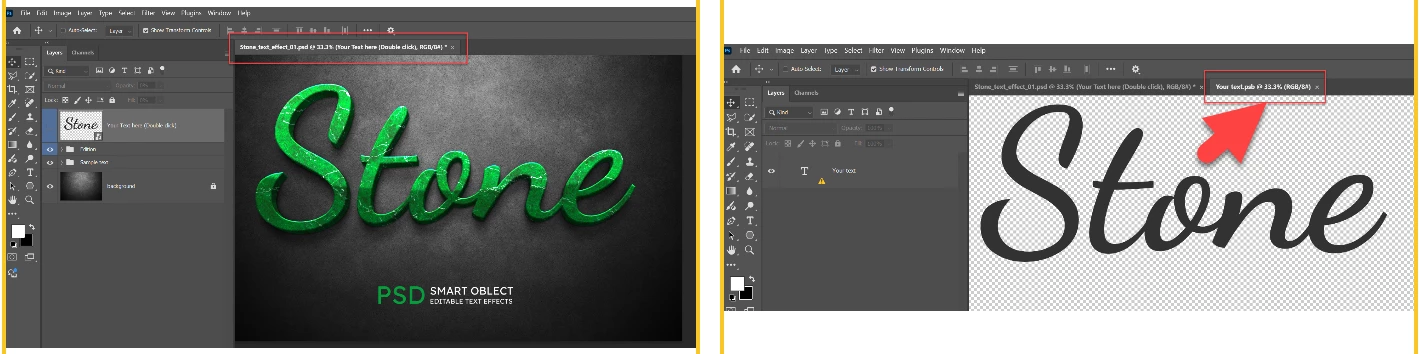
 

Stone Text

Correct answer davescm

That top layer is an embedded smart object. As such, that smart object can contain several other layers within it. What you did was open the smart object which you can now edit. When complete close and save it, and you will be returned to the original document, but with that smart object layer updated.


Dave

4 replies

davescm
Community Expert
davescmCommunity ExpertCorrect answer
Community Expert
June 6, 2025

That top layer is an embedded smart object. As such, that smart object can contain several other layers within it. What you did was open the smart object which you can now edit. When complete close and save it, and you will be returned to the original document, but with that smart object layer updated.


Dave

MahaB82A
MahaB82AAuthor
June 6, 2025

Thanks for the explanation.

davescm
Community Expert
Community Expert
June 6, 2025

You're welcome.
You can read more on smart objects here : https://helpx.adobe.com/uk/photoshop/using/create-smart-objects.html


Dave

Ares Hovhannesyan
Community Expert
Community Expert
June 6, 2025

Not able to download a file as it not available. IMHO your top layer shows Smart Object Layer and when you click on it. it opens the original file. 

MahaB82A
MahaB82AAuthor
June 6, 2025

Sorry for the inconvenient. Please try this link.

Stone Text


Community Manager
June 6, 2025

Hi @MahaB82A!

Are you referring to the Smart Object? Just to clarify, Smart Objects are special layers that keep the original image data (like raster or vector files) intact, which means you can edit them without permanently changing the original.

When you double-click on a Smart Object, it opens in a new document. If you make changes there, save it, and then return to your original file, those updates will automatically appear—pretty handy!

So in your case, if you edit the "Stone" text in that new window, save it, and go back to the main file, your new text should show up with the same cool text effect applied.

Hope that clears things up! Let me know if you have any other questions.

Alek


*(If you mention me with an @, like @Aleke, I’ll get a notification and can respond faster.)*
Ged_Traynor
Community Expert
Community Expert
June 6, 2025

@MahaB82A nothing uploaded
