



Answered
What is a Mockup Decal Layer and Why is it Automatic?
I’m self taught, but I’ve been doing mockups in Photoshop for over 10 years, and this is a file I’ve used and edited before. Today I went to change a smart object and this thing popped up:
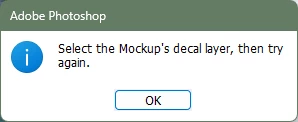
I’ve never seen this before, and it certainly wasn’t part of the original set-up. What’s going on? What is a decal layer? Why is it applied to this smart object and none of the others in this Photoshop file?
What I’ve done to troubleshoot:
- Updated Photoshop.
- Restarted Photoshop.
- Restarted my computer.
- Converted to Layers and then re-converted it to a new smart object. (Note, the convert-to-smart-object process has nothing new or that would designate a “decal layer.”)
- Converted the smart object to another smart object (the newest smart object is also locked behind this decal layer.
- Saved a new copy of the file.
- Put the smart object on a new file.
- Converted to layers, moved to a new file, re-converted to a smart object (This actually worked! But then when I duplicated the layers to put it back in the original file, the pop-up happened again!)
I can man-handle a work-around, but I really want to know what this is, why this is, and how far it reaches because I do a lot of mockups and if all my old mockups now have a massive time-sink built in to accommodate whatever this is, I’m in trouble!
 AdChoices