Semaphoric
Community Expert
Community Expert
December 10, 2025
Answered

What is the 'Modern Interface' ?

  • December 10, 2025
  • 2 replies
  • 506 views

So often here, the advice that solves the problem is disable Use Modern Interface in the prefs. Aside from some adjustment layer issues, I don't see that much visual difference, except that the old-fashioned interface actually works.


I couldn't find anything from Adobe's site, except that it exists. I see in the prefs that it is based on Adobe Spectrum. Searching Adobe for What is Spectrum tells me it is an editing framework that will make my editing more "Joyful". I would prefer efficient. But I still can't find any information on what it is visually (it's a GUI), and why it is superior to the old one, which works.


I hate to sound like one of those guys, but, if it ain't broke, don't fix it.


Correct answer Conrad_C

Although I’ve seen problems with Modern User Interface and have reported them to Adobe, overall Modern User Interface shows signs of being a step in the right direction that just hasn’t been completely debugged yet. And I don’t mean just in the cosmetic sense, but in a functional sense. For example…


For many years I’ve been frustrated that Photoshop is one of the few Mac applications that doesn’t fully support the macOS option Keyboard Navigation (in System Settings > Keyboard). Sometimes it’s faster for me to Tab through a dialog box to select and toggle options, and for some with disabilities this feature is essential. This works fine in Windows Photoshop, but not in many areas of macOS Photoshop…until recently. 


Photoshop dialog boxes upgraded to Modern User Interface respond to the Keyboard Navigation option more readily than older dialog boxes. Whatever the technical reason (moving to more standard, less proprietary dialog box widgets maybe?), this is evidence of a good thing, functionally speaking. 
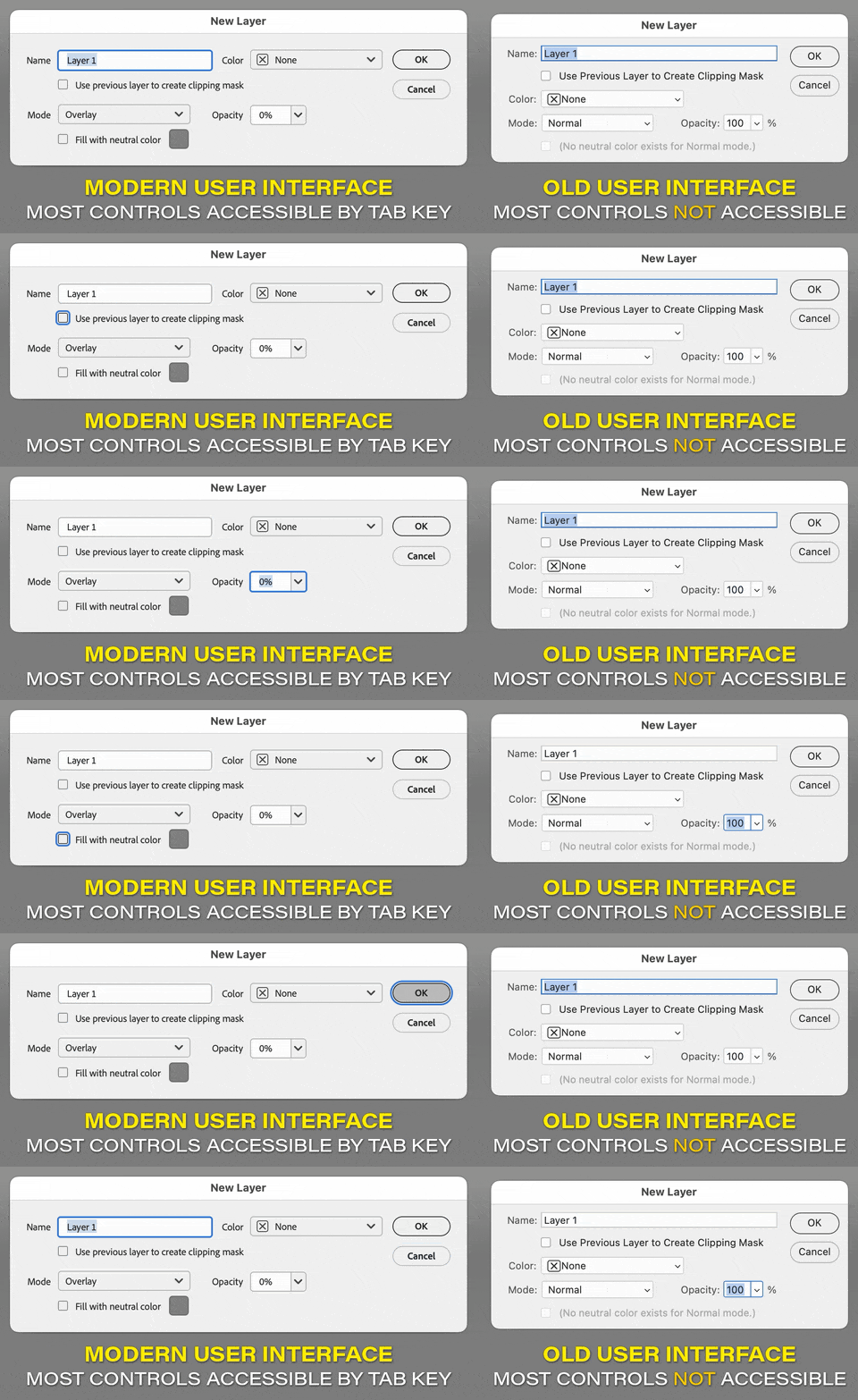
 

Photoshop New Layer db Modern User Interface enabled vs disabled.gif


Not all parts of Photoshop have been converted yet, and this may be because Adobe converted a few areas just to help flush out the bugs in Modern User Interface.


I don’t specifically know what other functional advantages there are to Modern User Interface, only that this is an improvement I’ve noticed and can definitely point to. It would be good for Adobe to be more publicly specific about why Modern User Interface is functionally better.

quote

I hate to sound like one of those guys, but, if it ain't broke, don't fix it.

By @Semaphoric


Many users (of Adobe and non-Adobe software) have posted that after a change that’s perceived to be unnecessary, but often the developer has actually been trying to fix something that’s always been broken but that many users aren’t aware of. Many Mac users didn’t notice that the old interface was less functional because they’re generally less likely to Tab through a dialog box than a Windows user, but it was in fact broken on the Mac. 


All this work does respond to a widespread perception that Photoshop is old code from the 1990s that, in the opinion of some, (people seem to say this a lot) “needs a total rewrite.” In some ways that kind of rewrite of Photoshop foundations has been going on recently. We’ve seen it in rewrites like Multithreaded Compositing and GPU Compositing, the Unified Type Engine, upgrades to HDR display, and now upgrades to user interface widgets. None of these updates have been perfect and they’ve required rounds of bug fixing, but they did need to update that code for kinds of CPUs and GPUs and international, mobile/desktop users that exist now. To help them get it right, we do need to send in bug reports when we notice anything about the new code that isn’t working properly. 


I don’t really know much about Adobe Spectrum other than what the Adobe Spectrum website says. I didn’t run into the word “joyful” on that website (it doesn’t even turn up in a search), but it’s a design system that appears to be intended to (among other things) result in…

quote

…better legibility and easier UI interactions to set a foundation for consistent experiences across devices…Spectrum is designed to be clearly readable, intuitive to use, and mindful of those who use alternative input peripherals or screen readers. Everything in our system — from color and type to interaction and language — is built to be compliant with industry standards.


And so although the short-term solution to problems is to disable Modern User Interface, the long-term solution is to tell Adobe what’s broken, so that Modern User Interface and Spectrum can succeed at their goals of being up-to-date (modernized) in terms of cross-device, cross-platform, cross-language, scalable, accessible usability. Because much of what is still in Photoshop from the 1990s is clearly not all that. 

2 replies

Conrad_C
Community Expert
Conrad_CCommunity ExpertCorrect answer
Community Expert
December 10, 2025

Although I’ve seen problems with Modern User Interface and have reported them to Adobe, overall Modern User Interface shows signs of being a step in the right direction that just hasn’t been completely debugged yet. And I don’t mean just in the cosmetic sense, but in a functional sense. For example…


For many years I’ve been frustrated that Photoshop is one of the few Mac applications that doesn’t fully support the macOS option Keyboard Navigation (in System Settings > Keyboard). Sometimes it’s faster for me to Tab through a dialog box to select and toggle options, and for some with disabilities this feature is essential. This works fine in Windows Photoshop, but not in many areas of macOS Photoshop…until recently. 


Photoshop dialog boxes upgraded to Modern User Interface respond to the Keyboard Navigation option more readily than older dialog boxes. Whatever the technical reason (moving to more standard, less proprietary dialog box widgets maybe?), this is evidence of a good thing, functionally speaking. 


Photoshop New Layer db Modern User Interface enabled vs disabled.gif


Not all parts of Photoshop have been converted yet, and this may be because Adobe converted a few areas just to help flush out the bugs in Modern User Interface.


I don’t specifically know what other functional advantages there are to Modern User Interface, only that this is an improvement I’ve noticed and can definitely point to. It would be good for Adobe to be more publicly specific about why Modern User Interface is functionally better.

quote

I hate to sound like one of those guys, but, if it ain't broke, don't fix it.

By @Semaphoric


Many users (of Adobe and non-Adobe software) have posted that after a change that’s perceived to be unnecessary, but often the developer has actually been trying to fix something that’s always been broken but that many users aren’t aware of. Many Mac users didn’t notice that the old interface was less functional because they’re generally less likely to Tab through a dialog box than a Windows user, but it was in fact broken on the Mac. 


All this work does respond to a widespread perception that Photoshop is old code from the 1990s that, in the opinion of some, (people seem to say this a lot) “needs a total rewrite.” In some ways that kind of rewrite of Photoshop foundations has been going on recently. We’ve seen it in rewrites like Multithreaded Compositing and GPU Compositing, the Unified Type Engine, upgrades to HDR display, and now upgrades to user interface widgets. None of these updates have been perfect and they’ve required rounds of bug fixing, but they did need to update that code for kinds of CPUs and GPUs and international, mobile/desktop users that exist now. To help them get it right, we do need to send in bug reports when we notice anything about the new code that isn’t working properly. 


I don’t really know much about Adobe Spectrum other than what the Adobe Spectrum website says. I didn’t run into the word “joyful” on that website (it doesn’t even turn up in a search), but it’s a design system that appears to be intended to (among other things) result in…

quote

…better legibility and easier UI interactions to set a foundation for consistent experiences across devices…Spectrum is designed to be clearly readable, intuitive to use, and mindful of those who use alternative input peripherals or screen readers. Everything in our system — from color and type to interaction and language — is built to be compliant with industry standards.


And so although the short-term solution to problems is to disable Modern User Interface, the long-term solution is to tell Adobe what’s broken, so that Modern User Interface and Spectrum can succeed at their goals of being up-to-date (modernized) in terms of cross-device, cross-platform, cross-language, scalable, accessible usability. Because much of what is still in Photoshop from the 1990s is clearly not all that. 

Semaphoric
Community Expert
Community Expert
December 11, 2025

@Conrad_C,  thanks for the response. I'm not really decrying an updated interface. It just seems to me that something that affects users' interaction with Adobe apps would get a splashy announcement on Adobes's site, or a write up on a Adobe Evangelist blog. All I found was some rather dry paragraphs of the advantages, without actually showing me how it's an advantage. An example such as you posted is the sort of thing I was looking for.


I will note, though, that i have been tabbing through dialogs for years under Windows. I'm somewhat surprised it was not so on Mac.

Legend
December 10, 2025

That's a deep dive, but I understand your desire to know the inner workings of Photoshop.

Check this simplistic overview excerpt as a start, until the resident gurus weigh in: How Do I Change Adobe to Classic View?


Understanding the Context: Classic vs. Modern UI

The ‘Classic’ interface in Adobe applications typically refers to the UI paradigms prevalent in older versions. These interfaces generally emphasize:

  • Menu-driven navigation: A comprehensive, hierarchical menu system provides access to all program functionalities.
  • Toolbar-centric workflow: Core tools are readily accessible via customizable toolbars, allowing for rapid selection and execution.
  • Dockable panels: Panels containing settings, layers, color palettes, and other resources are designed to be docked and arranged to suit individual preferences.

The ‘Modern’ interface, on the other hand, often leverages:

 
  • Contextual toolbars and panels: Tool options and panel content dynamically adjust based on the currently selected tool or object.
  • Simplified menus: Frequently used functions are prioritized in the main menu, while less common options are relegated to submenus or dedicated panels.
  • Cloud-based integration: Seamless access to Adobe Creative Cloud services, including cloud storage, libraries, and fonts.

Why Revert to Classic View (or Emulate It)?

The desire to revert to or emulate the Classic view stems from several factors:

  • Muscle Memory: Years of experience with a particular interface create deeply ingrained muscle memory. Changes to the UI can disrupt established workflows and reduce productivity.
  • Customization: Classic interfaces often offer greater flexibility in terms of toolbar and panel customization, allowing users to tailor the application to their specific needs.
  • Performance (Perceived): In some cases, users perceive the Classic view as being more responsive, particularly on older hardware or with large, complex files. While this is often subjective, the streamlined nature of some older UIs can contribute to a smoother experience.
  • Feature Accessibility: Some users find that specific features are more easily accessible or discoverable in the Classic view, even if they exist in the modern interface.


Larry
Semaphoric
Community Expert
Community Expert
December 10, 2025

Thanks for the information. I almost never use Cloud based services Contextual toolbars are  Microsoft Clippy's dull child. I'm all for simplified menus, but why are Fill Layers, which I use all the time, are now prioritized to the bottom of the list.


Sorry for th rant, but so much of the interface has been broken in the past eighteen months. See all the trouble with the Curves Panel for an example. I just want the app to run smoothly and efficiently.


— John


