Inspiring
November 2, 2025
Answered

what keyboard shortcut for scan

  • November 2, 2025
  • 1 reply
  • 167 views

Hello,

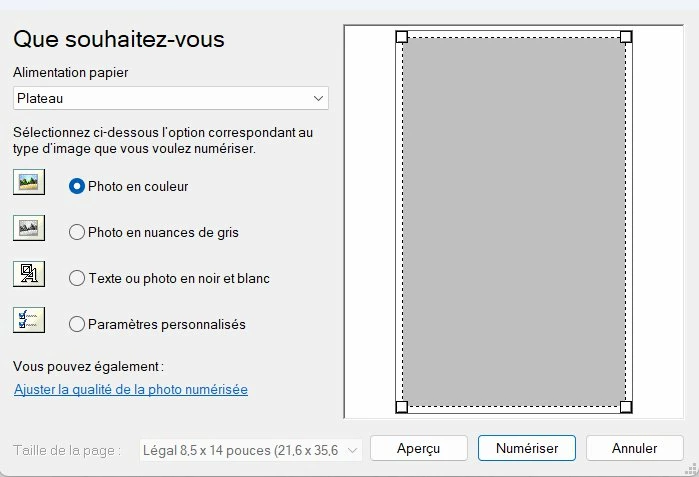
I would like to display this window by a keyboard shortcut. What keyboard shortcut ?

Because actually, for each scan I do, I am obliged to do import / WIA / choose my scanner before to arrive to this window.


Correct answer D Fosse

Even if you fire up the WIA app directly from Photoshop, you are still at the mercy of how that app works.  If it was not written as a Photoshop Plugin, then there is almost no advantage in trying to use it that way. WIA sup[port was withdraw from Photoshop even before the CC subscription model was introduced, and that was because it too much trouble getting them to play nicely together.  I see it is back now, but I wouldn't risk using it personally.  Just scan and import as JPGs, and open them into Photoshop, maybe using Bridge.


Why make life hard for yourself?


quote

WIA sup[port was withdraw from Photoshop even before the CC subscription model was introduced, and that was because it too much trouble getting them to play nicely together.  I see it is back now, but I wouldn't risk using it personally. 


By @Trevor.Dennis


You're probably thinking of the TWAIN plugin, which is ancient history by now and was never even developed for 64 bit architecture.


WIA has been there all along, but it'a very limited feature Windows utility (mostly, it seems, intended for typical "office" purposes) that I would never use for images.


So as you say, and I fully agree with, use the scanner software as a standalone app and scan directly to disk.

1 reply

D Fosse
Community Expert
Community Expert
November 2, 2025

If WIA is still under the File > Import menu (can't check now), you can assign your own shortcut to it in Edit > Keyboard Shortcuts.

Inspiring
November 2, 2025

In Photohsop, if I do File / Import / WIA extension / selection of the scanner, I have this scan window. 

My goal is to have direct access to this window from Photoshop.

Trevor.Dennis
Community Expert
Community Expert
November 3, 2025

Even if you fire up the WIA app directly from Photoshop, you are still at the mercy of how that app works.  If it was not written as a Photoshop Plugin, then there is almost no advantage in trying to use it that way. WIA sup[port was withdraw from Photoshop even before the CC subscription model was introduced, and that was because it too much trouble getting them to play nicely together.  I see it is back now, but I wouldn't risk using it personally.  Just scan and import as JPGs, and open them into Photoshop, maybe using Bridge.


Why make life hard for yourself?
