
Participant
July 6, 2026
Answered

When I try to open Bridge, I get an error message. I have uninstalled and reinstalled Bridge (twice) but the problem persists.

  • July 6, 2026
  • 1 reply
  • 17 views
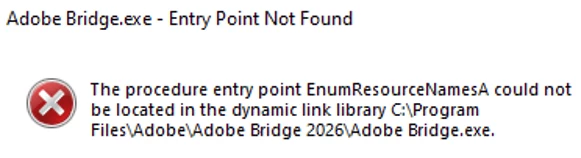
I can't open Adobe Bridge. I get the error message below. I've un-installed and re-installed Bridge (twice) but I still get the message below.
What do I need to do to fix this problem?  Thanks for any help you can offer.
 

    Correct answer Jeff Arola

    For now the fix is to remove Bridge 16.0.4 and install Bridge 16.0.3

    Seems to be a bug that only applies to Windows 10 systems.

    https://community.adobe.com/bug-reports-557/bridge-16-0-4-fails-to-launch-on-windows-10-with-enumresourcenamesa-entry-point-error-1630176

    1 reply

    Jeff Arola
    Community Expert
    Jeff ArolaCommunity ExpertCorrect answer
    Community Expert
    July 6, 2026

    For now the fix is to remove Bridge 16.0.4 and install Bridge 16.0.3

    Seems to be a bug that only applies to Windows 10 systems.

    https://community.adobe.com/bug-reports-557/bridge-16-0-4-fails-to-launch-on-windows-10-with-enumresourcenamesa-entry-point-error-1630176

    rexboggs5Author
    Participant
    July 6, 2026

    Thanks, Jeff!  I found this out a few minutes ago, and that has fixed the problem.

    I appreciate your assistance.