Sash_EX
Participant
April 13, 2018
Answered

where are my transform tools wow

  • April 13, 2018
  • 4 replies
  • 530 views

where is warp perspective flip I need them

Correct answer D.A.R

I don't believe they moved.

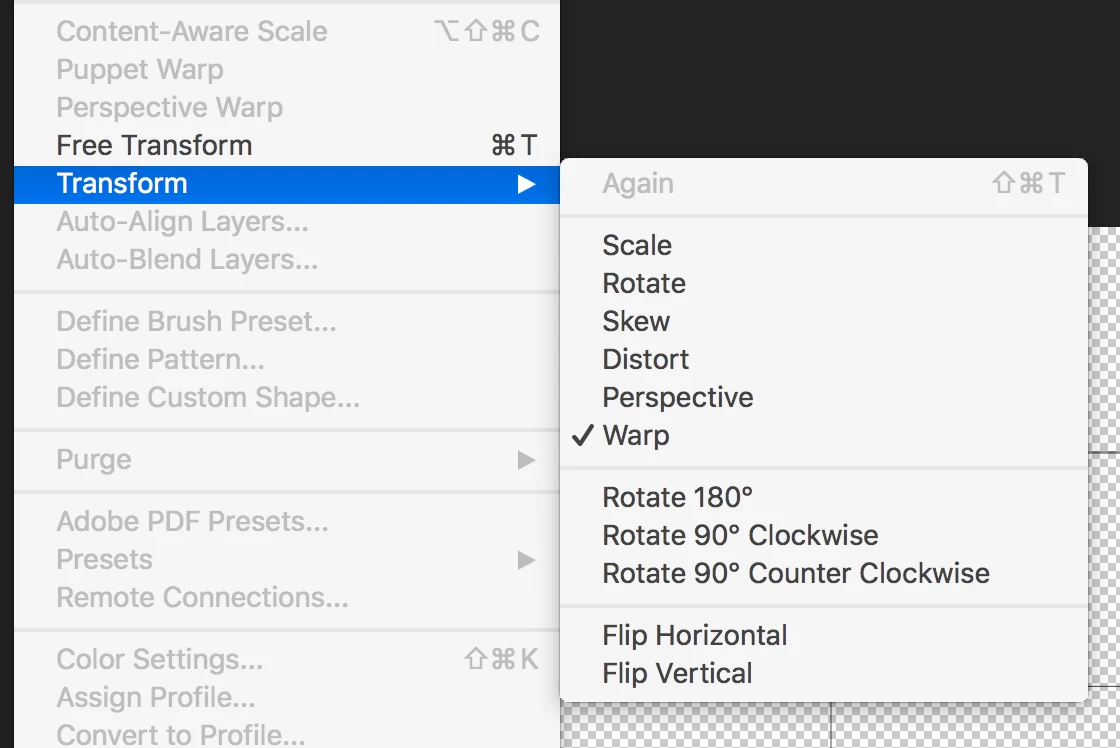
Under the Edit menu:

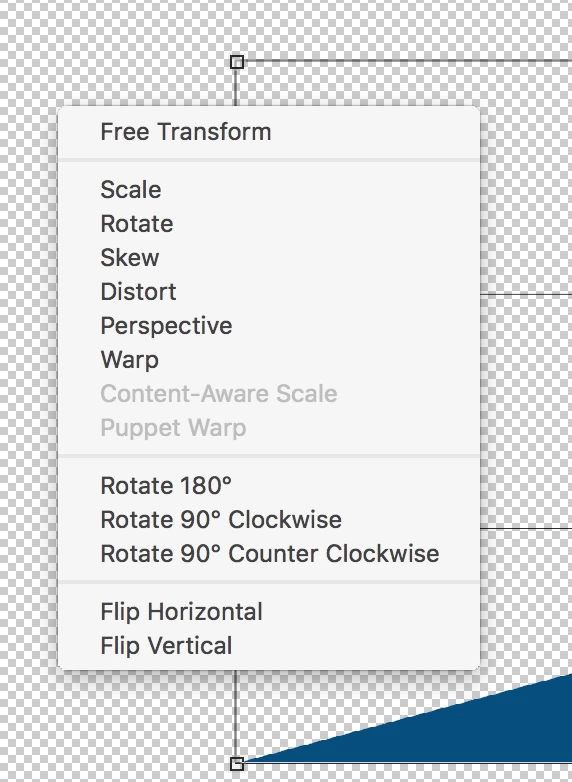
Or Right Click inside the Transform box:

Perhaps let us know what version of Photoshop you are using, when did you first notice the Transform tools missing, anything specific about your workflow.

4 replies

Participant
October 2, 2025

what about in PS Express?


Community Manager
October 3, 2025

Hi @James_McCown0625, welcome to the community!
Since this thread is a bit older, it might be a good idea to start a new one with all the details of your issue. That way, your question won’t get overlooked and you’ll likely get help faster.
Thanks so much, and looking forward to seeing your post!
Cheers,
Alek

*(If you mention me with an @, like @Aleke, I’ll get a notification and can respond faster.)*
D.A.R
D.A.RCorrect answer
Legend
April 13, 2018

I don't believe they moved.

Under the Edit menu:

Or Right Click inside the Transform box:

Perhaps let us know what version of Photoshop you are using, when did you first notice the Transform tools missing, anything specific about your workflow.

Norman Sanders
Legend
April 13, 2018

If they do not appear in the Edit menu (make a selection first for Transform options to be accessible) reset Preferences, for starters. Post an image of your Edit menu.

Sash_EX
Sash_EXAuthor
Participant
April 13, 2018

I cant continue until I know this. thanks for burning my time adobe. clap clap

jane-e
Community Expert
Community Expert
April 13, 2018

Sash.EX  wrote

I cant continue until I know this. thanks for burning my time adobe. clap clap

Hi Sash.EX,

You posted to a user forum and most of us are volunteers. I noticed this came in 15 minutes after your previous post am not sure if it is something you want us to address?

Also, if Norman's answer, which came in 3 minutes later, answered your question, please be sure to mark it correct!

Best to you,

J