
Inspiring
October 30, 2025
Answered

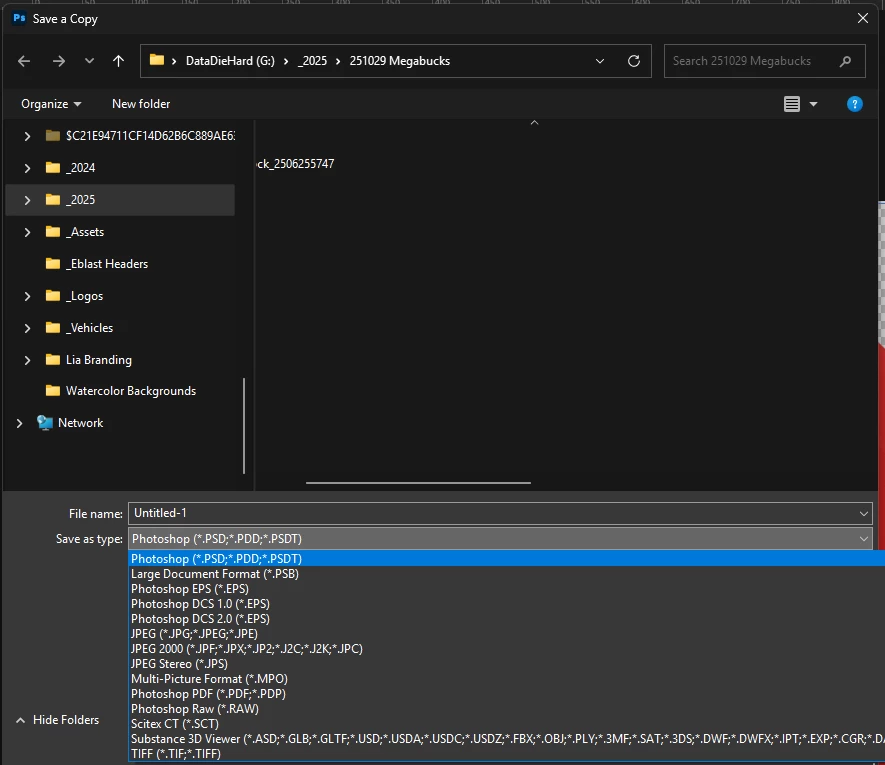
Where did save PNG go in Photoshop 27?

  • October 30, 2025
  • 3 replies
  • 73 views

It's in the export panel, but not in my Save As Copy anymore, or in generic save dropdown. I looked in the settings but didn't find anything about which file types appears in drop down menus. 


Where did it go????


Correct answer ElissaE

Lmao I'm just stupid. I was in a CMYK color space, not RGB. How do I delete this post because I'm an idiot

3 replies

J E L
Community Expert
Community Expert
October 30, 2025

Ha, no worries, @ElissaE! Your post might help someone else. We've all been there! Thanks for coming back on to let us know and I'm glad you can carry on now.

ElissaEAuthorCorrect answer
Inspiring
October 30, 2025

Lmao I'm just stupid. I was in a CMYK color space, not RGB. How do I delete this post because I'm an idiot

J E L
Community Expert
Community Expert
October 30, 2025

@ElissaE, that's strange. I have PNG in the list under File > Save a Copy... Did you try it with a different image?