Dave Rye
Known Participant
February 12, 2023
Answered

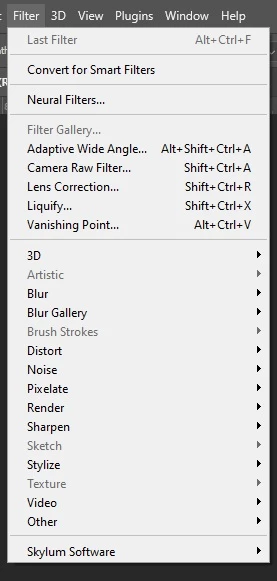
Where did Texture option in Filters menu go?

  • February 12, 2023
  • 3 replies
  • 1668 views

Anyone know why the Texture or Sketch options are not available in the past few days on 
 ?  Anyone with an answer is a welcome friend of mine!  🙂
Correct answer Jeff Arola

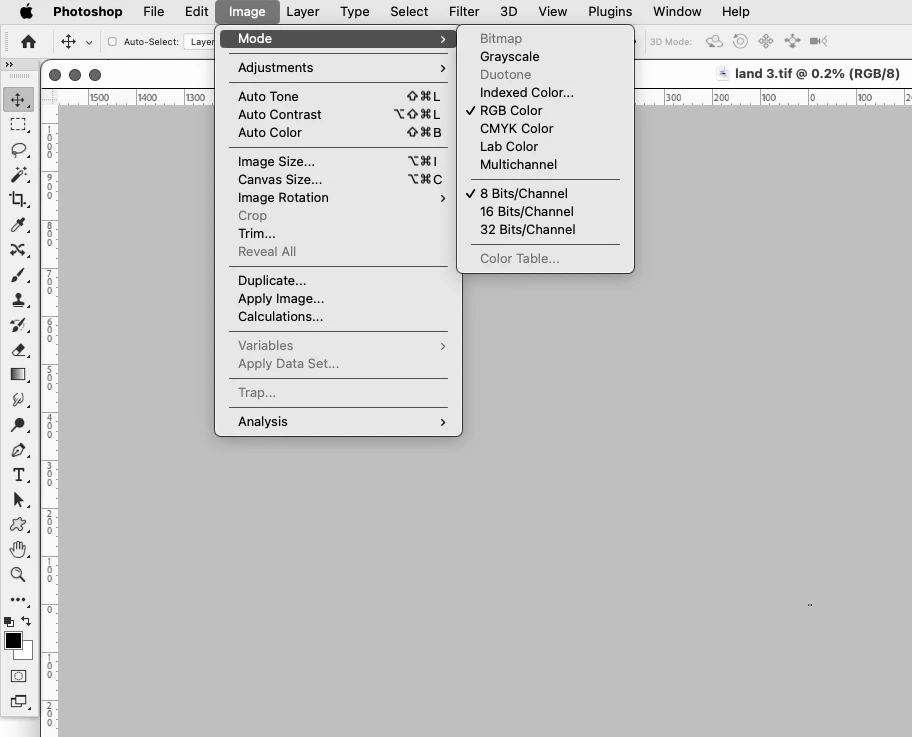
A common issue is not having the document in the RGB Color mode and/or 8 Bits/Channel.

Look under Image>Mode
 

3 replies

PECourtejoie
Community Expert
Community Expert
February 13, 2023

@Dave Rye Hello, and Welcome! FYI,  I converted your bug report into a discussion as it was normal behavior. 

It is often best practice to avoid jumping the gun, and making sure that we are facing a bug and not user/configuration error.

FYI, there is also a Photoshop(beta) forum for questions related to the new functions (this function was common to the regular Photoshop, so I'm leaving it here.)

Dave Rye
Dave RyeAuthor
Known Participant
February 12, 2023

Thank you so much for providing me with the correct answer for that.  I had moved directy from LrC using the Ctrl-E shortcut with a macro image I had taken using my Sony A7RM3 so didn't provide altered mode in it and was leaving me puzzled at to why the menu option was no longer available.  Worked great.  I appreciate your quick reply.  Please take care.

Jeff Arola
Community Expert
Jeff ArolaCommunity ExpertCorrect answer
Community Expert
February 12, 2023

A common issue is not having the document in the RGB Color mode and/or 8 Bits/Channel.

Look under Image>Mode


Known Participant
December 30, 2024

I must be missing something here! I using PS v 26.2.0 (on mac OS Sonoma) and I don't find any "Textures" available under the Filter Menu............unless one is now supposed to go to: Filter Gallery > Textures.

Jeff Arola
Community Expert
Community Expert
December 31, 2024

AppleAddict001,


In newer Photoshop versions one needs to go to to Photoshop 2025 (your version)>Settings>Plugins, check

Show all filter groups and names, then restart Photoshop.


Now all the Filters including Filter>Texture should be visible.
