
Participant
January 5, 2020
Answered

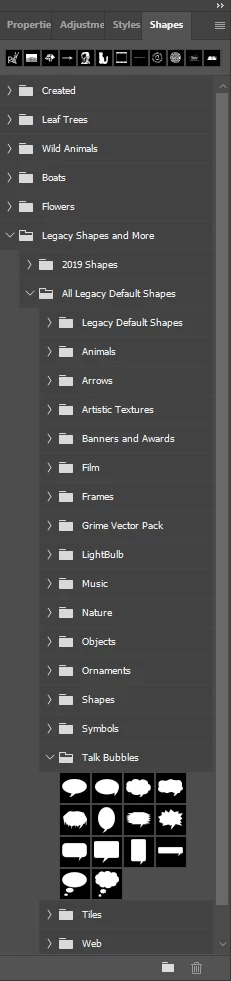
Where has the speech bubble gone in Adobe Photoshop Version: 21.0.2

  • January 5, 2020
  • 8 replies
  • 90582 views

I just selected the custom shape tool. The dropdown custom shape picker give me folder options for 'Leaf Trees', 'Wild Animals', 'Boats' and 'Flowers' only. I don't use any of these but used the speech bubble all the time. Now that I have upgraded to 21.0.2 it's gone. Is there a way to get it back?
 

Correct answer JJMack

Adobe added the Shapes Palette in PS 2020 moved Shape management from the preset manager to the shapes palette.  Shapes Palette supports groups of custom shapes and the ones you are looking for are in the legacy groups  you may need to include form the Shapes Palette fly-out menu

8 replies

louisd79464044
Inspiring
August 9, 2023

Hi Alec,


Speech bubbles are gone from the legacy list. Whereto?


Thanks,


Louis

Ged_Traynor
Community Expert
Community Expert
August 9, 2023

@louisd79464044 there still showing up for me with Photoshop version 24.7

PECourtejoie
Community Expert
Community Expert
December 9, 2021

I still cannot understand why the legacy presets are not found in the option bar, or in the right-click panels's local menus.

Participant
December 9, 2021

Thank you.  You are right.  I finally found it with your help

Participant
January 26, 2021

Looks like I have the same trouble but don't follow what needs to be done so that the speach bubble shows up in the shape choices.

Participant
January 31, 2021

Same here.. Can notfind it... how hard can they make this!!

jane-e
Community Expert
Community Expert
January 31, 2021

Hi @edward5C57 

If you can't find the Shapes panel in the Window menu, then tell us what version of Photoshop you have. The Shapes panel is new, and the speech bubble shapes that the OP asked about were not considered "Legacy" in older versions.


If you have the current version, please show a screen shot of what you are seeing so we can better assist. 


~ Jane

Participant
December 28, 2020

Thank you! But it kind of boggles my mind why Adobe would bury one of the most used shapes deep inside a menu. This is where Adobe's competition gets things right, and Adobe always seems to make the simple things harder. 😞

Participant
September 30, 2020

Tack så väldigt mycket. Nu hittade jag de gamla formerna! .Det är ju för min del ytterst sällan man behöver använda formen av en chimpans eller koala. 😉

R&B_Adventure_Photography
Participant
February 6, 2020

and exactly how does one find the way to this magical sounding place called the "Shapes Palette?"

JJMack
Community Expert
Community Expert
February 6, 2020

In Photoshop 2020 menu Window>Shapes

JJMack
R&B_Adventure_Photography
Participant
February 7, 2020

Perfect, many thanks.

JJMack
Community Expert
JJMackCommunity ExpertCorrect answer
Community Expert
January 5, 2020

Adobe added the Shapes Palette in PS 2020 moved Shape management from the preset manager to the shapes palette.  Shapes Palette supports groups of custom shapes and the ones you are looking for are in the legacy groups  you may need to include form the Shapes Palette fly-out menu

JJMack
gragraAuthor
Participant
January 5, 2020

Thank you so much! I doubt I ever would have found it without your help