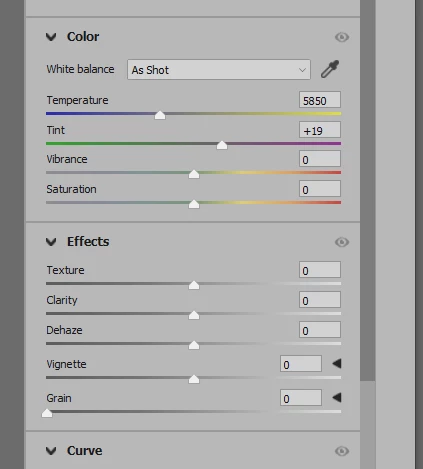
Conrad, yes ACR, but can't find it there anymore... maybe more hidden? It used to be there as a slider, right near Vibrance and Saturation. I don't see it anywhere now.
Try resetting the preferences. To restore preferences quickly using a keyboard shortcut:
Press and hold Alt+Control+Shift (Windows) or Option+Command+Shift (Mac OS) as you start Photoshop. You are prompted to delete the current settings. The new preferences files are created the next time you start Photoshop. Note: Using the keyboard shortcut, preference files for custom shortcuts, workspaces, and color settings will also be reset to default.
The "resetting the preferences" .... Lets see what Conrad says.. Should never have to reset preference as we are now force fed, new versions contantly no?
Of course, now that we get all these updates, they mangle all saved short cuts. Don't use all great keyboard shortcuts anymore as don't work from version to version, sadly, so guess nothing to lose,
But always suspiscoud of the catch all resetting the preferences, as usually rarely solves issues, and if offered quickly by zillions as a quick fix to issue.. all issues.
Note no confirmation at all, saying Yes, you should be seeing that ,... preciesly...
It can’t be found in Photoshop and has never been in the menus or panels in Photoshop itself. Dehaze is a feature in the Adobe Camera Raw plug-in that comes with Photoshop. Dehaze is found in Camera Raw both when you use it as a plug-in for converting raw images, and also when you use it as a layer filter (Filter > Camera Raw Filter).




 AdChoices