


Inspiring
April 25, 2024
解決済み

Where is Photoshop getting color profiles? Not from the Windows color profiles folder.

  • April 25, 2024
  • 返信数 3.
  • 2917 ビュー

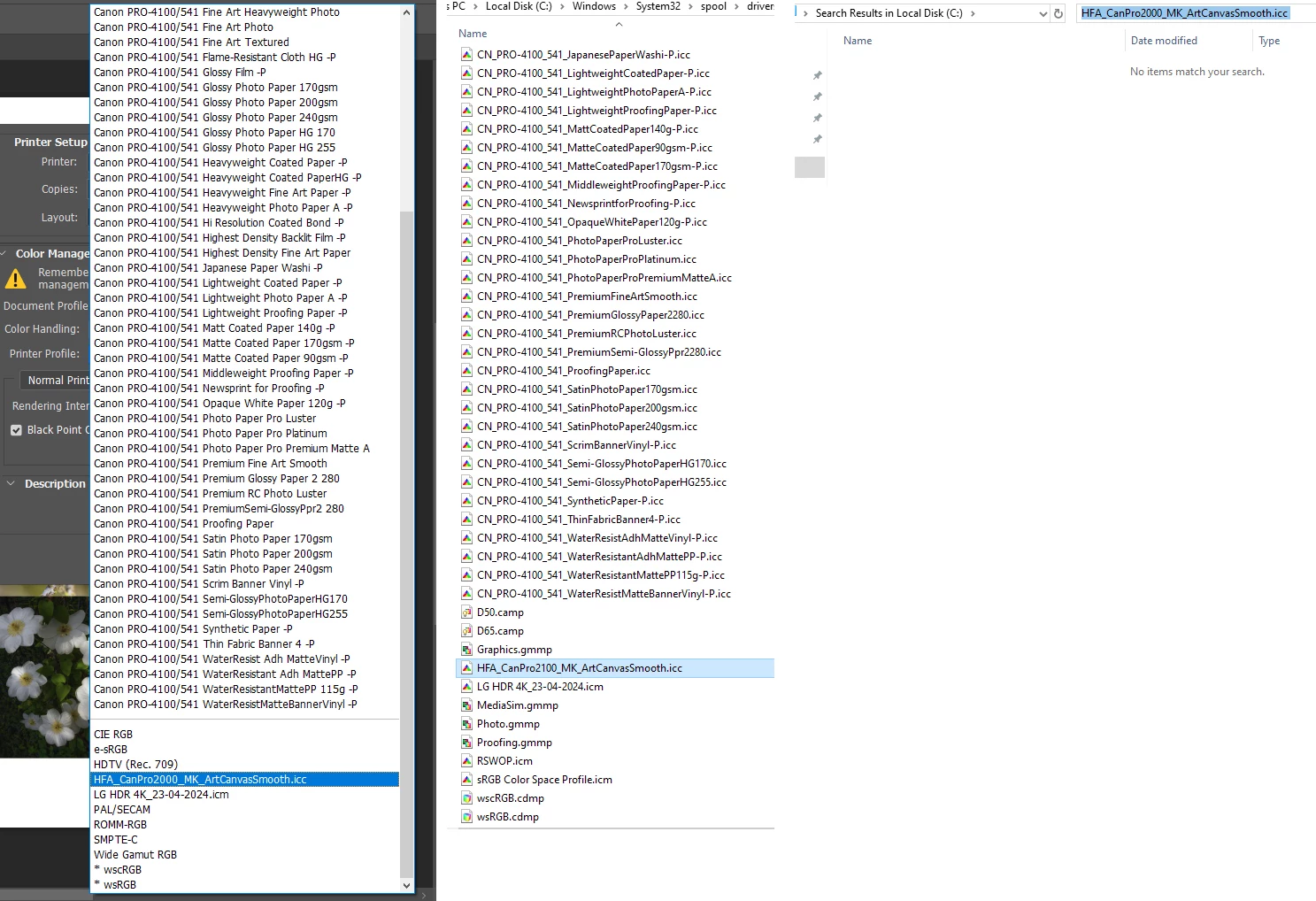
The drop down box shows Canon profiles, but they are not the ones that are  in the windows/system32/spool/drivers/color folder.  A search does not show where Photoshop is pulling them from. The drop down box shows  HFA_CanPro2000_MK_ArtCanvasSmooth.icc but I need HFA_CanPro2100_MK_ArtCanvasSmooth.icc, which is in the windows color profile folder. Win 10. thx.
解決に役立った回答 Stephen Marsh

ICC profiles have an "external name", i.e. what you see in Explorer on Windows or Finder on Mac... However, the ICC profile also has an "internal profile name" which is shown inside the application GUI. If the two are named differently this can create confusion.

返信数 3

Inspiring
October 12, 2024

I had the same problem, in Windows 10 using Photoshop CS6, and solved it.


The folder C:\Windows\System32\spool\drivers\color had files AdobeRGB.icc and USSheetfedUncoated.icc.  They showed in Color Management under All Profiles as Adobe RGB (1998) and U.S. Sheetfed Uncoated V2. But neither one was in Photoshop Print Settings dialog Printer Profile pulldown when Photoship Manages Colors was selected.


I got them to appear, at the top under my printer's Epson IJ Printer 07 profile, above the horizontal line in the list. To do that, I went to the Devices tab of Color Management, selected the printer under Device:, then Add and selected the profile.


It worked right away with U.S. Sheetfed Uncoated v2, but I had to fiddle around with Adobe RGB (1998). It was on the Devices tab of Color Management just like the U.S. Sheetfed Uncoated v2, but not in Photoshop's pulldown. I exited and restarted Photoshop, and that might have done it. And in Color Management I selected Manual Profile selection and set Adobe RGB (1998) as default profile, and that might have done it. In any event, they are both now in the Photoshop pulldown, and Adobe RGB (1998) is the default when Printer Manages Colors is selected.


D Fosse
Community Expert
Community Expert
October 12, 2024

@Walt Bilofsky 

None of that should normally be necessary - this sounds like you have a defective install.


The OP's problem was internal vs. external profile names, as Stephen explained.


Stephen Marsh
Community Expert
Stephen MarshCommunity Expert解決!
Community Expert
April 26, 2024

ICC profiles have an "external name", i.e. what you see in Explorer on Windows or Finder on Mac... However, the ICC profile also has an "internal profile name" which is shown inside the application GUI. If the two are named differently this can create confusion.

RAB123作成者
Inspiring
April 26, 2024

Thank you for taking the time to reply, I found that out eventually. Very confounding how did I not know this. The external name and internal name have always been the same - until now? What am I missing?  Never mind, onward.

Kevin Stohlmeyer
Community Expert
Community Expert
April 25, 2024

This page lists the location of the color profiles used by Adobe:

https://helpx.adobe.com/photoshop/using/working-with-color-profiles.html

Scroll down to "Install a color profile" for the location.

Participant
August 25, 2025

OK so just to be clear, at least from 26.x there are a bunch of device profiles here as well C:\Program Files (x86)\Common Files\Adobe\Color  - so if you want to clear out that crap you never wanted in your profile list you have to delete all these!
