Inspiring
December 21, 2025
Answered

Where to find legacy color picker

  • December 21, 2025
  • 1 reply
  • 382 views

Where can I find the setting to use the legacy color picker?

Correct answer Ged_Traynor

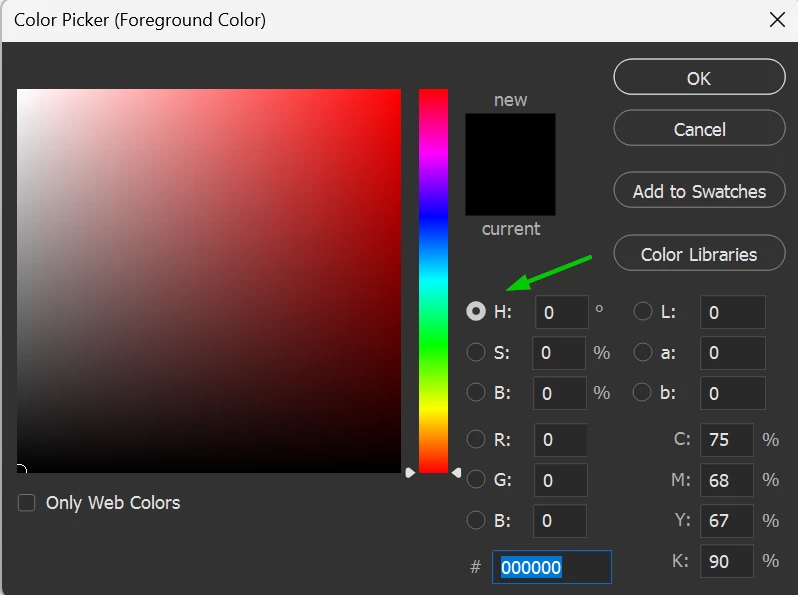
@Chris201Chris Instead of red, which you have selected, change it to hue

2025-12-21 13_53_42-Color Picker (Foreground Color).png

1 reply

Ged_Traynor
Community Expert
Community Expert
December 21, 2025

@Chris201Chris I'm not sure if I understand your query, maybe check the Photoshop preferences, and make sure the colour picker is set to Adobe

2025-12-21 11_34_34-Untitled-1 @ 100% (RGB_8).png

If that's not what you're referring to, please post a screenshot to highlight the issue, to add a screenshot use the insert photos icon

2025-12-21 11_41_18-Where to find legacy color picker - Adobe Product Community - 15640192 — Mozilla.png


Inspiring
December 21, 2025

color picker.JPG

Thanks for your speedy reply. This is what my color picker suddenly looks like. I used to have one where one corner was white and one black - making it easier to find the right combination of brightness and saturation - something I have no idea how to achieve now.

Ged_Traynor
Community Expert
Ged_TraynorCommunity ExpertCorrect answer
Community Expert
December 21, 2025

@Chris201Chris Instead of red, which you have selected, change it to hue

2025-12-21 13_53_42-Color Picker (Foreground Color).png