Known Participant
September 28, 2025
Answered

Where to post comments about the Remove tool

  • September 28, 2025
  • 1 reply
  • 111 views

The Remove tool says comments are welcome, but still doesn't say where to post them.

I would like to post comments about the Remove tool.

Is there a link to do so?

(using latest version of Pshop)



Correct answer Conrad_C

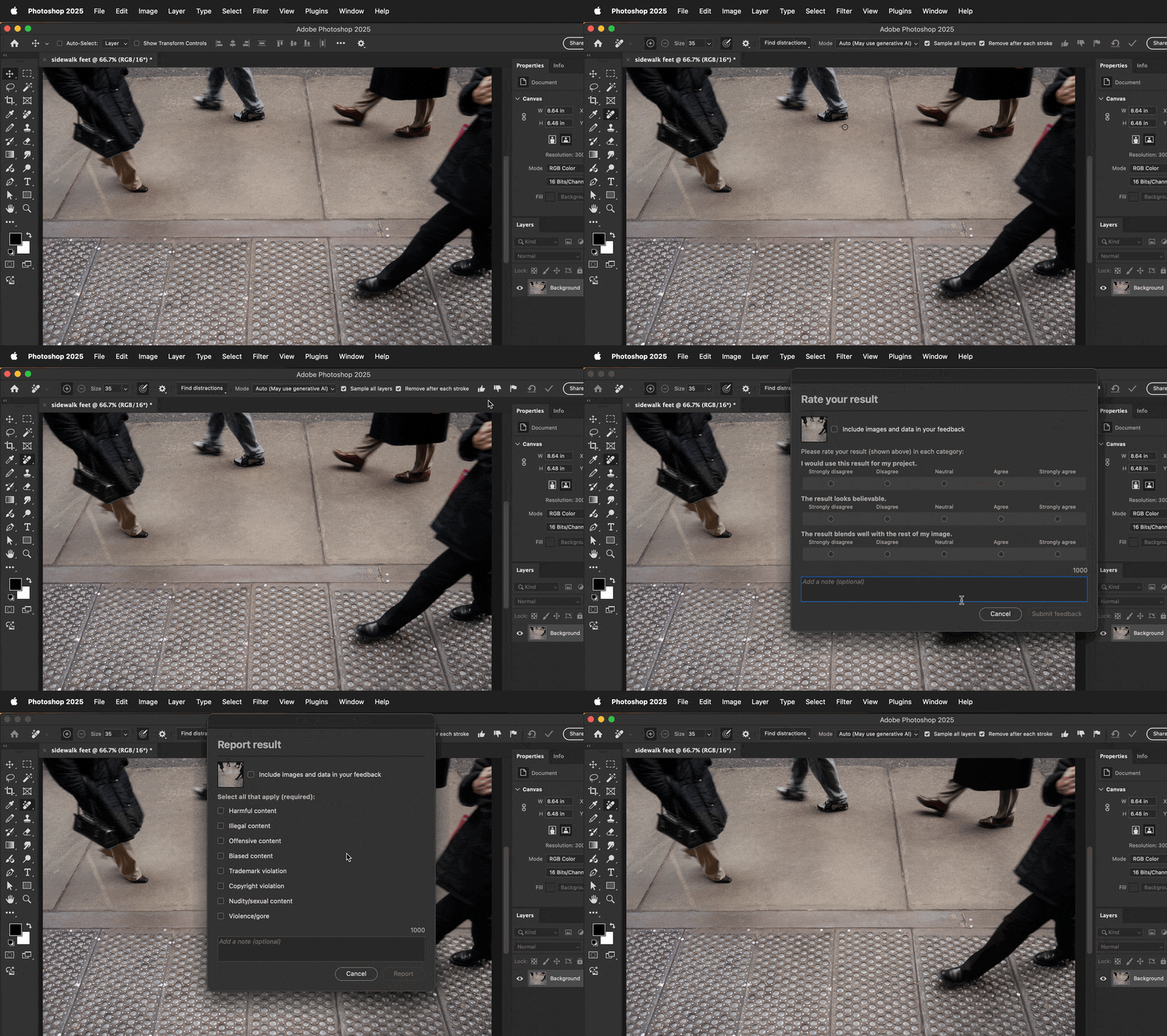
When the Remove tool is selected, look up in the options bar for the Remove tool. Like some other generative AI tools, you will see feedback icons like thumbs up, thumbs down, and flag (report). Clicking any of those icons will open a dialog box where you can let Adobe know what you thought of your Remove tool result, as shown in the demo below.


1 reply

Conrad_C
Community Expert
Conrad_CCommunity ExpertCorrect answer
Community Expert
September 28, 2025

When the Remove tool is selected, look up in the options bar for the Remove tool. Like some other generative AI tools, you will see feedback icons like thumbs up, thumbs down, and flag (report). Clicking any of those icons will open a dialog box where you can let Adobe know what you thought of your Remove tool result, as shown in the demo below.


BirdwomanAuthor
Known Participant
September 28, 2025

I see the icons  but it never occurred to me what they were for.  Thank You!!  

Kami