



Why am I getting a request to allow Photoshop to record my screen?
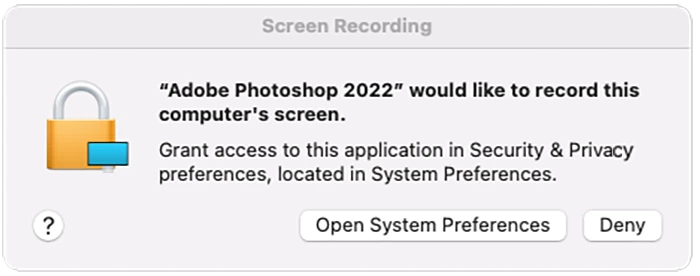
What should I do if I receive a message from macOS saying
"Photoshop would like to record this computer's screen"?
Many folks are curious why they received a pop-up message asking them to grant permission to Photoshop to record their computer's screen. Here is the explanation.
A security feature introduced by Apple in macOS Catalina (10.15) requires explicit consent before allowing apps to record screen information. Because the Photoshop Eyedropper tool collects color information from pixels at a specific screen position, macOS requires permission from the user.
Because of this security change, you might receive a message asking you to grant Photoshop permission to record the computer's screen. Permission is only required if you want to use the Photoshop Eyedropper tool to sample colors from apps other than Photoshop. If you do not grant permission, you will be limited to sampling colors from within the Photoshop app.
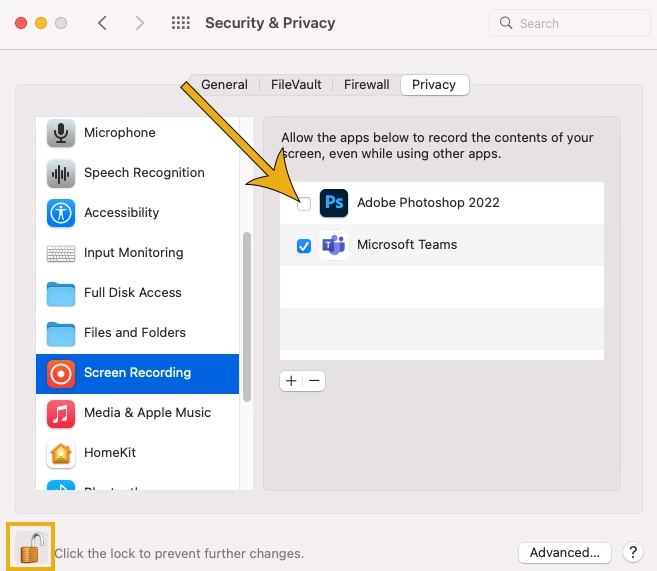
To change the setting on your Mac to give Photoshop this access, go to System Preferences > Security & Privacy > Privacy > Screen Recording and check the box by Adobe Photoshop. You may have to click on the lock icon at the bottom left side of the panel to unlock it and allow changes. You can click it again to lock it after checking the Photoshop box.
Related Link:
 AdChoices