
Answered
Why are some layer names underlined?
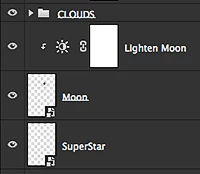
I have noticed recently that some of the layer names are underlined in my editing projects (see screen capture below). What does this mean? Using Photoshop CS6 on MacBook Pro running OS 10.9.5. Thanks.

I have noticed recently that some of the layer names are underlined in my editing projects (see screen capture below). What does this mean? Using Photoshop CS6 on MacBook Pro running OS 10.9.5. Thanks.
It indicates the layer is modified by a Clipping Mask above it.
Select the Clipping Mask and choose "release" from the Layers Panel menu and the underline goes away.
Already have an account? Login
No account yet? Create an account
Enter your E-mail address. We'll send you an e-mail with instructions to reset your password.


 AdChoices