What platform are you using? (Windows 10, 11 or Mac)
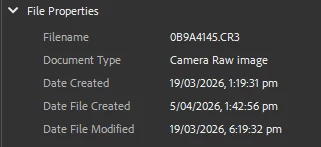
If you check the metadata in Bridge and Lightroom you definitely see the Date Created along with all dates that the file has been worked on
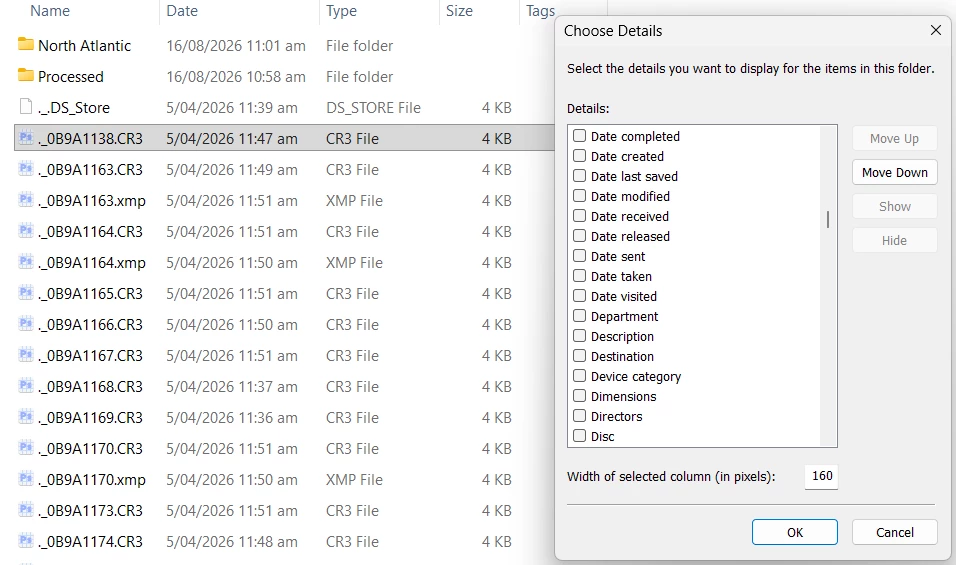
If you are using Windows File Explorer, set to Details then get a list with a huge number of options. Right click anywhere in the header to open the Choose Details panel.
If the images were taken with a smart phone, then it is surely 100% certain that the date info is correct. However, if you used a DSLR or similar, then you need to set the date and time before the first time you use the camera. Whatever date and time is set on the camera, will be reflected in File Explorer (Date Created) and Bridge/Lightroom (Date Created).
If the Date Modified info is incorrect, then that’s due to your computer. That could be a failing battery, or incorrect time zone. Actually, your phone could have a non-local time zone set if you have been travelling, and the phone is not set to Auto. I was in Australia in March, and in one location there is a half hour time zone difference. I could only make that work using Manual settings.
What platform are you using? (Windows 10, 11 or Mac)
If you check the metadata in Bridge and Lightroom you definitely see the Date Created along with all dates that the file has been worked on
If you are using Windows File Explorer, set to Details then get a list with a huge number of options. Right click anywhere in the header to open the Choose Details panel.
If the images were taken with a smart phone, then it is surely 100% certain that the date info is correct. However, if you used a DSLR or similar, then you need to set the date and time before the first time you use the camera. Whatever date and time is set on the camera, will be reflected in File Explorer (Date Created) and Bridge/Lightroom (Date Created).
If the Date Modified info is incorrect, then that’s due to your computer. That could be a failing battery, or incorrect time zone. Actually, your phone could have a non-local time zone set if you have been travelling, and the phone is not set to Auto. I was in Australia in March, and in one location there is a half hour time zone difference. I could only make that work using Manual settings.
It could be related to incorrect file metadata or a timestamp conversion issue. I’d first check the computer’s date/time settings and compare the file dates in Photoshop with the dates shown in Finder or Explorer.
Most likely, your computer lost its battery or reset its internal clock.
“January 1, 1970, at midnight UTC, is the Unix Epoch. Computers use this exact second as the starting point to track time. When a device loses its battery or resets its internal clock, it defaults back to this zero point, which appears as Jan 1, 1970.”




 AdChoices