Participant
September 24, 2023
Question

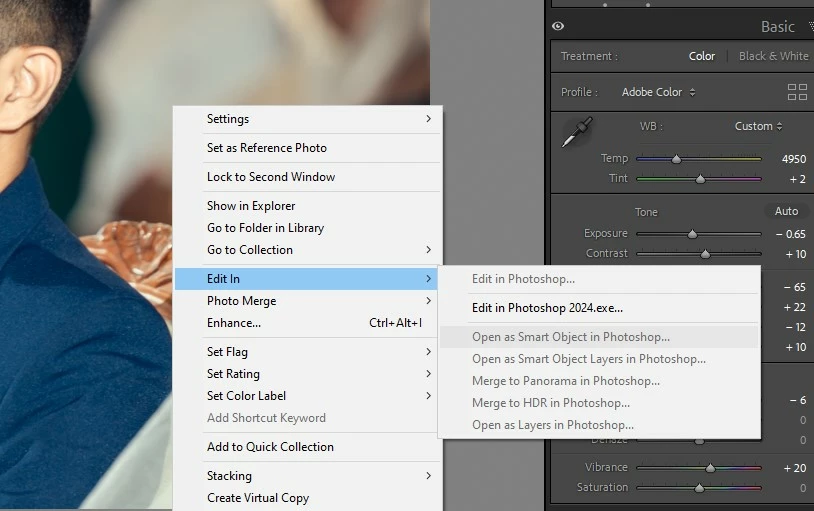
Why Can't i open the Pic as a Smart Object in PS?

  • September 24, 2023
  • 5 replies
  • 731 views

Why Can't i open the Pic as a Smart Object in PS? 

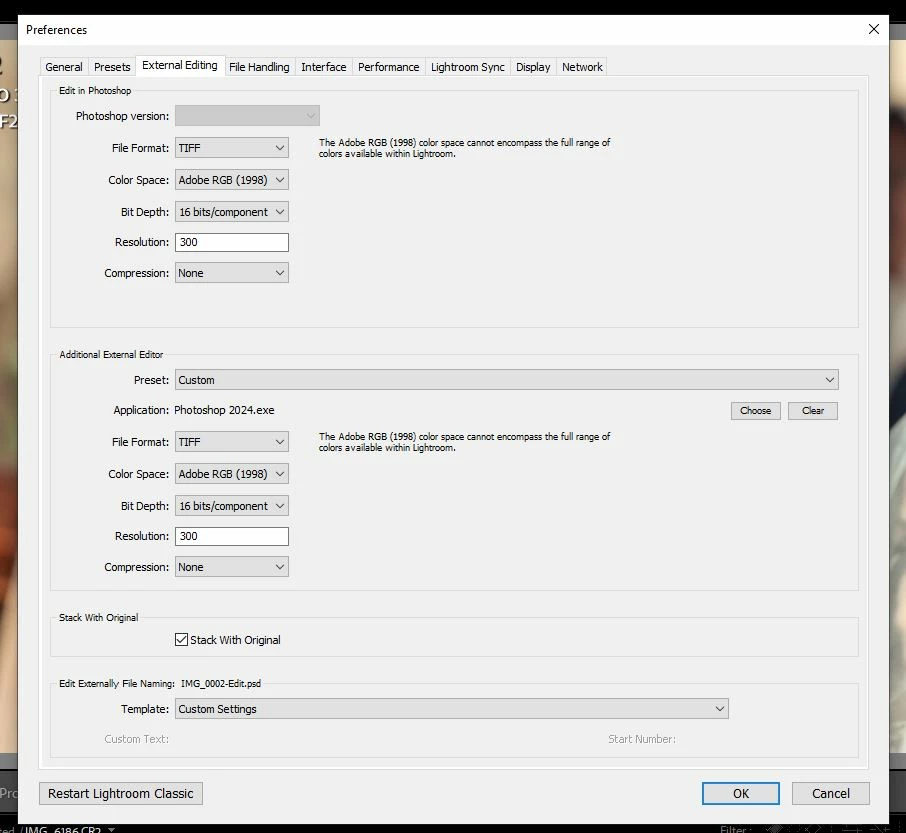
Any modifications done under Preference?
 

This topic has been closed for replies.

5 replies

mglush
Community Expert
Community Expert
September 26, 2023

How are you opening the image--with Camera Raw?

When you are in Camera Raw and finished with your image and want to open it in Photoshop, holding down the Shift key will change the Open Button to Open Object--is that not working in your version of Camera Raw?

Let us know!

Michelle

Participant
September 25, 2023

I can still open the image as a normal file.. only I can't open the image as a smart object..

D Fosse
Community Expert
Community Expert
September 25, 2023

Looking at your Preferences screenshot, there's no Photoshop version active for "Edit in". Apparently the link between Lr and PS is broken. Can you do a normal Edit In? Do you have any other problems with file associations in Photoshop? Have you had, or do you have, the beta installed?


To restore a broken Lr-PS link, the standard fix is to reinstall Photoshop first, then reinstall Lightroom second. The sequence is important.


Participant
September 25, 2023

It's a Raw file shot with canon dslr.

CR2

mglush
Community Expert
Community Expert
September 25, 2023

Hi!

What type of file are you opening--a Jpg or some other type of Camera file? 


Here is a step that you can follow to open a file as a Smart Object:

How to use Smart Objects in Photoshop

If you're interested in using Smart Objects in Photoshop, here are some steps you can take:

1. Open a file as a Smart Object

In Photoshop, go to "Choose File." Choose the option that says "Open As Smart Object." This allows you to browse your files. Once you find the one you want, select the file and click "Open."

Here is the link to the help page where you can find more information about Smart Oblects: https://helpx.adobe.com/photoshop/using/create-smart-objects.html

Let us know if that answers your question, or if you still need help?

Thanks,

Michelle