
Participant
May 17, 2024 6:31 PM UTC
Question

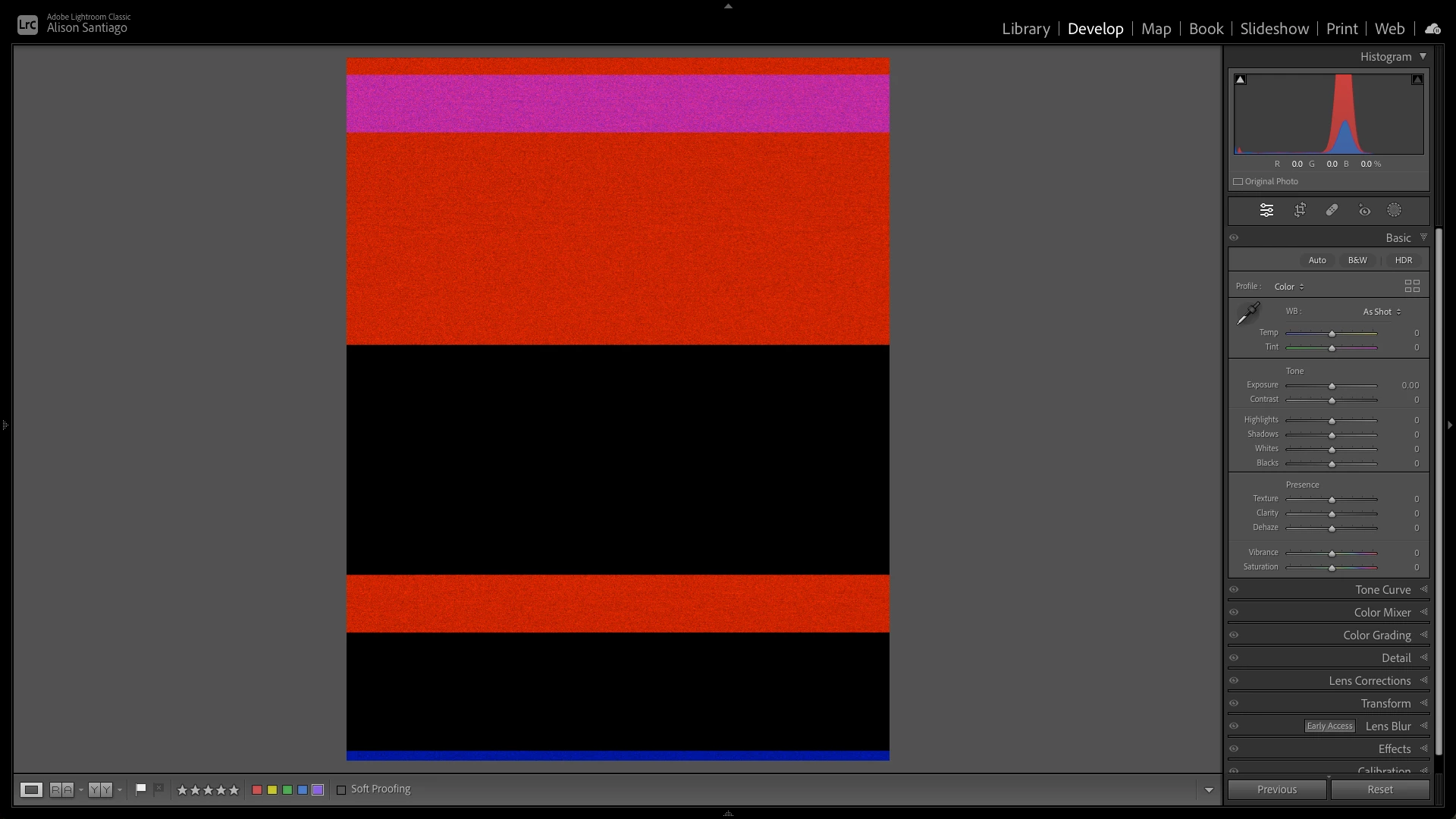
Why do my images get corrupted when saving from PS to LRC?

I send images from LRC to PS to edit and after completing my edits I save the file so it can be 'returned' to LRC for final adjustments and management. Recently my images returning from Photoshop are corrupted and I have reset my PS settings. I'm using a Macbook Pro M3 (OS Sonoma 14.4.1) and the latest LRC, PS, and ACR. Has anybody exprienced this and has a solution?
4 replies

Stephen Marsh
Community Expert
Community Expert
May 18, 2024 3:08 AM UTC

Is this every image or just some?


Do you have an external drive that you can test with, if you are using the main drive in the laptop?


Not a direct answer, but you could try a 2-step approach... With the image from Lr opened, do your regular SAVE so that it automatically updates back in Lr. While the edited image is still open in Photoshop, do a SAVE AS/SAVE A COPY and save a backup file that isn't in the Lr catalogue to preserve the edits from Photoshop, just in case the first step corrupts. This can be automated if it becomes a bother.


Good luck!

Translate
Participant
Sep 13, 2024 8:38 PM UTC

Ive been having this problem repeatedly saving PS files to an external drive thye keep corrupting. Did you work out what the problem was? Was it a cable? 

Translate
D Fosse
Community Expert
Community Expert
May 17, 2024 7:58 PM UTC

Yes, that looks like file corruption and not a GPU failure - the histogram here doesn't look very promising either.


File corruption is always caused by failing hardware. You need to isolate and replace the failing component. Try to make a note of exactly when/where in the chain it happens.


If you save directly to an external drive, that's a prime suspect. Maybe not the drive itself, but worn/loose cables and connectors. External drives get kicked around a lot. Start by replacing all cables.


To be clear, Photoshop doesn't save "to Lightroom". It just saves to disk. So if it's corrupt when saved from Photoshop, that points to a disk failure.

Translate
dubuj
Participant
Jan 18, 2025 2:36 PM UTC

I was having the same problem for several months but couldn't find an answer until now.  I have always saved my files to a NAS so I don't have an external HD that I kick around, however, I decided to A) optimize the NAS and B) reboot it which fixed my problems.  Additionally, after the reboot as a test, I save a .PSD to my local HD and then to the NSA.  I then opened the NAS file in LR and was able to work on it.  I don't think saving it to the HD is required in the future, I just wanted to see where corruption might occur. 


Translate