
Puzzled!!
Participant
March 28, 2026
Question

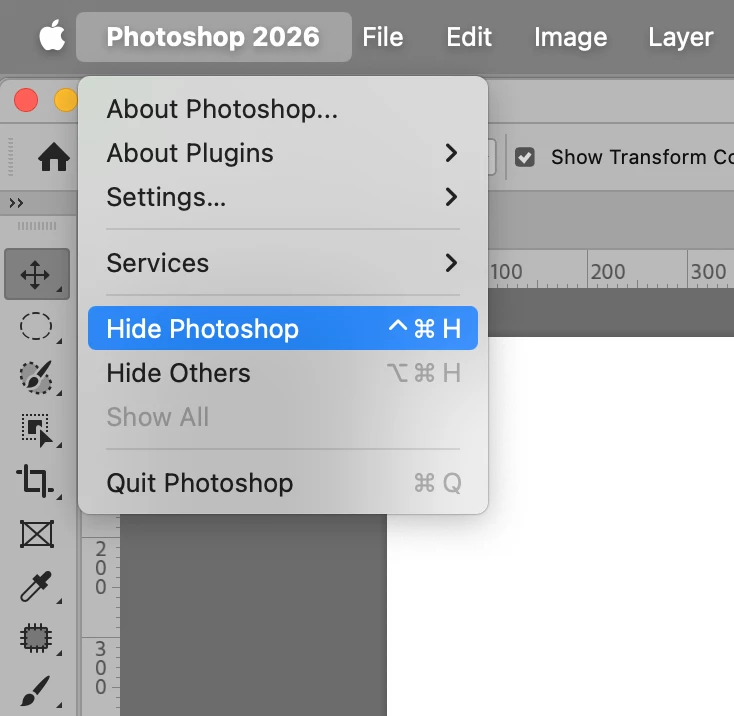
Why does Command H does not hide Photoshop anymore?

  • March 28, 2026
  • 3 replies
  • 40 views

Using Photoshop 27.4.0, Mac Tahoe 26.4, using my computer when working in Photoshop.  I used to be able to use Command H to hide the application as I worked between LR and Ps.  That shortcut continues to work on my older computer, on my new laptop, but for some reason no longer works on my Mac Mini.  The only way I can minimize it is to click on the yellow circle in top left corner.  I’ve gone into Keyboard Shortcuts, to View > Extras which shows the Command symbol+H.  How do I get the shortcut back the way I want it to work? Thanks in advance.
    3 replies

    Legend
    March 31, 2026

    The first time you use that command, Photoshop asks you whether it should be Help or Hide Extras. Which did you choose?

    Legend
    March 28, 2026

    Excuse Mr. Buttinski, Trevor.

    It looks like command-H may have been changed to control-command-H
    Edit>keyboard shortcuts and menus, search for


    Larry
    mglush
    Community Expert
    Community Expert
    March 31, 2026

    It also may have been overtaken by the Apple OS? Did you possibly change something in the OS on your Mac mini?

    Michelle

    Trevor.Dennis
    Community Expert
    Community Expert
    March 28, 2026

    Cmd H hides extras, (guides, selections etc.). Tab toggles toolbar and panels on and off.  I don’t use LR so can’t say if it is related to using both apps.


    So can you be more specific?