


Participating Frequently
December 26, 2025
Answered

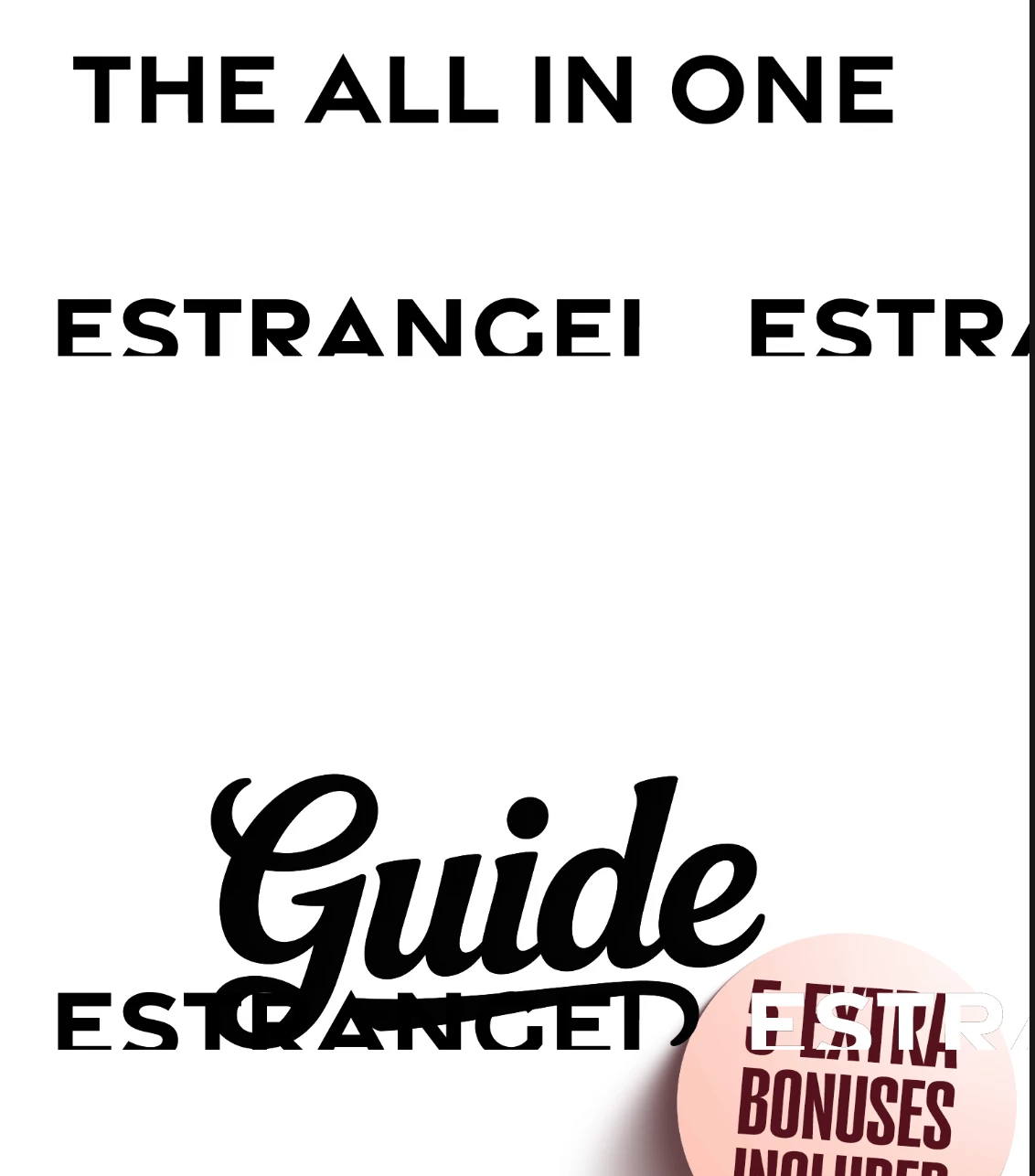
Why does the Font/Text gets all messed up!!??
  • December 26, 2025
  • 2 replies
  • 332 views

Safeer_Ahmed_1-1766772133316.png


Hi everyone,
Is anyone else experiencing this issue with Photoshop? It keeps corrupting/glitch or changing the fonts whenever I switch to a different one. Even after quitting Photoshop and reopening the file, the problem persists and happens repeatedly.

It’s extremely frustrating—especially when I’m trying to get work done. I use Photoshop on both Mac and PC, and this issue occurs on both systems.

Has anyone found a solution or workaround for this?


Correct answer Safeer_Ahmed

Hi Anshul,

Thank you for your cooperation.

The font is from Adobe Fonts, and I believe the issue may have been related to Adobe Creative Cloud having trouble loading the font. I would have shared a video, but after restarting my Mac, the issue appears to be resolved for now.


My Photoshop version is 27.2.0 (latest).

I’ll be sure to share a video if the issue occurs again.

2 replies

Anshul_Saini
Community Manager
Community Manager
December 26, 2025

Hi @Safeer_Ahmed,


Thanks for clarifying. From what you’re describing and showing, this looks like a text rendering/layout glitch at first glance, not an issue with a specific font file or missing glyphs. Since it’s happening on both macOS and Windows, that narrows it down further.


To help us isolate this properly, could you please share a bit more detail:


• Photoshop version on both Mac and PC (Help > About Photoshop)

• Whether this happens with all fonts or only certain ones

• Does it occur in new documents as well, or only in an existing file

• A short screen recording showing the behavior while switching fonts


A couple of quick things you can also try in the meantime:


• Check if turning off Preferences > Type > Enable Missing Glyph Protection makes any difference

Reset Photoshop preferences once (after backing them up)

• Temporarily disable Technology Previews and restart Photoshop

• If you’re using GPU acceleration, toggle it off and test once


I’ll wait for the additional details and a screen recording so we can reproduce this internally and take it further if needed.


Best regards,

Anshul Saini

Safeer_AhmedAuthorCorrect answer
Participating Frequently
December 27, 2025

Hi Anshul,

Thank you for your cooperation.

The font is from Adobe Fonts, and I believe the issue may have been related to Adobe Creative Cloud having trouble loading the font. I would have shared a video, but after restarting my Mac, the issue appears to be resolved for now.


My Photoshop version is 27.2.0 (latest).

I’ll be sure to share a video if the issue occurs again.

creative explorer
Community Expert
Community Expert
December 26, 2025

@Safeer_Ahmed is the text box expanded to show all? What font are you using? I tried looking for 'Estrangei' in Adobe and Google Fonts, so I don't see it...a little more information so we can test too

m
Participating Frequently
December 26, 2025

No no, It was a random word I was typing. Can you see the cut off, and being repeated, like a glitch or something, That is the problem I am facing. its not working normally.