
f30055449
Known Participant
February 24, 2017
Answered

Why does the layer row become red when I enter Quick Mask?

  • February 24, 2017
  • 5 replies
  • 23576 views

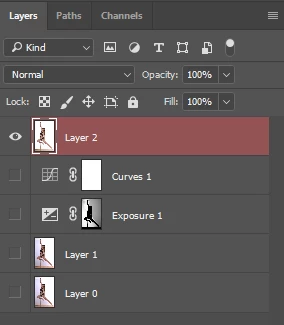
When I press "Q" to enter Quick Mask mode, the layer I am on shows red in the layer panel (see screenshot, Layer 2 row is red)

What does the red color mean in the layer panel ? How can I find out what is wrong ?
This topic has been closed for replies.
Correct answer davescm

It indicates that you have that layer selected and are using quick mask mode. Nothing is wrong

Dave

5 replies

f30055449
f30055449Author
Known Participant
February 27, 2017

Thanks a lot for this link Joseph, addresses a lot of issues I'm having, like how to copy a mask from one layer to another (without loading it to a selection and then saving the selection as a mask, which was the only way I could figure out so far).

f30055449
f30055449Author
Known Participant
February 26, 2017

OK, thanks for your help, I'll try that.

josephlavine
Community Expert
Community Expert
February 26, 2017

Here is a link to a handful of Juliieanne Kost Blog posts on Quick Masks.  I think you'll find the information useful.

Quick Mask « Julieanne Kost's Blog

f30055449
f30055449Author
Known Participant
February 26, 2017

Something's got to be wrong, because although I am expecting to be in quick mask mode (I just pressed Q, and the history also says "entered quick mask") the cursor on the image is not a brush, but the cursor of the move tool.

And I am not able to mask.

If I press Q again, history says that I am leaving quick mask, and I still have the cursor of the move tool.

Basically typing Q turns this layer red in the layer panel and creates a new line in the history, but other than that has no effect.

Any idea ?

Note: I had tried to create a mask based on color range earlier, and this mask got saved as a new Channel. The channel mask has the little eye on to indicate visibility, while the RGB eyes are not on.

davescm
Community Expert
Community Expert
February 26, 2017

Hi - again -nothing is wrong.

Press Q to enter quick mask mode then B to change to the brush tool

Dave

josephlavine
Community Expert
Community Expert
February 26, 2017

As Dave mentioned above, there is nothing wrong here; it simply indicates you've entered the Quick Mask mode.  You can alter the color by clicking on Select and Mask... after making a e selection and choose a different color, which will both alter the color of the actual mask and overlay color in the layers palette. 

davescm
Community Expert
davescmCommunity ExpertCorrect answer
Community Expert
February 26, 2017

It indicates that you have that layer selected and are using quick mask mode. Nothing is wrong

Dave