Known Participant
February 14, 2022
Answered

why is free transform alway a percentage??

  • February 14, 2022
  • 4 replies
  • 1660 views

Hi all,


this has been bothering me... like FOREVER.


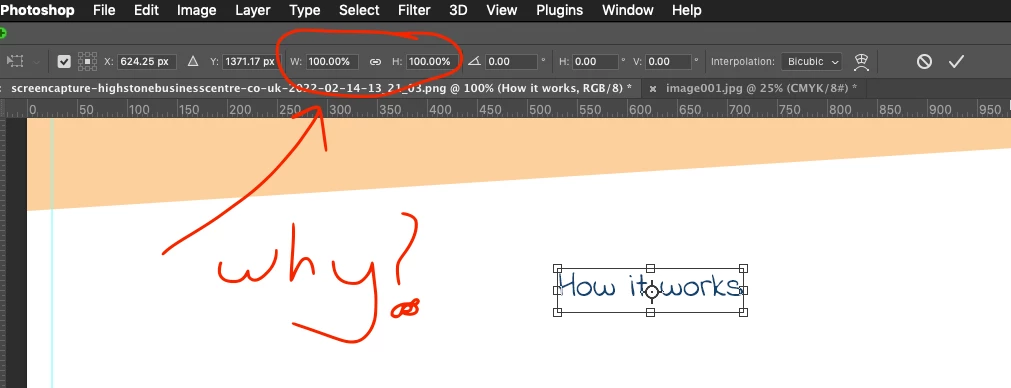
why is free transform alway a percentage?? i never EVER use percentage, i use pixels.


so why, when say, Im drawing a shape, as i draw it, im shown the dimension against my the mouse pointer in pixels as i do it, then i finish and tap "cmd + t"


and there it is... damn percentages!? WHY??? i find it counter intuitive, to move from pixels to percentage.


it there a way to change this?? i feel like it has been doing this since CS4. 
 

This topic has been closed for replies.
Correct answer gener7

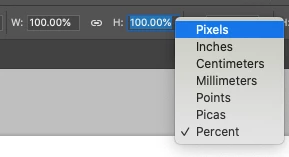
There's also a pop-up menu if you Ctrl (MacOs) or right-click (Windows) in the field:

I'll admit it would be nice if it were a sticky.

4 replies

gener7
Community Expert
Community Expert
February 14, 2022

This was asked in Photoshop Feedback three years ago. One answer:

 
"I believe that this intentional because it makes recorded actions more useful when they work with a percentage instead of fixed size. Same for repeat last transformation command."
 
Gandhi4Author
Known Participant
February 14, 2022

thank you for this answer.


still would be useful for it not to do that, of have an option to change to what i want.


as it stand i have to either write down the dimension after creating an object OR refer to the info panel the get the dimension, then i have to free-tranform and change it from % to px. it just sooo time consuming


i can't honest believe there is no option for this.... like i said it been annoying me since CS4... so like 20 years

Community Expert
February 14, 2022

Same here. Since CS4. I hate it. It always reverts back to percentage.

marliton
Community Expert
Community Expert
February 14, 2022

Hi. You can write pixels values like 1280px or 1280in in those fields.


Marlon Ceballos
Gandhi4Author
Known Participant
February 14, 2022

Hi dude i know that.


why can't it just been in pixel to start with? else i'm guess what size it was?

Semaphoric
Community Expert
Community Expert
February 14, 2022

I have to agree with you on this. Mostly, I find percentages to be a relic of photo-mechanical reproduction and proportion wheels. I've never understood why there is no full keyboard control for the Option bar, especially for Free Transform.


It's an even bigger pain in Export As, since that doesn't link the Width and Height fields. I do a rough estimate of my percentage in my head, enter that, and then finesse it Why?

lambiloon
Community Expert
Community Expert
February 14, 2022

Hi yes you can control it first unlock the propostion lock the width and height can be changed the indiviual...regards

Ali Sajjad / Graphic Design Trainer / Freelancer / Adobe Certified Professional
Gandhi4Author
Known Participant
February 14, 2022

not what i mean.


when i select free transform i want it to already be in pixels not percentage.


if i draw a box that is 340px by 450px then i free tranform why am i seeing percentages!? rather than pixels... i find this extremely annoying.


i just dont want percentages, at all, ever. for it just makes no sense.