



asterisk99
Participant
May 31, 2026
Answered

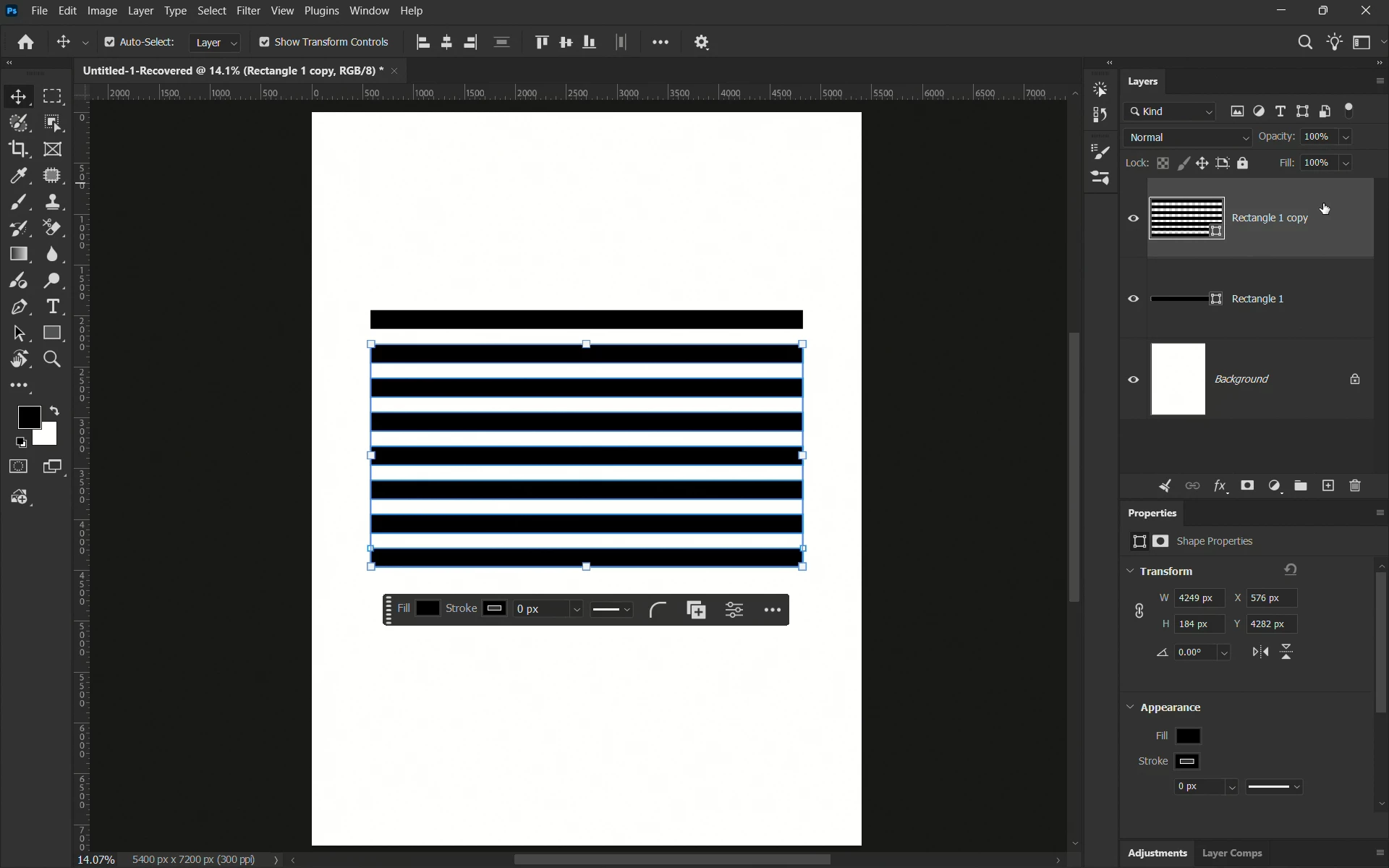
Why is Photoshop adding all the copies to the same shape layer when using Transform Again?
  • May 31, 2026
  • 4 replies
  • 59 views

I'm trying to create evenly spaced copies of a rectangle using Transform Again but instead of creating separate layers, PS keeps adding the copies to the same shape layer.

Is this expected behavior in newer Photoshop versions, or am I missing a setting somewhere?

Because I learned this from Piximperfect's Tip & Tricks video and in his tutorial, PS create multiple separate layers. Here's the video. 

    Correct answer Jeff Arola

    Here’s what I did to get Cmd Option Shift T to create new shape layers:


    1. After creating the initial rectangle, switch to the Hand tool
    2. Cmd J to copy the rectangle to a new layer
    3. Cmd T to and move your copied rectangle layer
    4. Press Cmd Option Shift T multiple times until you get the required amount of copied rectangles.

    I’m pretty sure in the past that Cmd Option Shift T worked with other tools selected like the Brush tool as shown in the video, however, for whatever reason it only seemed to work on a consistent basis with the Hand tool selected.


    I did do a reset of the Photoshop preferences, but that didn’t make any difference.


    Also with regular layers, rasterized layers and smart object layers there was no issue getting Cmd Option Shift J to create new layers.

    4 replies

    Jeff Arola
    Community Expert
    Jeff ArolaCommunity ExpertCorrect answer
    Community Expert
    May 31, 2026

    Here’s what I did to get Cmd Option Shift T to create new shape layers:


    1. After creating the initial rectangle, switch to the Hand tool
    2. Cmd J to copy the rectangle to a new layer
    3. Cmd T to and move your copied rectangle layer
    4. Press Cmd Option Shift T multiple times until you get the required amount of copied rectangles.

    I’m pretty sure in the past that Cmd Option Shift T worked with other tools selected like the Brush tool as shown in the video, however, for whatever reason it only seemed to work on a consistent basis with the Hand tool selected.


    I did do a reset of the Photoshop preferences, but that didn’t make any difference.


    Also with regular layers, rasterized layers and smart object layers there was no issue getting Cmd Option Shift J to create new layers.

    asterisk99
    Participant
    May 31, 2026

    THAAANKK YOUUU SO MUCH MAN, IT WORKED!!!!!

    Yes, it does not seem to have any issues with Smart Objects and regular layers but for Shape Layers it wasn’t working. I’m glad it’s working now, thank you once again.

    Stephen Marsh
    Community Expert
    Community Expert
    May 31, 2026

    You can take a look at my Layer Step & Repeat script which can create an array, columns or rows (look for the 1.5 version code towards the foot of the page, the new forum software might have "helpfully” collapsed/hidden the reply to save scrolling):


    asterisk99
    Participant
    May 31, 2026

    I’m a beginner so I don’t know much about how to use these scripts and all. Thanks! though, I’ll see what I can do.

    c.pfaffenbichler
    Community Expert
    Community Expert
    May 31, 2026

    Other options for regularly spaced objects would be 

    • the Offset Filter

    • making copies, moving one to the extreme »other« position and distributing vertically


    It might be worth considering involving Illustrator via an embedded or linked Smart Object, because Illustrator has useful features for creating multiples of path elements. 


    c.pfaffenbichler
    Community Expert
    Community Expert
    May 31, 2026

    How did you transform/which Tool was selected at the time? 

    Please try performing the first transformation with the Move Tool selected, that way it seems to work as expected her. 


    asterisk99
    Participant
    May 31, 2026

    I tried with the Move Tool selected but it’s still not working :(

    c.pfaffenbichler
    Community Expert
    Community Expert
    May 31, 2026

    Can you provide a screen recording or screenshots to illustrate? 


    Do you ultimately need vector output? 

    If not then converting the Shape Layer to a Smart Object before transforming would provide a work-around.