


Bowmanitis
Participant
October 6, 2026
Question

Why would Adobe ever be associated, let alone integrate technology into its backend knowing full well the clear ethical threats OpenAI represents?
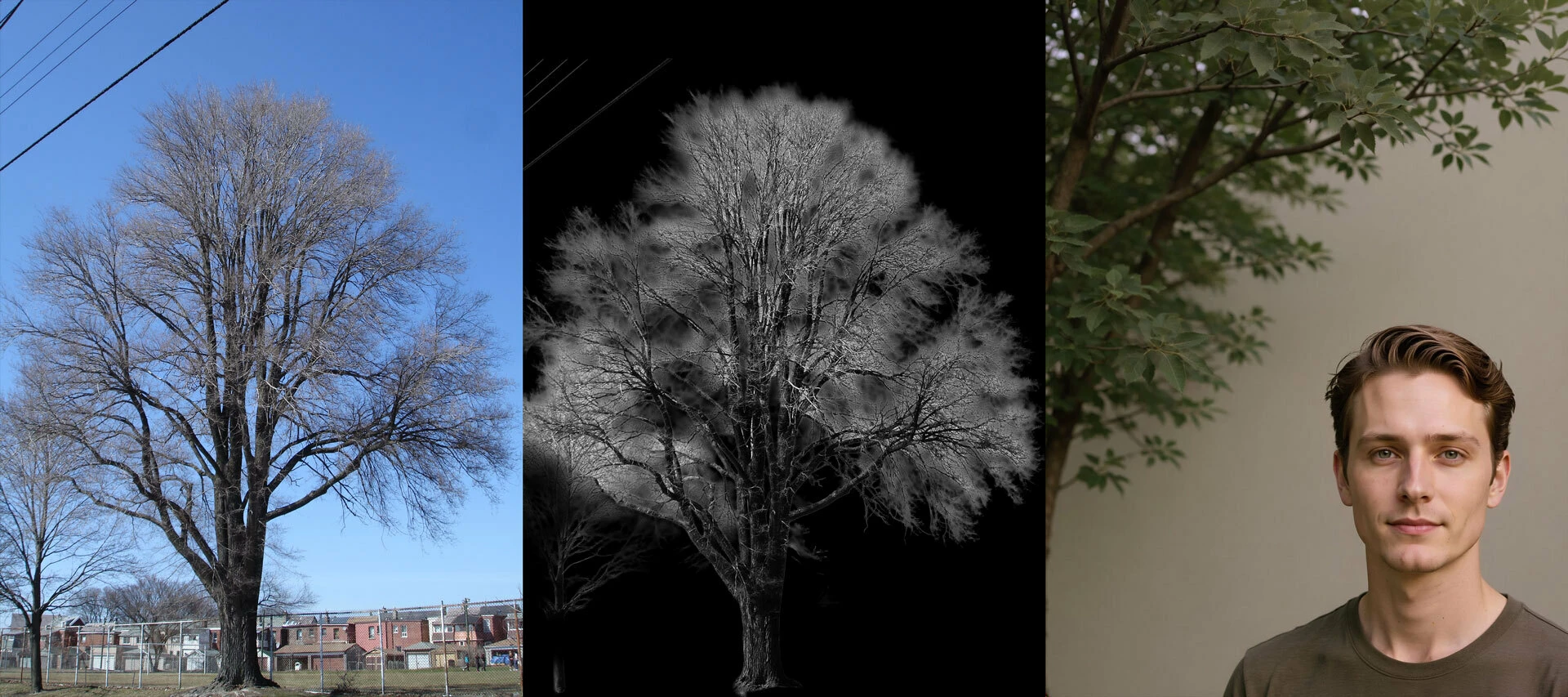
  • October 6, 2026
  • 2 replies
  • 22 views

Remove background. Result. Generate again. 

Follow up Question: How do you turn this off?

    2 replies

    johng44721896
    Community Expert
    Community Expert
    October 7, 2026

    I’m not sure what you mean by “this” when you write “turn this off?”
    I’m fairly sure you aren’t meaning something as simple as not using Remove Background if it isn’t giving the desired result. We can’t turn off the feature that is offered, but we aren’t obligated to use it.

    There are many methods for creating selections. Some methods work better depending upon characteristics that are image specific. 

    And some things, like this tree with tiny branches against a sky, would definitely need refinement of the selection or the channel or mask created by the selection.

    johng44721896
    Community Expert
    Community Expert
    October 7, 2026

    That tree is especially difficult. In the screen shot that is attached, I began with Remove Background from the contextual task bar. Then the channels were examined as there was a lot of blue still evident after the background removal.

    The blue channel brightened the sky the most so it was duplicated. Then a direct Levels adjustment was used on it.

    That channel was used as the basis for a layer mask, the mask was inverted, and the brush tool used in Overlay blend mode at reduced opacity to paint white into the mask, helping to refine it.

    This mask might now be used to isolate the tree itself.

    Of course a higher res version of the image brought to this thread would garner better results than what I was able to get.