December 19, 2025
Answered

Windowsで保存しようとするとフリーズして保存が出来ない

  • December 19, 2025
  • 1 reply
  • 55 views

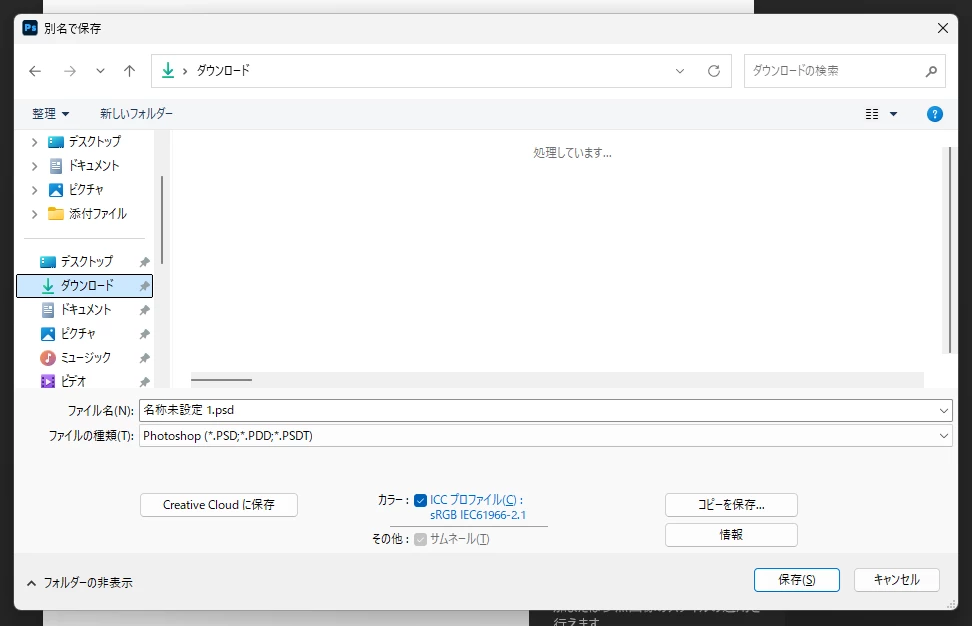
phoshopで[保存]or[別名で保存]or[コピーを保存] ⇒ クラウドに保存するウインドウ ⇒ コンピューターに保存を選択 ⇒ コンピューターの保存先を指定する

の動作をしたときに、最後の保存用のウインドウがでた段階で、フリーズします。
「処理しています」という文字が出たままです。(添付画像)


ウインドウが出た段階で数秒動くこともありますが、すぐにフリーズします
新規作成したもの、今までに作成したファイル、ファイルサイズに関わらずおきます。
ペイントなど他のソフトでは起きません。


解決方法はありますか?


photoshop27.20使用(前のバージョンでも起こり、アップデートしても変わらず)
キャッシュクリア済

windows11  HOME 64ビット
バージョン 25H2
RAM 32GB
キャッシュクリア済


photoshop 保存不調.png

Correct answer AxelMatt

Do you get an error message?


In the first step try to reset the preferences of Photoshop using the steps described here:

https://helpx.adobe.com/photoshop/using/preferences.html#reset-preferences

It's recommended to backup your settings before resetting the preferences.

See here:  https://helpx.adobe.com/photoshop/using/preferences.html#backup-photoshop-preferences

So you can, if the reset doesn't solve the issue, go back to the saved settings. Quit Photoshop and put the Settings folder back.


If this doesn't help check if you have the appropriate write access rights to the appropriate folder to which you try to save the file.


If this all doesn't help, we need more informations about your system. Maybe you can post your Photoshop system info. In Photoshop goto Help > System Info and hit the copy button. Then paste the entire informations into this thread.


1 reply

AxelMattCommunity ExpertCorrect answer
Community Expert
December 19, 2025

Do you get an error message?


In the first step try to reset the preferences of Photoshop using the steps described here:

https://helpx.adobe.com/photoshop/using/preferences.html#reset-preferences

It's recommended to backup your settings before resetting the preferences.

See here:  https://helpx.adobe.com/photoshop/using/preferences.html#backup-photoshop-preferences

So you can, if the reset doesn't solve the issue, go back to the saved settings. Quit Photoshop and put the Settings folder back.


If this doesn't help check if you have the appropriate write access rights to the appropriate folder to which you try to save the file.


If this all doesn't help, we need more informations about your system. Maybe you can post your Photoshop system info. In Photoshop goto Help > System Info and hit the copy button. Then paste the entire informations into this thread.


My System: Intel i7-8700K - 64GB RAM - NVidia Geforce RTX 3060 - Windows 11 Pro 25H2 -- LR-Classic 15 - Photoshop 27 - Nik Collection 9 - PureRAW 6 - Topaz Photo AI