


Inspiring
October 20, 2022
Question

Windows Photoshop 2023 V24 just randomly closes!

  • October 20, 2022
  • 16 replies
  • 17082 views

Photoshop 2023 V24 = Garbage! Windows Photoshop 2023 V24 just randomly closes! We're back to random crashes again! 

C'mon Adobe GET YOUR ACT TOGETHER!
Rolling back to 23.5.2, I have work to get done!

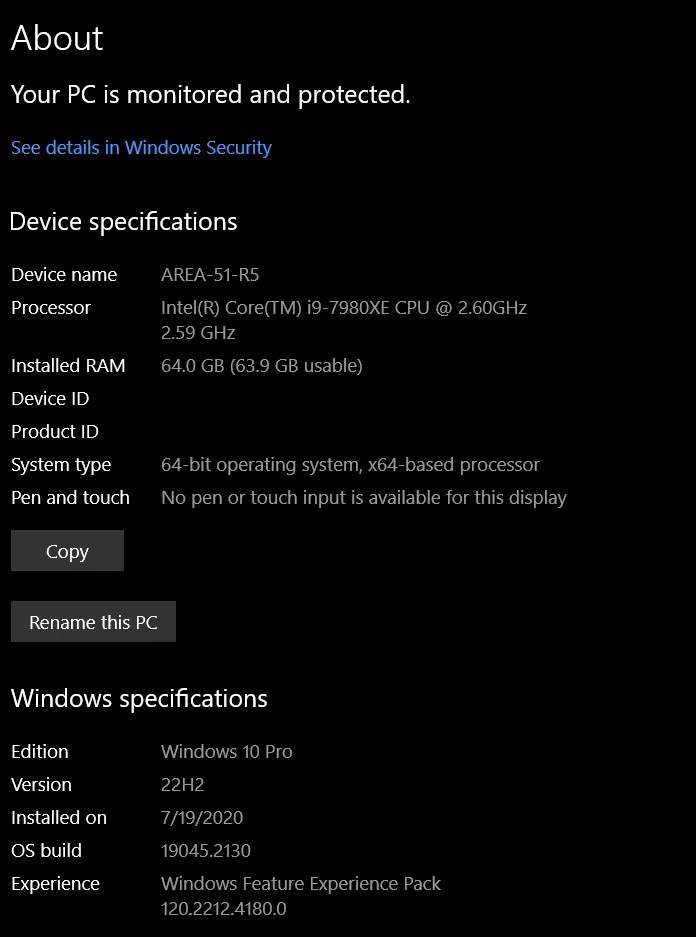
Windows 10 Pro 22H2
This topic has been closed for replies.

16 replies

PECourtejoie
Community Expert
Community Expert
October 28, 2022

Hi, remember that Photoshop runs on top of your operating system, your hardware, and their drivers. All of them need to work correctly together, be powerful enough, etc.

Ps 24 has newer options, on windows preferences that deal about stability and GPU mode: https://helpx.adobe.com/uk/photoshop/using/whats-new/2023.html#other-enhancements


If you tried the more stable and older GPU mode, you can also try  to check "Deactivate Native Canvas" in the menu Edit/Preferences/Technology preview, then restart Photoshop.

If you can, please post the contents of Photoshop's Help>System Info... menu, so that we get to know your OS, its version, the exact version of Photoshop you are running, the date of the GPU driver, etc.


I hope this helps!

ViscottAuthor
Inspiring
October 28, 2022

Just reinstalled PS24 for kicks and giggles and it still crashes! I got a crash dialog box this time. But the second time no dialog box PS 24 just closes.

Also after installing PS 24 the file assoications for PS 24 don't work and you have to manually assign it in Win Expolrer to always open with PS.

This is also with a brand new NVIDIA GeForce RTX 3090 Ti.

Going back to 23.5.2 which works perfectly. So YES something is WRONG with 24.


<system platform="Windows 10 Pro" osversion="10.0" osbuild="19045" applicationlanguage="en-us" userlanguage="en-US" oslanguage="en-US" ram="65410" machine="Intel(R) Core(TM) i9-7980XE CPU @ 2.60GHz" model="Intel64 Family 6 Model 85 Stepping 4" cpuCount="36" cpuType="8664" cpuFreq="2592 MHz" processorArchitecture="9"/>
<gpu>
<gpuinfo availability="Running/Full Power" adapterCompatibility="NVIDIA" adapterRAM="4095 MB" caption="NVIDIA GeForce RTX 3090 Ti" description="NVIDIA GeForce RTX 3090 Ti" driverDate="20221012000000.000000-000" driverVersion="31.0.15.2230" videoModeDescription="3840 x 2160 x 4294967296 colors" pnpDeviceID="PCI&#92;VEN_10DE&#38;DEV_2203&#38;SUBSYS_161810DE&#38;REV_A1&#92;4&#38;D17DF1F&#38;0&#38;0000" installedDisplayDrivers="nvldumdx.dll"/>
</gpu>

Participating Frequently
October 31, 2022

They always blame it on our Graphics card or our PC as to an Adobe issue

Participating Frequently
October 28, 2022

I have the same problem in a space of a full shift 8 hours it must do it 4 times


D Fosse
Community Expert
Community Expert
October 28, 2022

Disable the GPU in PS preferences and see if the crashing stops. If so, it can probably be narrowed down further.

Participating Frequently
October 31, 2022

Also once closed down I can't re open it again for ages 

D Fosse
Community Expert
Community Expert
October 20, 2022

What GPU do you have? Most often this is the GPU driver crashing.


FWIW, v24 has been rock solid for me this far, and I use it 8 hours a day (and then some more when I come home from work).

ViscottAuthor
Inspiring
October 21, 2022

I'll amuse you.

Nvida GTX 1080 Ti
Studio Driver 522.30 - 2022.10.18
I have a NVIDIA GeForce RTX 3090 Ti coming next week. 

But either way that's not the issue. PS Version 23.5.2 works fine on my Alienware Area 51 R5 FW 2.0.7 with an i9 Extreme Processor and 64 GB RAM.

This is a very powerful, and current system.

daveh51704562
Participant
December 12, 2022

I am on a very similar Alienware, i9, 128 Gb, it's a beast and it has literally never blue screened or crashed, and I am getting the precise same behavior you are seeing with 24, 23 was rock solid.

And just FYI, I am also running 3DS Max, Maya, Blender, ZBrush, Blender, and Mari and none of them are behaving like this.  The issue seems to be totally isolated to Photoshop.

ViscottAuthor
Inspiring
October 20, 2022

That's becassue Photoshop 24 just crashes and does not even present the crash reporting dialog box.
Sorry, I am not a beta tester. I have to get back to work with 23.5.2.

Participating Frequently
October 31, 2022

Can second this doesn't provide a crash report 

Legend
October 20, 2022

I'm not seeing any submitted crash reports from you in our system. If you haven't done so already, please submit all Crash Reports along with your email address: https://helpx.adobe.com/photoshop/kb/submit-crash-reports.html That will help us diagnose the crash.

daveh51704562
Participant
December 12, 2022

I can second and third that, there is no crash report, no warning, it just closes, pow.  And nothing.  For me it is happening 10-15 times a day, literally.  It just happened a few seconds ago yet again.  This behavior started right after the fix that got the object find tool to run efficiently.  I'm on 24.01 the very latest updates.  This is a REAL problem.  And I don't know how to debug or what to send since there is no report or log of anything.  I'll be happy to help but need some guidance.

ViscottAuthor
Inspiring
October 20, 2022

I knoew something was up when the file associations as well had to be manually reapplied.

Adobe, seriously you have billions of doallars how do these products get puit out into the wild so buggy?!