


Wirting an ExtendScript to change a brush’s Flow without losing current other brush settings?
Hi everyone, I have recently put together these two scripts in ExtendScript (with basically all of it done by ChatGPT and Copilot) to increase and decrease Flow values for the currently selected brush.
try {
    var ref = new ActionReference();
    ref.putProperty(charIDToTypeID("Prpr"), stringIDToTypeID("tool"));
    ref.putEnumerated(charIDToTypeID("capp"), charIDToTypeID("Ordn"), charIDToTypeID("Trgt"));
    var desc = executeActionGet(ref);
    var options = desc.getObjectValue(stringIDToTypeID("currentToolOptions"));
    var currentFlow = options.getUnitDoubleValue(stringIDToTypeID("flow"));
    var newFlow = Math.min(100, currentFlow + 5);

    var toolDesc = new ActionDescriptor();
    var toolRef = new ActionReference();
    toolRef.putClass(stringIDToTypeID("paintbrushTool"));
    toolDesc.putReference(charIDToTypeID("null"), toolRef);

    var optionsDesc = new ActionDescriptor();
    optionsDesc.putUnitDouble(stringIDToTypeID("flow"), charIDToTypeID("#Prc"), newFlow);
    toolDesc.putObject(charIDToTypeID("T   "), stringIDToTypeID("paintbrushTool"), optionsDesc);

    executeAction(charIDToTypeID("setd"), toolDesc, DialogModes.NO);
} catch (e) {
    alert("Error: " + e.message);
}
increaseflow.jsx
and
try {
    var ref = new ActionReference();
    ref.putProperty(charIDToTypeID("Prpr"), stringIDToTypeID("tool"));
    ref.putEnumerated(charIDToTypeID("capp"), charIDToTypeID("Ordn"), charIDToTypeID("Trgt"));
    var desc = executeActionGet(ref);
    var options = desc.getObjectValue(stringIDToTypeID("currentToolOptions"));
    var currentFlow = options.getUnitDoubleValue(stringIDToTypeID("flow"));
    var newFlow = Math.max(0, currentFlow - 5);

    var toolDesc = new ActionDescriptor();
    var toolRef = new ActionReference();
    toolRef.putClass(stringIDToTypeID("paintbrushTool"));
    toolDesc.putReference(charIDToTypeID("null"), toolRef);

    var optionsDesc = new ActionDescriptor();
    optionsDesc.putUnitDouble(stringIDToTypeID("flow"), charIDToTypeID("#Prc"), newFlow);
    toolDesc.putObject(charIDToTypeID("T   "), stringIDToTypeID("paintbrushTool"), optionsDesc);

    executeAction(charIDToTypeID("setd"), toolDesc, DialogModes.NO);
} catch (e) {
    alert("Error: " + e.message);
}
decreaseflow.jsx
The issue is that when I use these scripts, I lose some of my current brush’s settings. Not only that, but some of my settings change.
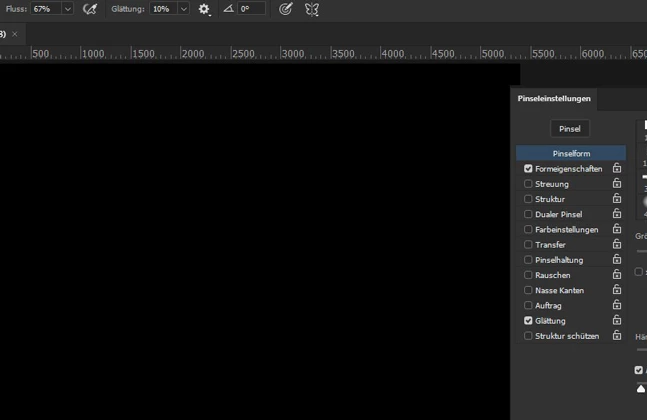
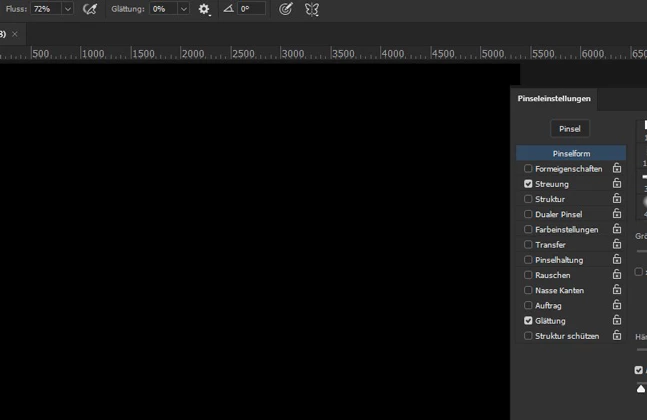
My Shape Dynamics are being switched off, Scattering gets turned on, Smoothing gets turned on as well, if it wasn’t turned on to begin with.
My understanding is that my scripts actually do not change the values of Flow per se, but instead they create a new brush or a new brush setting with my new Flow values.
My goal is to create a script for incrementally changing a brush’s Flow values so that I can execute this script using my tablet’s input keys, like a hotkey for Flow changes, because mouse input is a chore, and so is putting in values numerically. But using a radial dial on a tablet?
That would be cool. This is as far as I’ve got. Any ideas for how to preserve all the other brush settings?

 AdChoices