
Mr. Content
Known Participant
November 5, 2025
Answered

You are NOT a Tool anymore :-(

  • November 5, 2025
  • 2 replies
  • 133 views

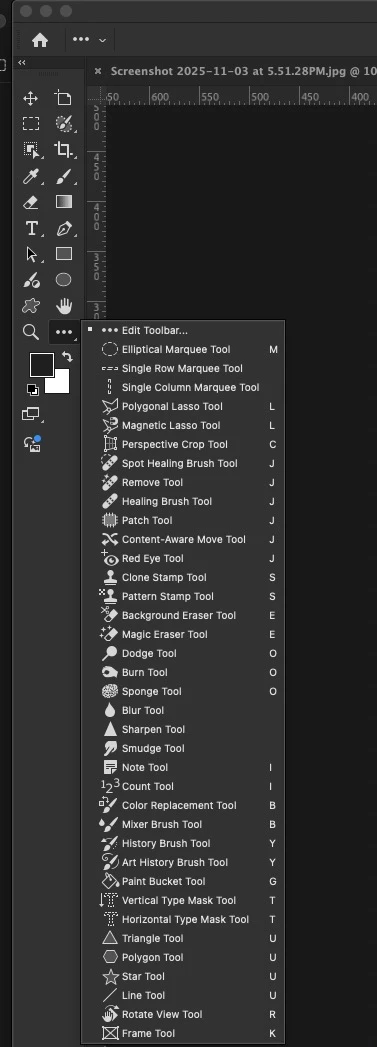
I have what I think is a very basic interface problem. My toolbar with smudge, select, clone stamp, and shapes is very out of order. I have square, ellipse, and custom shape taking up 3 different spaces., when they use to be all in one that required a click and hold to access. ( think the 4 eraser tools in 1 tile with that little arrow that let you know it was a stacked tool tile)
I would prefer not to use the 3-dot menu to look through 20 tools to find one. I would prefer a stack of related tools. 

HOW do i get these tools to restack into their default states like pre-2023 versions did by default? 
Correct answer D Fosse

Edit > Keyboard Shortcuts, or Settings > Keyboard Shortcuts (Win/Mac).


Shortcuts are fully customizable and can be saved with a workspace.

2 replies

Mr. Content
Known Participant
November 5, 2025

I wish i could delete this post. I just figured it out. Sorry folks. 

Mr. Content
Known Participant
November 5, 2025

I have no idea how this was changed. cause i have always liked the tool layout in PS and I never change them.


jane-e
Community Expert
Community Expert
November 5, 2025
quote

I never change them.

By @Mr. Content


One way the tools could change is because, as DFosse said, keyboard shortcuts can be assigned to a workspace and you were using that workspace. This may or may not have been the reason for you.


Jane

D Fosse
Community Expert
D FosseCommunity ExpertCorrect answer
Community Expert
November 5, 2025

Edit > Keyboard Shortcuts, or Settings > Keyboard Shortcuts (Win/Mac).


Shortcuts are fully customizable and can be saved with a workspace.
