
davidg16542261
Participant
June 27, 2024
Answered

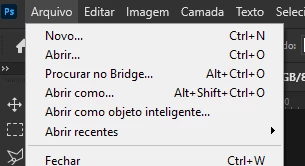
You should remove this button from "search adobe bridge..."

  • June 27, 2024
  • 2 replies
  • 508 views

You should remove this button from "search adobe bridge..." this is very annoying for those who don't use the application.

---
For those who don't use this application, it's extremely annoying to keep clicking without meaning to. Or add a confirmation button.
------
 

This topic has been closed for replies.
Correct answer jane-e

@davidg16542261 


I've moved your post from Ideas to Discussions.


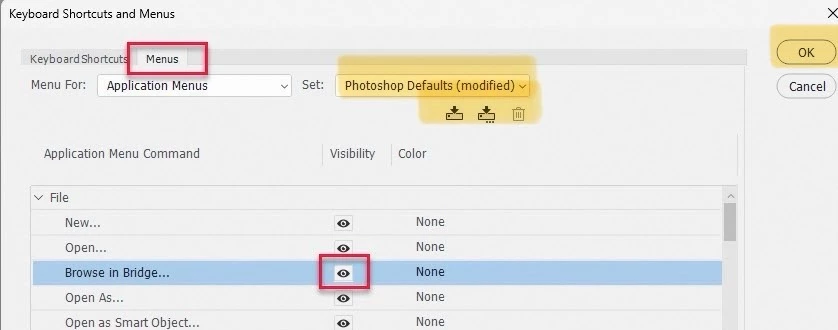
Also, note that @davescm's screenshot says ("modified"). You can't save Photoshop Defaults, but you can save the file with a new name, then click okay.


Jane


2 replies

Semaphoric
Community Expert
Community Expert
June 27, 2024

I, on the other hand, use it all the time.

davescm
Community Expert
Community Expert
June 27, 2024

You can remove it yourself using the edit menus functionality in Photoshop.


Go to Edit > Menus and select 'Application menus' then uncheck the 'eye' symbol next to Browse in Bridge:


Dave

jane-e
Community Expert
jane-eCommunity ExpertCorrect answer
Community Expert
June 27, 2024

@davidg16542261 


I've moved your post from Ideas to Discussions.


Also, note that @davescm's screenshot says ("modified"). You can't save Photoshop Defaults, but you can save the file with a new name, then click okay.


Jane


gener7
Community Expert
Community Expert
June 27, 2024

Also a helpful point to rename "modified" to "hide browse in bridge".