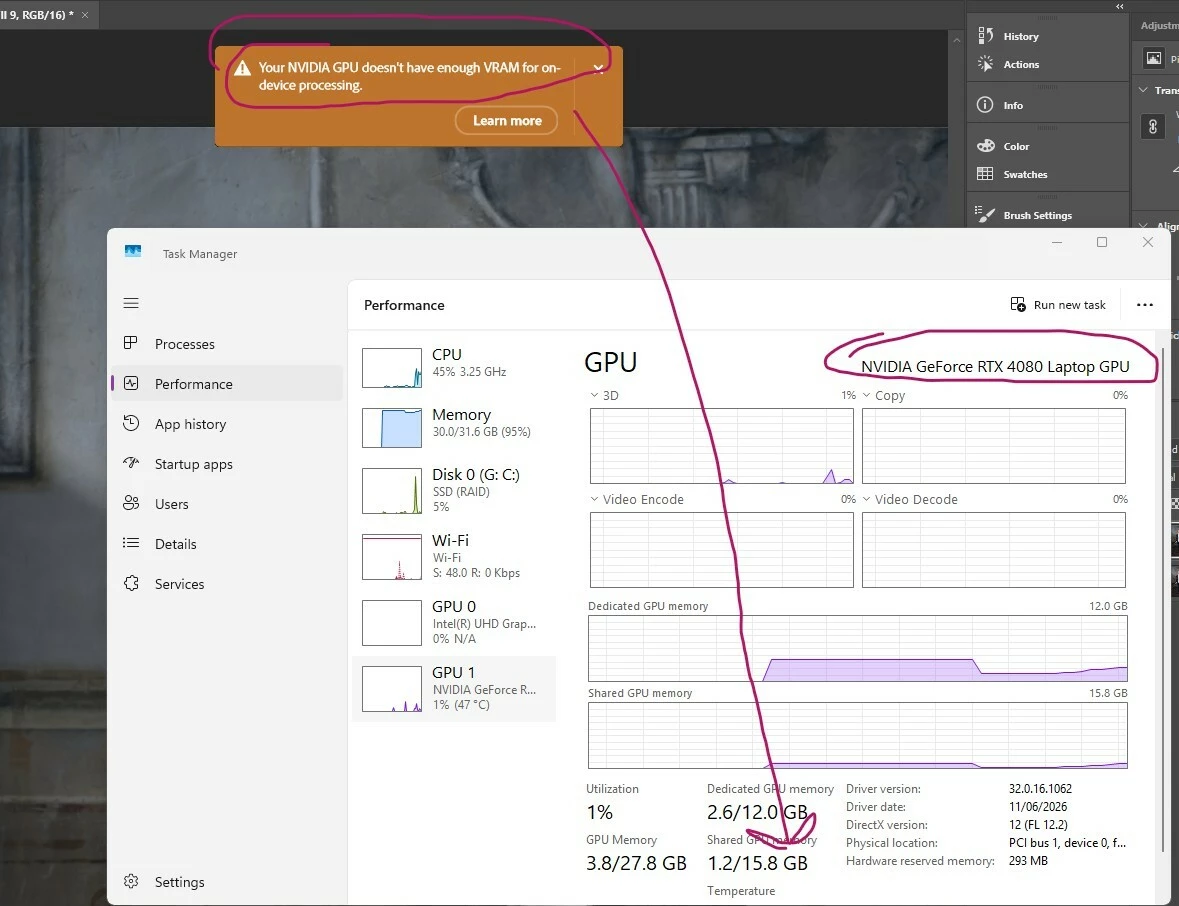
@Dmitrii35956449d9tl I would not expect you to see a change, unless your installed GPU now has more than 14GB VRAM. (see the link from Sameer). Shared memory is not dedicated VRAM.
@Dmitrii35956449d9tl wrote: I cannot attach image with screenshot into the post
Instead of Attach (the paper clip), try Insert Image (the mountain and sun). If that doesn’t work, try copying, then paste your image into a Reply window.
I’ve run into this kind of VRAM limitation before. An RTX 4080 with 12GB can still struggle with larger models or higher settings when most of the workload needs to stay on the GPU. Reducing model size, batch size, resolution, or enabling CPU offloading can help.
HasSufficientRAM: 1 GPU accessible RAM: 11,995 MB Required GPU accessible RAM: 1,500 MB UseGraphicsProcessorChecked: 1 It's pity that Adobe doesn't test it. I have about 5 everyday bug types (remove tool total memory allocation, Z hotkey zoom crack, remove tool delay after Z (zoom pressed), Camera Raw fail, object selection tool fail) which exist for monthes.
Yeah, this seems to still be a work in progress. I get that message on my home machine with RTX 5060 Ti 16 GB.
On my work machine, however, it now works, which is odd because that’s a somewhat older machine (9 gen i7), with an RTX 4060 Ti 16 GB. Otherwise these two machines mirror each other with all the same software installed.



 AdChoices