
Known Participant
August 19, 2020
Question

Zoom and dragg problem (after latest update)

  • August 19, 2020
  • 5 replies
  • 1084 views

Trying to retoch a picture but every few minutes the zoom and dragg function stops working. I have to save what I'm doing, close and open up the picture again. 
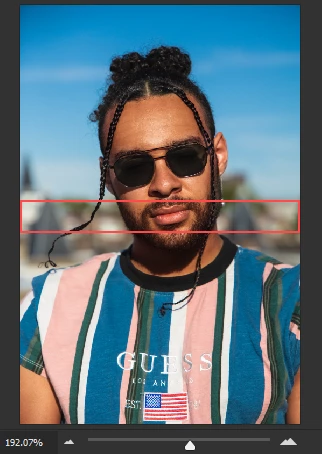
This is what my navigation panel shows after it's get stuck

This topic has been closed for replies.

5 replies

AgaNagAAuthor
Known Participant
September 22, 2020

Wouw, still not fixed

------------------------------------------------------------------------------------------------------------------------------------------- Windows10Home64-bit/IntelCorei7-4810MQ CPU@2.80GHz/16GBRAM/NvidiaGeForceGTX880M
Participant
November 19, 2020

same problem Windows10 pro 64 bit

Mohammad.Harb
Community Expert
Community Expert
August 21, 2020

Do you have the most recent update of graphic card driver ? If Not , update the graphic driver.


if yes, Try resetting the preferences:

edit-> preferences-> general

,click on reset preferences on quit , restart photoshop

AgaNagAAuthor
Known Participant
August 21, 2020

Yes I am on the most recent update of my graphic card driver.
Just did a reset of my prefences. It did not work
Again my working tab freezes after panning with spacebar and Wacom tablet.


Only difference is that now my file won't save, stuck at 10%


------------------------------------------------------------------------------------------------------------------------------------------- Windows10Home64-bit/IntelCorei7-4810MQ CPU@2.80GHz/16GBRAM/NvidiaGeForceGTX880M
Mohammad.Harb
Community Expert
Community Expert
August 21, 2020

Report this bug in the link below 

https://www.adobe.com/products/wishform.html

AgaNagAAuthor
Known Participant
August 21, 2020

Any fix yet ?

------------------------------------------------------------------------------------------------------------------------------------------- Windows10Home64-bit/IntelCorei7-4810MQ CPU@2.80GHz/16GBRAM/NvidiaGeForceGTX880M
JJMack
Community Expert
Community Expert
August 19, 2020

Can you post all of Photoshop UI so we can see what tool you may be using and see what you mean  by stuck seeing part of your navigation panel is not doing anything for me. Seeing all of you UI may help it may not.  What does this show not much info.


Ths aspect ration of your window seems odd in the panel


your like this

JJMack
AgaNagAAuthor
Known Participant
August 19, 2020

Here is a my UI , this time the picture disappeared. Cant work like this


Im only using the (broken) healing brush and I'm draging the image with spacebar and mouse and then it freezes on me

------------------------------------------------------------------------------------------------------------------------------------------- Windows10Home64-bit/IntelCorei7-4810MQ CPU@2.80GHz/16GBRAM/NvidiaGeForceGTX880M
JJMack
Community Expert
Community Expert
August 19, 2020

It looks like your tabbed Image window is not correct. Do you have Legacy Compositing checked in your Preferences Performance section.  There is an issue in some Photoshop version in that area that messes up images windows.

JJMack
marliton
Community Expert
Community Expert
August 19, 2020
Marlon Ceballos