

Participant
November 21, 2024
Question

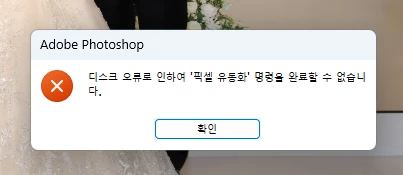
픽셀 유동화 명령을 완료 할수 없습니다.
  • November 21, 2024
  • 2 replies
  • 1949 views

디스크 오류로 인하여 '픽셀 유동화' 명령을 완료 할수 없습니다.


Adobe Photoshop 버전: 26.0.0 20240927.r.26 a733fda x64


도와주세요. ㅠ

This topic has been closed for replies.

2 replies

Community Expert
November 21, 2024

English translation of the error message: "Due to a disk error, the 'Liquify Pixel' command could not be completed."

--------------------------------------------------------

It looks like that your hard drive has a fault.  Check your hard drive.


My System: Intel i7-8700K - 64GB RAM - NVidia Geforce RTX 3060 - Windows 11 Pro 25H2 -- LR-Classic 15 - Photoshop 27 - Nik Collection 9 - PureRAW 6 - Topaz Photo AI
Sameer K
Community Manager
Community Manager
November 21, 2024

Hey, @득준조47153580. Welcome to the Photoshop Community. I'll need more information to help you figure this out. Please share a video of this behavior and the system information from Photoshop Help > System info > Copy and paste into a text document > upload and attach here.


Are there any other significant applications running in the background? Press and hold the ALT key when you go to Filter > Liquify, and check if the issue exists. 


When the error appears, please save your work & restart Photoshop & check how it goes. 


Thanks!

Sameer K

(Use '@mention' to tag me when you reply)