
Participant
October 29, 2019
Question

2018 Catalog not converting catalog to 2020

  • October 29, 2019
  • 1 reply
  • 252 views

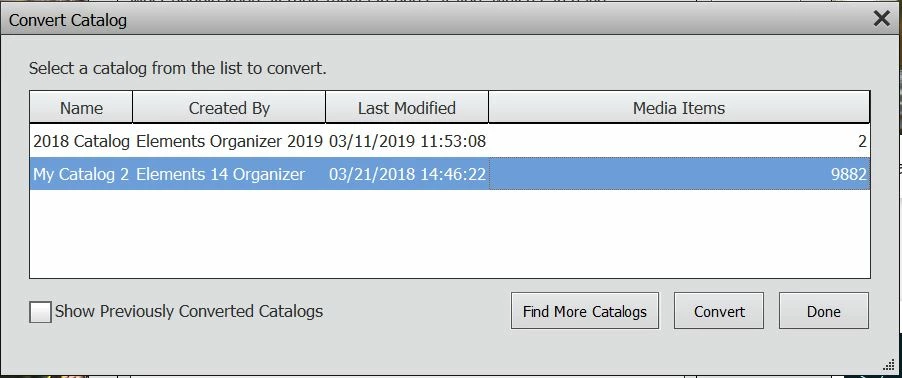
I installed 2020 and converted the 2018 version catalog. However only a handful of media files were included out of the 12,794 that I have. When I look at Convert it shows my old catalog with only 2 media files included. I tried running Repair from PE 2018 but it said everything is fine. This is always the most frustrating part of upgrading, can anyone help? Here's a photo of what I see when I go to Manage Catalogs > Convert in PE 2020:
 

    This topic has been closed for replies.

    1 reply

    MichelBParis
    Legend
    October 29, 2019

    Try ticking the 'Show Previously Converted Catalogs', then 'Find More Catalogs'. You may also have to browse to the location of the current 2018 catalog (use the menu Help >> system info to locate from PSE2018)

    Participant
    October 29, 2019

    I changed the catalog name today to "2018 Catalog" to be sure That I selected the right one. Somehow PE2020 doesn't seem to read it correctly? I guess I could just directly import all my photos, as I am not really using tags and labels any more. Or try restoring from my backup, but that worries me for incorrectly overwriting existing files.