Known Participant
February 4, 2019
Question

2019 - Organizer Catalog Problems

  • February 4, 2019
  • 1 reply
  • 307 views

I was having difficulty with PSE 14 on macOS Mojave so followed advice to upgrade to PSE 2019. Now aim having problems with the Organizer Catalog

Did the initial conversion as part of the upgrade - thumbnails displaying but when I double click to open an image in larger view all I get is a grey square with a ? in the middle.

I keep my Catalog on a separate, dedicated drive so I created a new catalog making sure to map it to the location. Went through all the steps again - same results, thumbnails OK but can't view the image in large view.

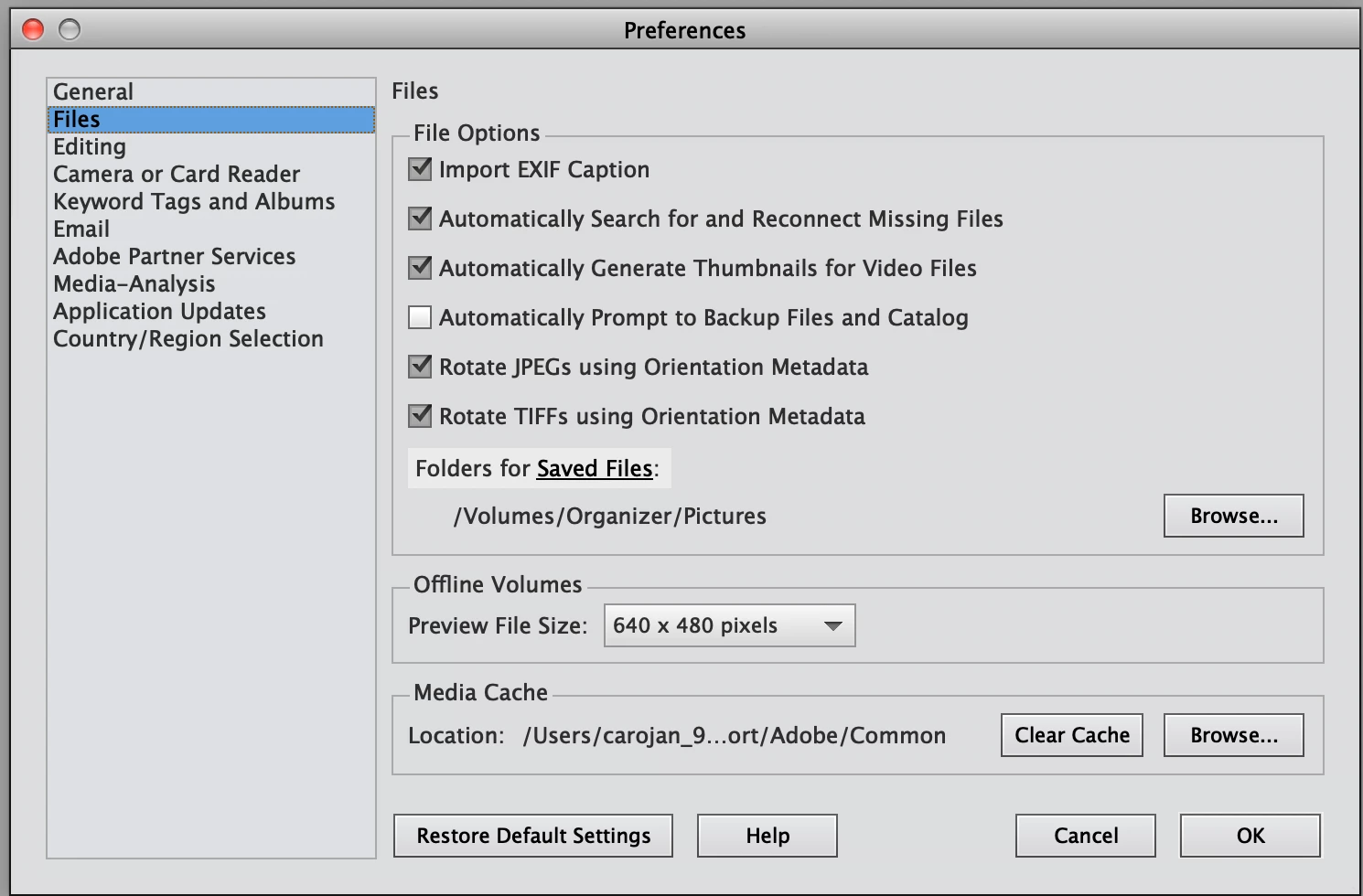
Do I need to change Media Cache location?

Why can't I see my images? I've paid A$145 and not feeling happy.
    This topic has been closed for replies.

    1 reply

    MichelBParis
    Legend
    February 4, 2019

    Willow5075  wrote

    .../...

    Did the initial conversion as part of the upgrade - thumbnails displaying but when I double click to open an image in larger view all I get is a grey square with a ? in the middle.

    When you install a new version of Elements, at the end of the installation, if a current catalog of the old version is found in the computer, you are prompted to 'convert' it. That means a new catalog in the new format will be created and all the data in the old catalog will be brought in the new catalog. The new catalog keeps the catalog name, and the old catalog is renamed with a -1 suffix;  it is still available for the old PSE version. If you don't have missing (disconnected) items in the old catalog, you never have missing items in the new catalog. So, I wonder what you mean for the 'initial conversion'.

    I keep my Catalog on a separate, dedicated drive so I created a new catalog making sure to map it to the location. Went through all the steps again - same results, thumbnails OK but can't view the image in large view.

    Let's be clear about the word 'catalog'. It's not the 'library' which is your photo files folders. It's physically a folder containing the various databases and components of the catalog. The catalog folder itself is either in the default location (to be found by the menu Help >> System Information) or in any 'custom' location of your choice. You can move or duplicate the catalog folder without changing anything. You simply have to choose the right location from the catalog manager to open from the moved location. When you install the new PSE version, chances are that you'll only get a new empty catalog if the catalog folder is on 'custom location' in another drive. That's why my guess is that your library is on the separate, dedicated drive and your catalog folder is in the default location.

    so I created a new catalog making sure to map it to the location.

    Could you explain what you did? You can't map the catalog to a new location (unless you are fiddling with the catalog.pse17db database with a sqlite utility).

    Can you confirm where your catalog folder is situated in the older version and in the new version?

    I suppose your library has always been on the same dedicated drive or partition.

    You'll probably have to do a new catalog conversion.

    Known Participant
    February 4, 2019

    Thanks for your detailed response.

    What I mean for "initial conversion:" was when the install prompted to convert the existing PSE14 catalog and rename the old one with (-1)  I clicked OK  to proceed.

    I did not have missing or disconnected items in the PSE14  catalog.

    I understand that the catalog is not the images themselves.

    My media location is on an external drive - \Organizer\Pictures.

    I don't think I have changed the default location of the catalog based on you answer - I have certainly not fiddled with the catalog.pse17db database.

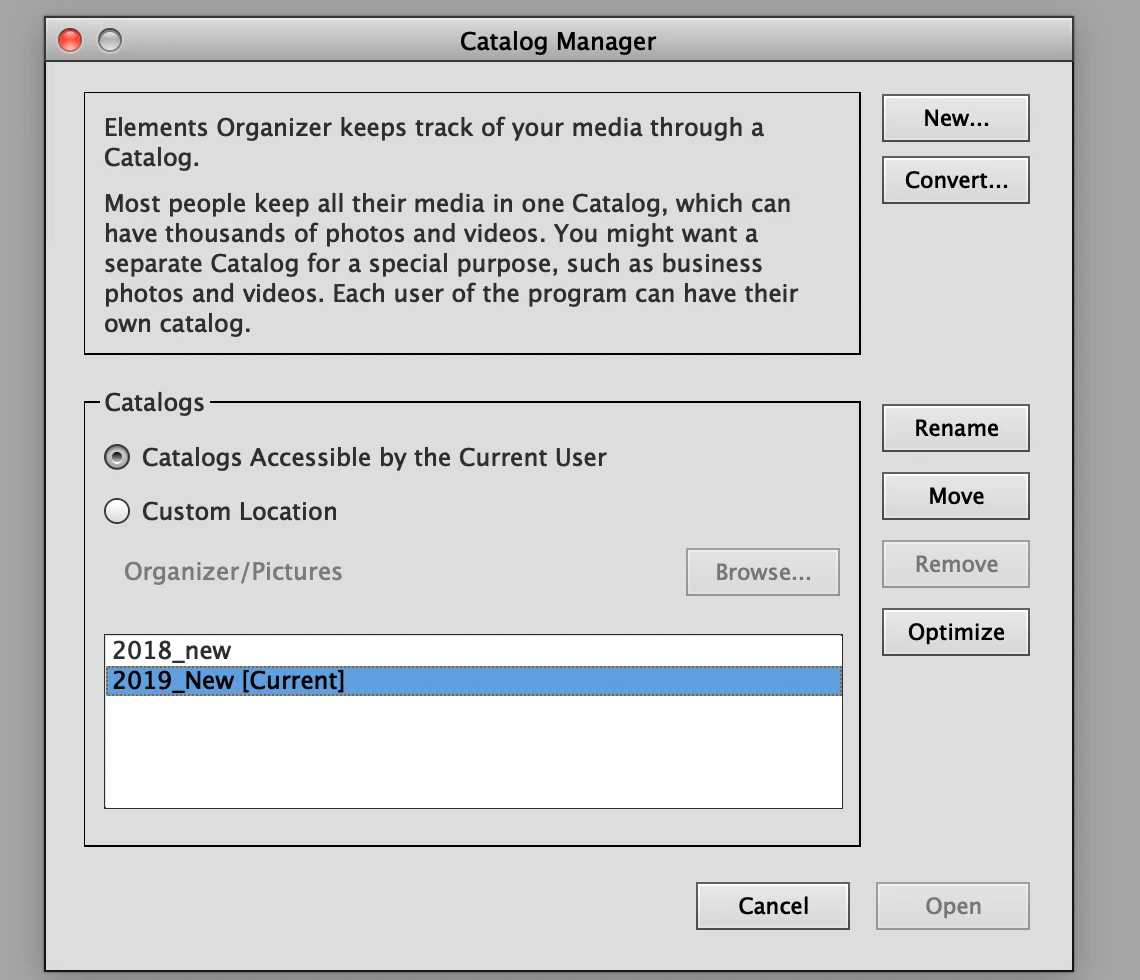
    I merely went via Manage catalogs and created a new second catalog when the first one did not work fully, making sure I put in the correct location for the media files. As I said thumbnails all OK but no image when I try to open a larger version via in Organizer. (eg via double click)

    So in the image above 2018_new is the converted catalog and 2019_new is the one I created

    I can open the image in the PSE editor

    Please can you tell me the  steps to convert the original catalog again?

    Known Participant
    February 5, 2019

    OK so I bit the bullet and uninstalled the whole lot then re-installed with new conversion and it's all OK this time. No idea why. Now to get on with Editing.