Participant
October 1, 2022
Answered

2023 Photoshop Elements, how change order of photos in slideshow?

  • October 1, 2022
  • 1 reply
  • 536 views

Hi, help please,

How do I change the order of the photos in my slideshow? I tried to click and drag but did not do it.

Thanks!

This topic has been closed for replies.
Correct answer Greg_S.

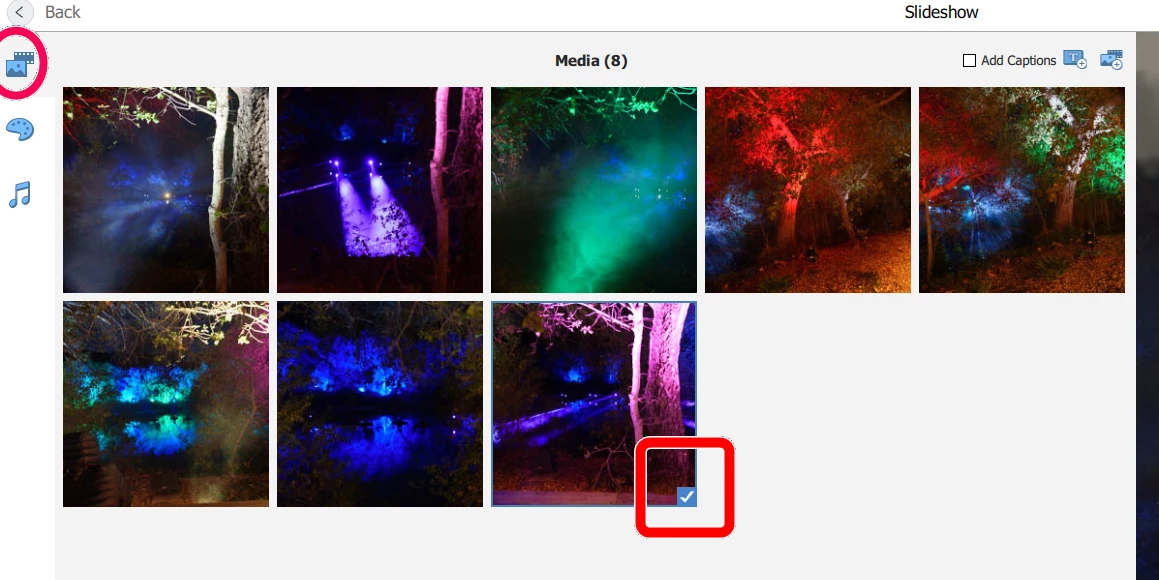
What OS are you using?  Click-and-drag should work. Did you click and drag in the Media tab of the slideshow editor?  If you select a thumbnail to move, does a checkmark appear?  Maybe be a little more patient with the click and drag. 

Can you change the order of images in an Album by click and drag?  If so, use the Album to change the order of images, select them and then hit the Slideshow button.


If there is a lot of media analysis going on in the background, I suppose it is possible that this will interfere with other operations.  Try going to Edit>Preferences>Media Analysis and uncheck all boxes.  See whether that makes a difference.


1 reply

Greg_S.
Community Expert
Greg_S.Community ExpertCorrect answer
Community Expert
October 1, 2022

What OS are you using?  Click-and-drag should work. Did you click and drag in the Media tab of the slideshow editor?  If you select a thumbnail to move, does a checkmark appear?  Maybe be a little more patient with the click and drag. 

Can you change the order of images in an Album by click and drag?  If so, use the Album to change the order of images, select them and then hit the Slideshow button.


If there is a lot of media analysis going on in the background, I suppose it is possible that this will interfere with other operations.  Try going to Edit>Preferences>Media Analysis and uncheck all boxes.  See whether that makes a difference.


Participant
October 1, 2022
Thank you! You were right, too impatient with the click and drag! Yay! Thanks!