AngusPatterson123
Participant
February 23, 2018
Question

A problem caused the program to stop working correctly

  • February 23, 2018
  • 3 replies
  • 3833 views

Hi,

I keep getting this error every time i go to open Elements. It has been running without issue up until now.

"Adobe Photoshop Elements 11 has stopped working

A problem caused the program to stop woking correctly. Windows will close the program and notify if a solution is avaliable."

This is the crash log:
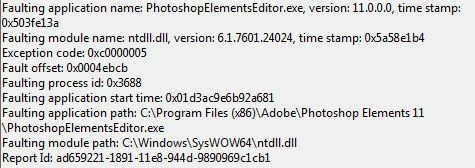
Any ideas? I have tried updating graphics card and runing as admin - out of ideas now.

Thanks

    This topic has been closed for replies.

    3 replies

    VipinGupta
    Adobe Employee
    Adobe Employee
    February 28, 2018

    The nttdll.dll is something that gets installed with the Microsoft Windows installation, and not something that gets installed with Elements.

    I searched for some of the resolutions given, which you can try to implement and see if your issue gets resolved.

    Or otherwise please try to update your windows/Reinstall Windows in Repair mode, which should not remove any files/applications from your computer, but fixes these errors.

    How To Fix Ntdll.dll Errors

    1. Restart your computer. The ntdll.dll error you're receiving could be due to a one-time, temporary issue and a simple reboot may resolve the problem completely.
    2. Reinstall the program if the ntdll.dll error only displays when you use a specific program.

      If the software program has any updates or service packs available, install them too. The software's programmers may have identified an issue with the program that caused the ntdll.dll error and then issued apatch for it.

      Note: Third party software programs that have been installed on your computer are almost always the cause of ntdll.dll errors. The remainder of these troubleshooting steps resolve ntdll.dll issues only rarely.
    3. Check the Windows service pack level you're running and then check Microsoft's support site to see if there is a more recent service pack available for installation. Some issues that caused ntdll.dll errors have been corrected in these service packs from Microsoft.
    4. Selectively disable Internet Explorer add-ons. If your ntdll.dll error is displaying when you start, run, or close Internet Explorer, an add-on may be causing the problem. Disabling each add-on, one by one, will determine which add-on is the culprit (if any).

      Note: As a workaround, assuming the ntdll.dll error really is Internet Explorer related, install and use a competing browser like Firefox.
    5. Rename the NLSPATH system variable. If your Windows system does not have this environment variable, skip this step.

      Note: This is a troubleshooting step for this issue only. Be sure to set this path back to its original name if this does not resolve the ntdll.dll issue.
    6. Disable Data Execution Prevention for Explorer.exe. As in the previous step, this is for troubleshooting the ntdll.dll issue only. If this doesn't resolve the problem, return the Data Execution Prevention settings to their previous settings.
    7. Update drivers for any hardware in your computer where updated drivers are available. Outdated drivers sometimes cause ntdll.dll errors.
    8. Test your memory for damage. If you're receiving ntdll.dll messages, one possible cause could be a bad memory module in your system. Testing your memory will either identify a problem or clear your RAM of any responsibility.

    Regards,

    Vipin

    VipinGupta
    Adobe Employee
    Adobe Employee
    February 28, 2018

    Since the report shared by you says that the faulting module is nttdll.dll, this is the reason why PSE 11 is not working.

    Could you please try to disable all the Third party Add-on for Internet explorer and then restart your computer, If this fixes your problem, then there might an issue with one of the Add-on that is being used with internet explorer. (https://support.microsoft.com/en-in/help/17447/windows-internet-explorer-11-manage-add-ons )

    Thanks

    Vipin

    AngusPatterson123
    Participant
    February 28, 2018

    Have tried that now too - still the same crash!

    VipinGupta
    Adobe Employee
    Adobe Employee
    February 24, 2018

    Could you please try removing and Re-installing the application again on your computer?

    Thanks,

    Vipin

    AngusPatterson123
    Participant
    February 27, 2018

    Hi, took me while to find the box and licence key! Have now tried reinstall and i am still getting the same crash.

    Peru Bob
    Community Expert
    Community Expert
    February 27, 2018

    Try updating or rolling back your video driver directly from the card manufacturer's site.