NightWatcher
Participant
September 9, 2017
Answered

Add green light to black area

  • September 9, 2017
  • 2 replies
  • 541 views

I'm on Photoshop Elements 13.

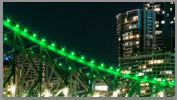
I have taken a photo of a bridge at night that has been lit green. Unfortunately, one of the green light bulbs on the bridge was blown. Therefore, I have 10 green bulbs and then a black one and the another 10 green bulbs. The photo now looks a little odd with one of the bulbs being black because the bulb was blown or not working.

So, I would like to know how to copy one of the green bulbs from the photo and place onto the black area where the bulb was blown and make it green like all the other green bulbs.
    This topic has been closed for replies.
    Correct answer davescm

    Hi

    I don't use Elements so I am not sure exactly what tools are available to you. Hopefully this method from Photoshop will help though.

    In Photoshop I would :

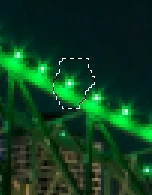
    a. make a selection round an existing lamp

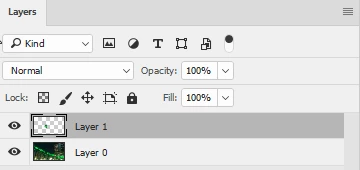
    b. Copy that selection to a new layer

    c. Move and rotate (using transform) the new layer so that the copied light fills the gap

    Dave

    2 replies

    davescm
    Community Expert
    Community Expert
    September 9, 2017

    Hi

    I've moved your post to From the Photoshop forum to the Photoshop Elements forum where you are more likely to get help relevant to the version you are using.

    Dave

    c.pfaffenbichler
    Community Expert
    Community Expert
    September 9, 2017

    Dang, I had read over that sentence … well, seeing the image in question should be equally useful for Photoshop Elements users on that Forum.

    c.pfaffenbichler
    Community Expert
    Community Expert
    September 9, 2017

    Please post the pertinent section of image in question (or a lores version).

    NightWatcher
    Participant
    September 9, 2017

    davescm
    Community Expert
    davescmCommunity ExpertCorrect answer
    Community Expert
    September 9, 2017

    Hi

    I don't use Elements so I am not sure exactly what tools are available to you. Hopefully this method from Photoshop will help though.

    In Photoshop I would :

    a. make a selection round an existing lamp

    b. Copy that selection to a new layer

    c. Move and rotate (using transform) the new layer so that the copied light fills the gap

    Dave