
Participant
February 4, 2017
Answered

Adding Text

  • February 4, 2017
  • 1 reply
  • 814 views

I have a 1940s class photo that I would like to add names to the faces.

I've resized the canvass size to add white space at the bottom of the pic (after cropping the white off the top of the photo).

I'm adding the text in the white space.  My problem is the text is underscored & rather not have that.  How do I correct this?

And, is there a better way of adding text?  thanks.

fjm4160

I have Elements 14 on Mac OS 10.
    This topic has been closed for replies.
    Correct answer hatstead

    I'm adding the text in the white space. My problem is the text is underscored & rather not have that. How do I correct this?

    I don't have PSEv.14, but you should be able to find this.

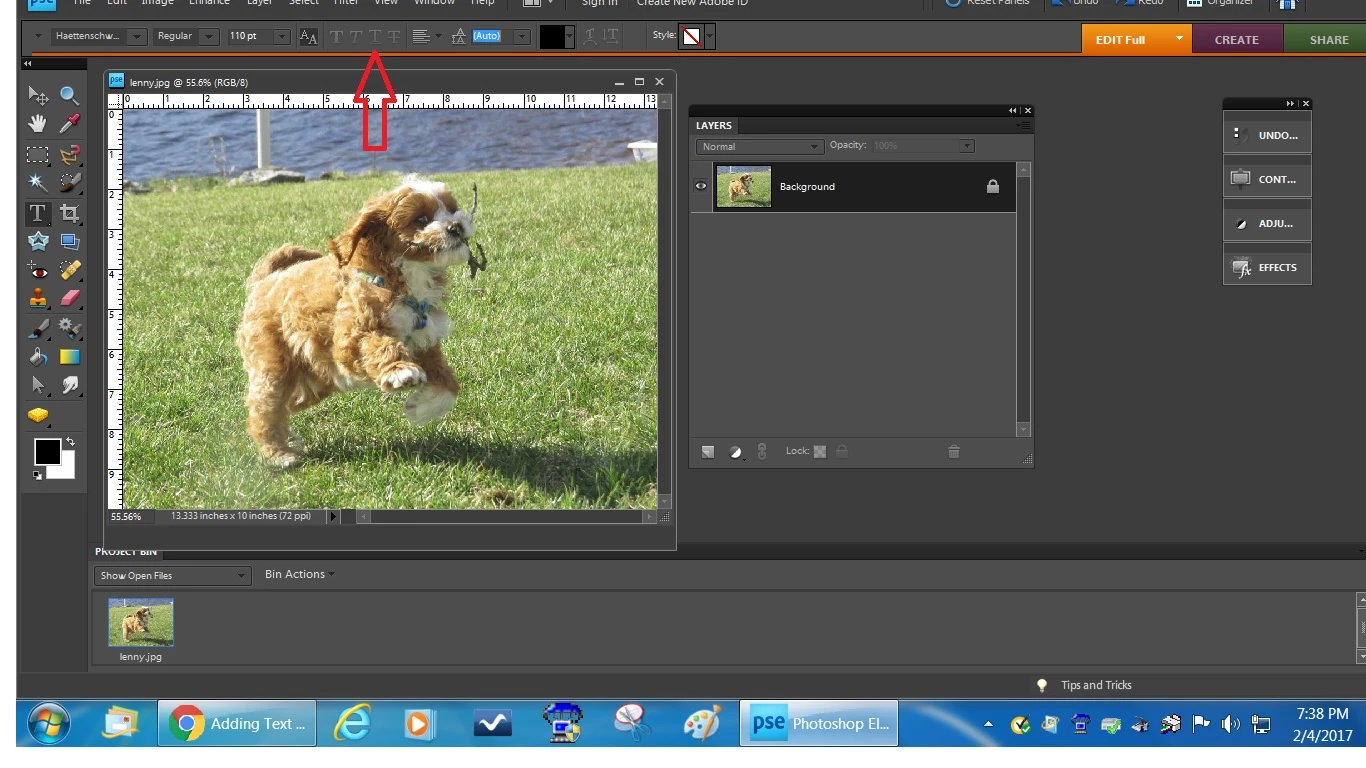
    On the Type tool's option bar, look for the "underline" icon; it is probably engaged. See red arrow.

    I've resized the canvas size to add white space at the bottom of the pic (after cropping the white off the top of the photo).

    On the Image>resize>canvas size dialog, there are some anchor points. You can click on the appropriate one to limit the extension to just below the picture. This will eliminate the necessity to crop.

    1 reply

    hatstead
    hatsteadCorrect answer
    Inspiring
    February 5, 2017

    I'm adding the text in the white space. My problem is the text is underscored & rather not have that. How do I correct this?

    I don't have PSEv.14, but you should be able to find this.

    On the Type tool's option bar, look for the "underline" icon; it is probably engaged. See red arrow.

    I've resized the canvas size to add white space at the bottom of the pic (after cropping the white off the top of the photo).

    On the Image>resize>canvas size dialog, there are some anchor points. You can click on the appropriate one to limit the extension to just below the picture. This will eliminate the necessity to crop.

    fjm4160Author
    Participant
    February 5, 2017

    Thanks for your reply.  Back when I had Elements 6, I could add white space at the bottom of an old photo and add the names of individuals.  It appears that IN Elements 14, I can't add names in the white space without the underscoring.  fjm

    hatstead
    Inspiring
    February 5, 2017

    It appears that IN Elements 14, I can't add names in the white space without the underscoring.

    A. Suggest that you reset the Type tool. On the tool's option bar, look for a box on the right with lines in it to reset. If that does not fix it, then

    B. Go to Edit>Preferences>General and reset preferences to default