
larrys9217534
Participant
October 17, 2017
Question

adobe elements error message 150:30 ?

  • October 17, 2017
  • 2 replies
  • 291 views

Hi,

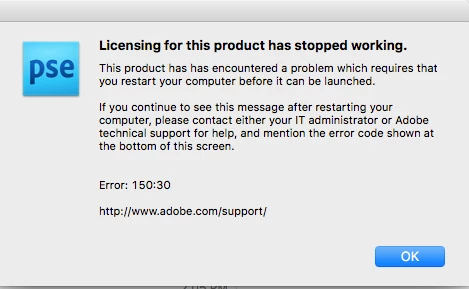
I've been using photoshop Elements V8 on my Mac with the El Capitain OS.  Even though it is an old version, no longer supported, it still worked perfectly.  I updated my operating system to Sierra 10.12.6 and the program wouldn't open.  I got error message: 150:30. (see below) Note: I did try restarting as the message suggested.

Does anyone know what this error message means?  Suspect it means the program is no longer compatible with my operating system but before buying the new version of Photoshop I'd like to make sure.  I called Adobe technical help and they couldn't answer my question.

Thanks
This topic has been closed for replies.

2 replies

Peru Bob
Community Expert
Community Expert
October 31, 2017
Participant
October 31, 2017

I got the same msg today and spent hours troubleshooting according to some directions on Adobe's site.  I made no changes to my operating system that triggered this.  I have OS X Yosemite 10.10.5.  Directions available for this issue went to OS X 10.7.  I'm using Photoshop Elements 8.

I reinstalled Elements with original disk but that didn't work.  Was going to try a free trial for the new PE but it didn't recommend it for my operating system.  NOW WHAT?