Participant
May 31, 2018
Question

Adobe Elements Organizer 14: Custom folder pattern when importing

  • May 31, 2018
  • 1 reply
  • 253 views

Hi,

For several years I have used Lightroom for managing my images. I however wish to use Elements Oganizer for simplicity and pricing reasons.

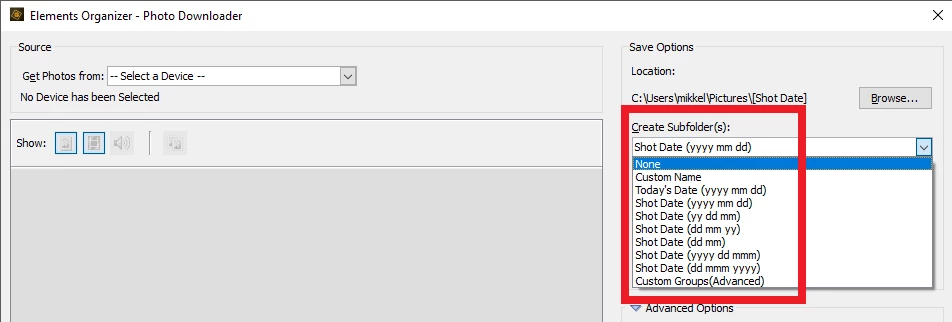
The one obstacle standing in my way is how I can use my own pattern for naming folder, when importing images. The pattern which Im using is like

  • yyyy
    • yyyy-mm-dd Custom description

It seems that I'm not able to do the naming of the imagefolders using hyphen character but needs to accept using the space character instead.

Is this true, or is it actually possible to use that kind of pattern?

    This topic has been closed for replies.

    1 reply

    MichelBParis
    Legend
    May 31, 2018

    Just a note about the dropdown menu you are showing;

    - to get all those options, you must be in advanced dialog mode

    - You must have chosen your camera or card reader

    - you have to scroll down this menu which offers many more options. (It's very flexible).

    That said, I don't think you can have your own template with hyphens instead of spaces inside date templates.

    Participant
    June 2, 2018

    Thanks a lot for your reply.

    That's quite unfortuneat since I then need to rename my entire catalog.