
Participant
November 3, 2017
Question

Adobe PElements 14 Organizer Dialogue Box Locks Up

  • November 3, 2017
  • 1 reply
  • 171 views

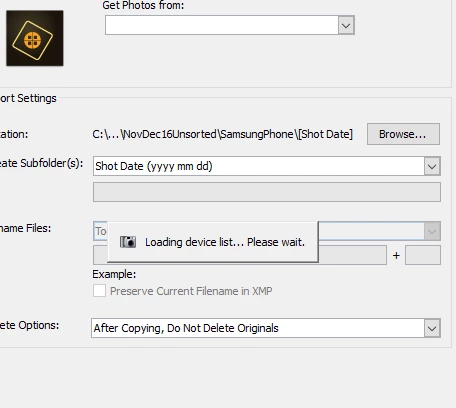
I need suggestions on how to unfreeze an unwanted entry in the dialog box for inportiing photos into my photo Elements 14 Organizer. Here is the frozen screen entry which seems to be blocking my importing photos from my phone device.
    This topic has been closed for replies.

    1 reply

    MichelBParis
    Legend
    November 4, 2017

    cecilh81837050  wrote

    I need suggestions on how to unfreeze an unwanted entry in the dialog box for inportiing photos into my photo Elements 14 Organizer. Here is the frozen screen entry which seems to be blocking my importing photos from my phone device.

    There may be different issues when uploading from smartphones. It looks like your phone is not recognized by Elements.

    - If you are able to upload your files to your computer from Windows/Mac without using Elements, that's a different problem. In that situation you can download the files and use Elements to 'Import' from files and folders'

    - If you can't, there is probably a phone setting to allow the download. My Android phone asks for permission to download before the Import starts.