
Participant
January 30, 2024
Answered

Adobe Photoshop 2024 justified text impossible

  • January 30, 2024
  • 3 replies
  • 1005 views
  1. Hi, my name is Alessio, and I have a problem with Photoshop. I speak Italian, and to make myself understood I use an online translator. I purchased Photoshop Elements 2024 on Amazon, but unfortunately I noticed that the program lacks the "justified text" function. I asked Amazon for clarification, which redirected me here, directly to Adobe support. I ask for feedback to understand whether this anomaly is a program defect or a normal omission on Adobe's part, and I hope to be able to resolve it with your help. Thank you, Greetings!
This topic has been closed for replies.
Correct answer Jeff Arola

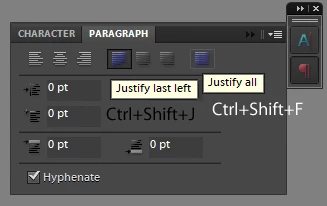
Photoshop elements has two undocumented Justify settings that can be used when all the paragraph text is selected:


Justify last left

Ctrl+Shift+J (Cmd-Shift-J)


and


Justify all

Ctrl+Shift+F (Cmd-Shift-F)


If you had a paragraph panel in photoshop elements (like photoshop cc) then these are

the buttons that those shortcuts correspond to:

(unfortunately the other two justify options don't have any default keyboard shortcuts in

elements nor photoshop, as far as i know)


3 replies

Jeff Arola
Community Expert
Jeff ArolaCommunity ExpertCorrect answer
Community Expert
January 30, 2024

Photoshop elements has two undocumented Justify settings that can be used when all the paragraph text is selected:


Justify last left

Ctrl+Shift+J (Cmd-Shift-J)


and


Justify all

Ctrl+Shift+F (Cmd-Shift-F)


If you had a paragraph panel in photoshop elements (like photoshop cc) then these are

the buttons that those shortcuts correspond to:

(unfortunately the other two justify options don't have any default keyboard shortcuts in

elements nor photoshop, as far as i know)


Participant
February 6, 2024

Hi, yes, thanks to Jeff Arola's advice I managed to justify the text. Thank you very much, and best wishes for continued success.

davescm
Community Expert
Community Expert
January 30, 2024

Hi , I've moved your post from the Photoshop forum to the Photoshop Elements forum where you are more likely to get help relevant to your question.

Dave

Participant
January 30, 2024

Thank you!

Ged_Traynor
Community Expert
Community Expert
January 30, 2024