
Known Participant
March 8, 2023
Answered

adobe photshop elements rearrange photos

  • March 8, 2023
  • 2 replies
  • 944 views

I imported 136 photos into the organizer media page. about 20 of them are of the same person. I want to move those twenty to the end of the page so they can be at the end of a slideshow. I naively thought that I could just drag and drop photos wherever I wanted to. I guess simplicity is too much to ask for with ADOBE. After a frustrating attempt to research this in the guides I then went though a frustratng chat with 3 different chat experts. Their official answer was : 

"Thank you for the information. I understand your query now, and unfortunate I have to tell you that we can not move them manually, we can only rearrange them by sorting them by name, date , size and types."

Does anyone have a simple workaround for this? Thanks
    This topic has been closed for replies.
    Correct answer Greg_S.

    There are features - not workarounds- that easily handle what you want to do in the Organizer.  Take a look at this article which explains  how to create Albums.  As stated in the article:

    You can drag the photos within an album to arrange them in any order you want.


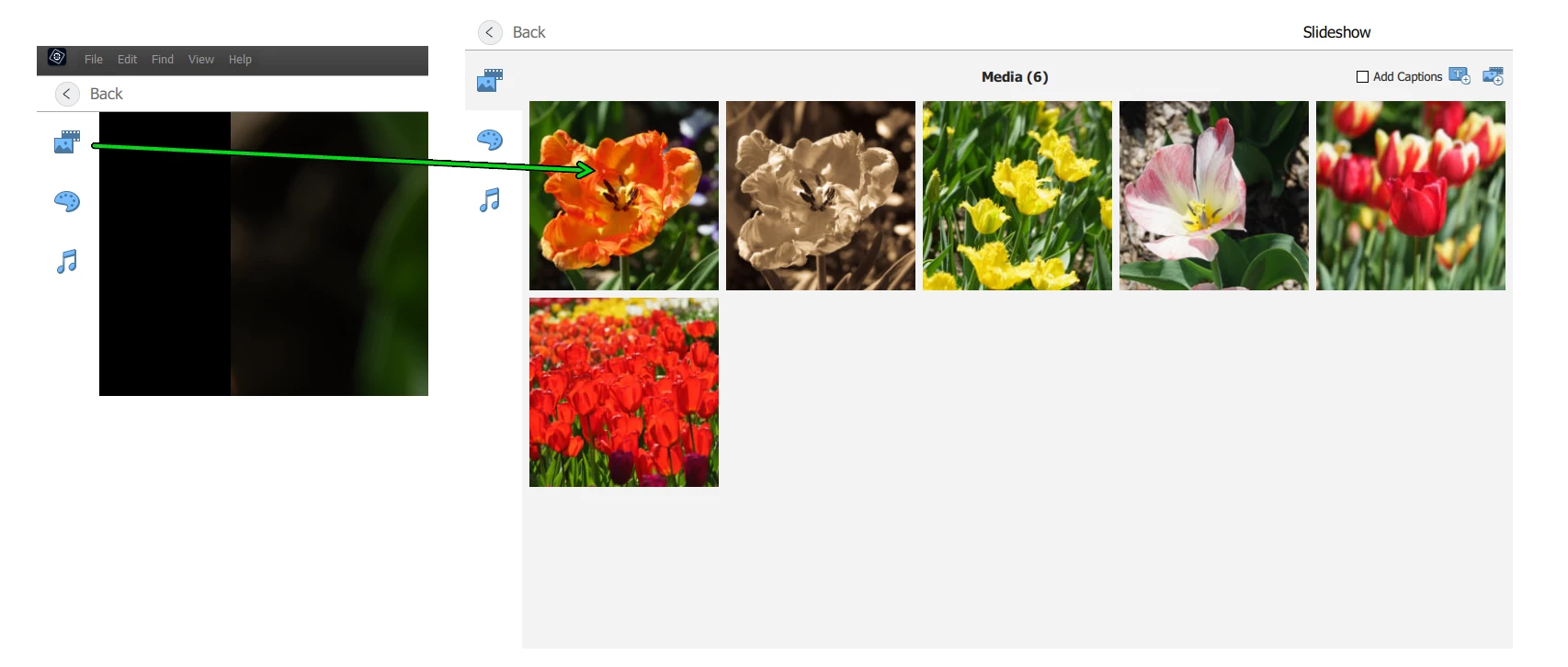
    If you are talking about creating a slideshow in the Organizer, you can also click on the Media tab in the Slideshow Editor and drag the photos around to your selected order there.


    2 replies

    Greg_S.
    Community Expert
    Greg_S.Community ExpertCorrect answer
    Community Expert
    March 9, 2023

    There are features - not workarounds- that easily handle what you want to do in the Organizer.  Take a look at this article which explains  how to create Albums.  As stated in the article:

    You can drag the photos within an album to arrange them in any order you want.


    If you are talking about creating a slideshow in the Organizer, you can also click on the Media tab in the Slideshow Editor and drag the photos around to your selected order there.


    Known Participant
    March 9, 2023

    Thanks Greg S---Ill look into it

    John T Smith
    Community Expert
    Community Expert
    March 8, 2023

    You need to ask program questions in the forum for the program you are using
    To ask in the forum for your program please start at https://community.adobe.com/
    Moving from Using the Community (which is about the forums) to the correct forum

    Known Participant
    March 9, 2023

    John T Smith. I dont know what you mean. When I click on the link you shared it brings me to a list of ADOBE apps to pick from. I pick the adobe phtoshop elements and it brings me to a page that shows my question. 

    MichelBParis
    Legend
    March 9, 2023
    quote

    John T Smith. I dont know what you mean. When I click on the link you shared it brings me to a list of ADOBE apps to pick from. I pick the adobe phtoshop elements and it brings me to a page that shows my question. 


    By @seniornewbie


    Yes, @John T Smith  has moved your post from the wrong forum where you have posted to the good one.