PSE-Nick
Participant
February 3, 2019
Answered

Always custom cropping at C pressed - avoid heart or smart cropping

  • February 3, 2019
  • 1 reply
  • 307 views

Hello,

at home I work with Photoshop Elements 15.0 64. I mostly improve larger numbers of photos for the web - cropping, depth enhancement, histogram stretching, etc. From Photoshop I'm used to working with the keyboard. If I press e.g. C I want to be able to crop the image freely. But what annoys me excessively is that Photoshop Elements selects each time a different cropping tool, often the heart cropping tool or the 'smart' cropping tool. I always want to do my cutting myself.

So here's the question: How can I get C (or any other key) to always have the tool with which I can determine my own cropping?

Thank you very much,

Thomas
This topic has been closed for replies.
Correct answer Jeff Arola

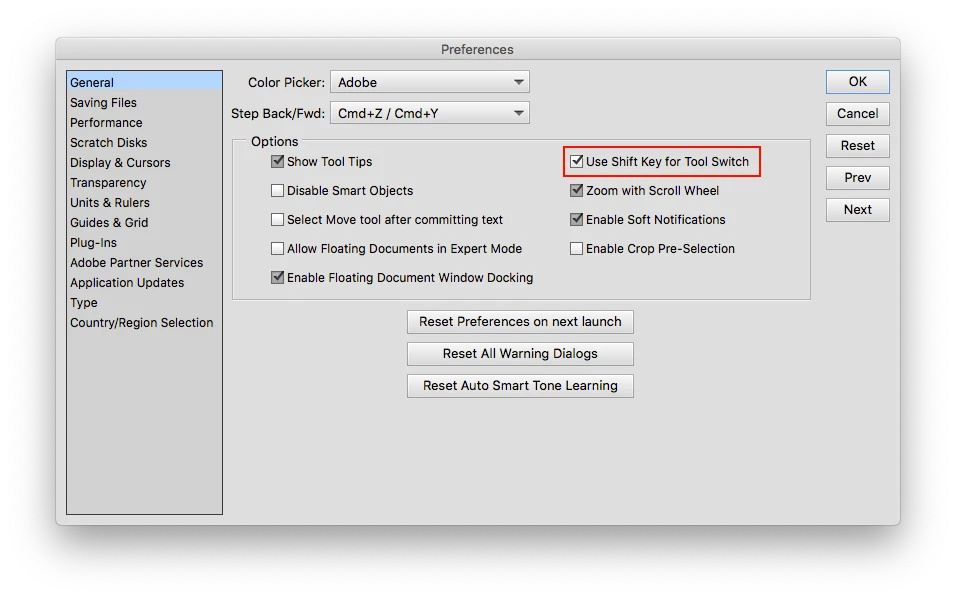
In Photoshop Elements Editor (Edit)>Preferences>General check Use Shift Key for Tool Switch.

What that means is, in order to cycle thru (switch) tools as in the example of C, one must use shift in

addition to C to switch to a different tool that uses the same letter, so in order to switch from the

Crop Tool to Cookie Cutter Tool takes pressing Shift+ C instead of just C.

1 reply

MichelBParis
Legend
February 3, 2019

The C shortcut is used not only for the normal crop tool, but also for the cookie cutter tool (by default the heart shape). Look at the tool bar on the bottom and select the normal crop tool. That selection should be sticky afterwards.

PSE-Nick
PSE-NickAuthor
Participant
February 3, 2019

Thank you, I'll try to rely on the stickyness. Until now I have ever pressed C again to get back to the crop tool. Maybe the stickyness does not work if done so.

By the way, is there a way to get rid of that horrible cookie cutter tool?

And the false smartness of the smart crop also gets on my nerves.

Jeff Arola
Community Expert
Jeff ArolaCommunity ExpertCorrect answer
Community Expert
February 4, 2019

In Photoshop Elements Editor (Edit)>Preferences>General check Use Shift Key for Tool Switch.

What that means is, in order to cycle thru (switch) tools as in the example of C, one must use shift in

addition to C to switch to a different tool that uses the same letter, so in order to switch from the

Crop Tool to Cookie Cutter Tool takes pressing Shift+ C instead of just C.